

A Year of Sentinel-2 NDVI: What a Time Series Shows About a Punjab Farm Town
Twelve monthly NDVI images of a 10 km square around Jagraon, Punjab: how to build the series, how to read the curve of a field and a town, and what the curves cannot tell you.
Introduction
One satellite image is a photograph of one day. Fields, towns and orchards can look alike on that day and behave very differently over the year. A series of images of the same place, lined up in date order, shows the behaviour.
This post follows a 10 km square around Jagraon, a town in Punjab, India, through 2023. Punjab is a good first place to try this, because its fields change colour twice a year and the pattern is easy to see. At the end I link two step-by-step tutorials that build the same series in QGIS and in Python.
What is a raster time series?
A raster is a grid of cells, and each cell holds one number. A raster time series is a stack of rasters of the same place, in date order, on the same grid. Position in the stack is time.
The number in each cell here is NDVI, the normalised difference vegetation index, (NIR - red) / (NIR + red), where NIR is near infrared light. Green leaves reflect a lot of near infrared and absorb red, so healthy crops give values near 0.8 or 0.9. Bare soil gives about 0.1 to 0.2, and roofs and roads stay low. I explain how to calculate it from a Sentinel-2 scene in NDVI from Sentinel-2: a step-by-step satellite imagery workflow.
Why it matters
Take two places with the same NDVI on one date. One might be a wheat field that is about to be harvested, and the other an orchard that is green all year. A single image cannot tell them apart. Their curves through the year can.
The same idea sits under crop monitoring, drought watching and the mapping of how land changes. All of them compare a place with its own earlier self, and that needs the time axis.
How the series was built
The images come from Sentinel-2, a set of European satellites that pass over a place about every five days at 10 m resolution. I read Level-2A scenes, which are corrected to surface reflectance, from the open Earth Search catalogue. For each scene I did the following:
- Took the red band (B04) and the near infrared band (B08).
- Removed cells that the scene classification layer marks as no data, saturated, cloud shadow, medium or high probability cloud, or thin cirrus.
- Calculated NDVI.
Then I took the median of the clear values of each cell within each month. A median is the middle value of a sorted list, so one bad observation barely moves it. Each month needs a composite because many single passes are cloudy, especially in the monsoon, and a month of passes gives every cell a better chance of at least one clear view. The price is that a monthly file hides what happens inside the month.
The result is twelve rasters of 1000 by 1000 cells in EPSG:32643 (WGS 84 / UTM zone 43N). Every month has 4 to 6 usable scenes, so every cell has a value in every month.
What the year looks like
The figure below puts all twelve months on one colour scale. Click a month to enlarge it, or switch to the play view to watch the year run. The scale matters. If each map were stretched to its own range, a pale May and a pale November could use the same colours for different values.
Read it like a film. January to March are dark green, April turns pale, May to July are mostly pale, and August to October are green again. November is the palest month. In December green patches come back. The town stays pale in every month, because roofs and roads do not grow.
Reading three places
The maps show the whole square. A curve shows one place. I picked three.
Show the numbers as a table
| Month | A | B | C |
|---|---|---|---|
| Jan | 0.67 | 0.11 | 0.56 |
| Feb | 0.86 | 0.11 | 0.52 |
| Mar | 0.85 | 0.09 | 0.44 |
| Apr | 0.35 | 0.09 | 0.56 |
| May | 0.12 | 0.06 | 0.44 |
| Jun | 0.06 | 0.07 | 0.42 |
| Jul | 0.10 | 0.07 | 0.49 |
| Aug | 0.74 | 0.11 | 0.57 |
| Sep | 0.79 | 0.16 | 0.60 |
| Oct | 0.72 | 0.10 | 0.64 |
| Nov | 0.13 | 0.07 | 0.46 |
| Dec | 0.43 | 0.08 | 0.65 |
Site A is a field next to the town. Its curve has two peaks: 0.86 in February and 0.85 in March, then 0.74, 0.79 and 0.72 in August, September and October. Between them it falls to 0.06 in June. This is the shape of a field with two crops in a year. The usual crop calendar of this region is wheat, sown from late October into December and harvested in April, then rice, transplanted in June and July and harvested from late September into October. A fits that calendar well. I did not visit the field, so this is a reading of the curve and not an observation of the crop.
Site B is in the middle of the town. Its NDVI stays between 0.06 and 0.16 in all twelve months.
Site C is a field south of the town that never falls to bare ground. Its NDVI stays between 0.42 and 0.65. Something green grows there for most of the year, but the curve cannot say what. An orchard, a fodder crop and a long-season crop can all look like this.
Mapping the whole square
A curve at three points says little about a million cells, but NumPy can do the same sums on all of them. Two summaries are useful.
The seasonal swing is the highest NDVI of a cell in the year minus its lowest. At A it is 0.81, at B it is 0.10, and at C it is 0.23. Across the square the mean swing is 0.64.
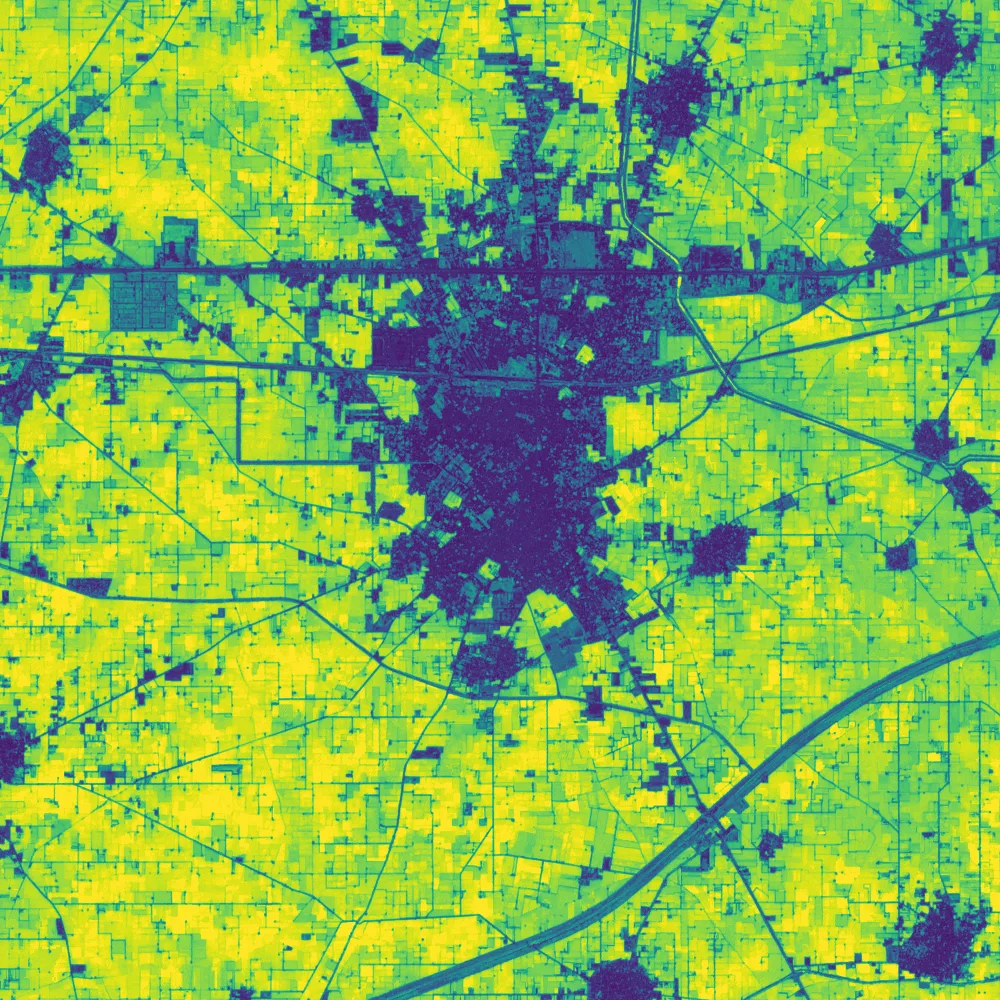
Mean swing over the whole square: 0.64.
The second summary asks in which seasons a cell is green. I call a cell green when its NDVI is above 0.6 at some point in a season, and I use February and March as the winter season and August and September as the monsoon season.
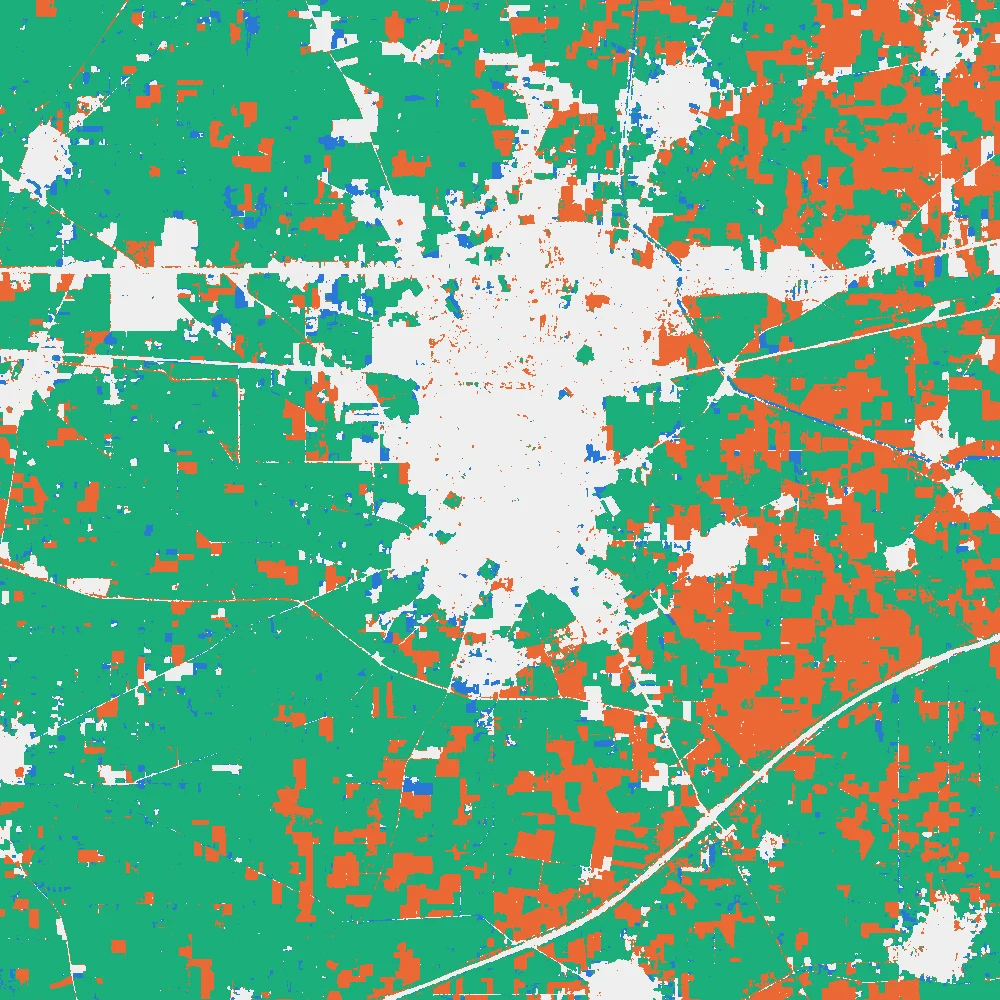
About 58.7 percent of the cells are green in both seasons, which is the pattern of site A spread over the square. Another 19.3 percent are green in the monsoon only, 2.5 percent in winter only, and 19.5 percent in neither. The last group holds the town, roads, canals and fields that never reach 0.6 in those months. These shares describe NDVI curves. They are not a crop map.
Workflow
If you want to build this yourself, the steps are:
- Search a catalogue such as Earth Search for Sentinel-2 L2A scenes over a small area for one year.
- Mask clouds with the scene classification layer, and calculate NDVI for each scene.
- Take the median per cell for each month, and write twelve GeoTIFF files on the same grid.
- Stack the twelve files, for example with Build Virtual Raster in QGIS or
np.stackin Python. - Read the curve of a few places, then summarise every cell with the swing and the peak season.
I wrote the QGIS and Python versions as step-by-step tutorials that follow the same steps with the same numbers, using ready-made monthly files so you can skip the download:
The study note Remote sensing time series covers composites, gaps, phenology and trends in more depth.
Common mistakes
- Stretching every map to its own minimum and maximum, so the colours mean different values in each picture.
- Stacking the files in the wrong order and reading March where January belongs.
- Filling a gap with a straight line and then treating the filled value as an observation. I tested this on the 2023 series by hiding August at site A and filling it from July and September: the fill gave 0.45 and the real value was 0.74, because rice grows fast between July and August and a straight line cannot know that.
- Smoothing a series of only twelve points. A three-month rolling mean lowers the peaks and raises the troughs, which are the features you wanted to see.
- Naming a crop from a curve that no one checked in the field.
Key takeaways
- A raster time series is a stack of rasters of one place, in date order, on one grid.
- Use one colour scale for every map in the series.
- The curve of a place through the year says more than any single date.
- In this square, one field has two green seasons, the town stays flat and low, and a third place stays green nearly all year.
- Summaries such as the swing turn a stack into one map.
- NDVI says how green a place was. It cannot say what grew there.
- Monthly medians hide what happens inside the month, and one year is not a trend.