

What is a time series?
A time series is a set of measurements of the same thing, taken at different times and kept in time order. In remote sensing the thing is a place, and each measurement is an image of it or a number taken from the image.
A raster time series is a stack of images of the same area on the same grid, in date order. You can look at it in two ways. As a stack of maps, it shows how the whole area changes from one date to the next. As a curve, it shows one cell through time: the value of that cell on the first date, the second, and so on up to the last. Most of the work with a series moves between these two views.
Why it matters
A single image says what a place looks like on one day. A series says how it behaves. That difference answers questions that one image cannot:
- Which fields are growing a crop, and when it was sown and harvested.
- Whether this year's vegetation is greener or drier than usual.
- When a lake filled, a flood receded or a forest was cleared.
- Which surfaces look alike on one date and part ways on another. A lawn and a wheat field can both be green in February, and only the wheat field is bare in May.
What a series needs
A set of images is not yet a time series. The values on different dates must mean the same thing, and the cells must line up.
| Need | Why |
|---|---|
| The same grid | Cell number 500 on every date must be the same ground. This means one CRS, one cell size and one extent |
| Comparable values | Use surface reflectance, the same index on every date, and the same sensor or sensors that have been matched |
| Clouds and bad cells removed | A cloud has an NDVI that has nothing to do with the field under it |
| Dates in order | The order is the whole point, so keep the date next to every image |
Where the images come from
| Source | Cell size | How often it sees a place | Use in a series |
|---|---|---|---|
| Sentinel-2 | 10 m for the main bands | 10 days for each satellite, about 5 days for the pair when the viewing conditions are the same | Fields and small places |
| Landsat 8 and 9 | 30 m | 16 days for each satellite, 8 days together | A long record and a steady archive |
| MODIS | 250 m to 1 km | Almost daily | Very large areas and regions, where the cells are too coarse for single fields |
| Sentinel-1 radar | About 10 m | Several days, by the number of satellites in service | Cloudy seasons, because radar sees through cloud, but it measures structure and moisture and not greenness |
The revisit on paper is the best case. In the monsoon, the number of clear views is far lower than the number of passes. The note on Earth observation satellites explains orbits and revisit in more detail.
How a series is built
Make the images comparable
Work from surface reflectance, check the scale factor and offset that the provider documents, and mask what you cannot trust. For Sentinel-2 the scene classification layer marks no data, saturated cells, cloud shadow, cloud, thin cirrus and snow. Then calculate the same index on every date, as the note on spectral indices describes.
Make a composite
On a single date much of the area may be under cloud. A composite combines the clear views from a window of time into one image, for example one month. For each cell it takes one value from the clear observations:
- The median is the middle value of the sorted list. One bad value that escaped the mask barely moves it. It is a safe default.
- The maximum NDVI keeps the greenest value. It was designed to push through haze and cloud edges, but it favours the high end and can overstate vegetation.
The length of the window is a trade. A long window gives more clear views and fewer gaps, and it blurs fast change. A short window keeps the timing and leaves more gaps.
A composite also lowers the peaks. A field that is greening up or turning brown during the month gives a median that sits between its early and late values. The tutorials on this site show it with real numbers. A rice and wheat field near Jagraon reached an NDVI of 0.95 on 13 March in a single clear image, and its monthly value for March is 0.85.
Deal with gaps
Even a composite can have holes. The cause is plain in cloud-prone regions: in the Indian monsoon, thick cloud can cover the sky for long stretches, and methods that remove cloud from an image fail over thick cloud. Your choices are:
- Leave the gap as missing, and make every calculation skip it. This is the most honest choice.
- Widen the window for that period, if you can accept the lower time precision.
- Fill the gap from the neighbouring dates, with a straight line or with a smooth curve fitted to the whole series. The Savitzky-Golay filter is a standard choice for NDVI.
- Bring in another source, such as radar, which sees through cloud. Research on Indian rice fields does this.
Every fill is an estimate. A straight line from July to September cannot know that a rice crop is still bare in July and green in August. In the Jagraon tutorial, filling August at one site gives 0.45, against a real value of 0.74. Say in your report which values are measured and which are filled.
Smoothing is related but not the same. It reduces noise, and it also lowers peaks and raises troughs. With only twelve values a year, smoothing removes more than it helps.
Read the curve
The curve of a crop usually has a shape, and a few numbers describe it:
| Measure | What it is |
|---|---|
| Peak | The highest value, and the date it happens |
| Trough | The lowest value |
| Swing, or amplitude | The peak minus the trough. It is large where vegetation changes a lot, and small in towns, water and evergreen forest |
| Start and end of season | When the curve rises above and falls below a level, often a share of the swing |
| Length of season | The time between the start and the end |
| Area under the curve | A rough measure of the total greenness over the season |
Programs such as TIMESAT calculate these from a smoothed curve. With a few simple steps you can get far: the highest value of a cell in a season window, the swing, and the season in which a cell is green.
Anomalies and trends
Once you have several years, you can ask whether a place is different from usual. The usual value for a month is the climatology: the average of that month over the years. The anomaly is the value in one year minus the climatology. A negative anomaly in a crop month can point to drought or a late sowing.
A trend asks a harder question: is the place changing in one direction over the years? That needs a longer record, the same month compared across years, and a method such as the Theil-Sen slope or the Mann-Kendall test. A change of sensor, a different window or a different cloud year can all fake a trend. One year, however well made, shows a pattern and not a trend.
Example: a rice and wheat town in Punjab
The two tutorials on this site build 12 monthly NDVI rasters for 2023 for a 10 km square around Jagraon, Punjab. The table gives the monthly NDVI at three places in it.
| Site | What it is | Peak | Lowest | Swing |
|---|---|---|---|---|
| A | A field with two crops | 0.86 in February | 0.06 in June | 0.81 |
| B | The town | 0.16 in September | 0.06 in May | 0.10 |
| C | A field that stays moderately green | 0.65 in December | 0.42 in June | 0.23 |
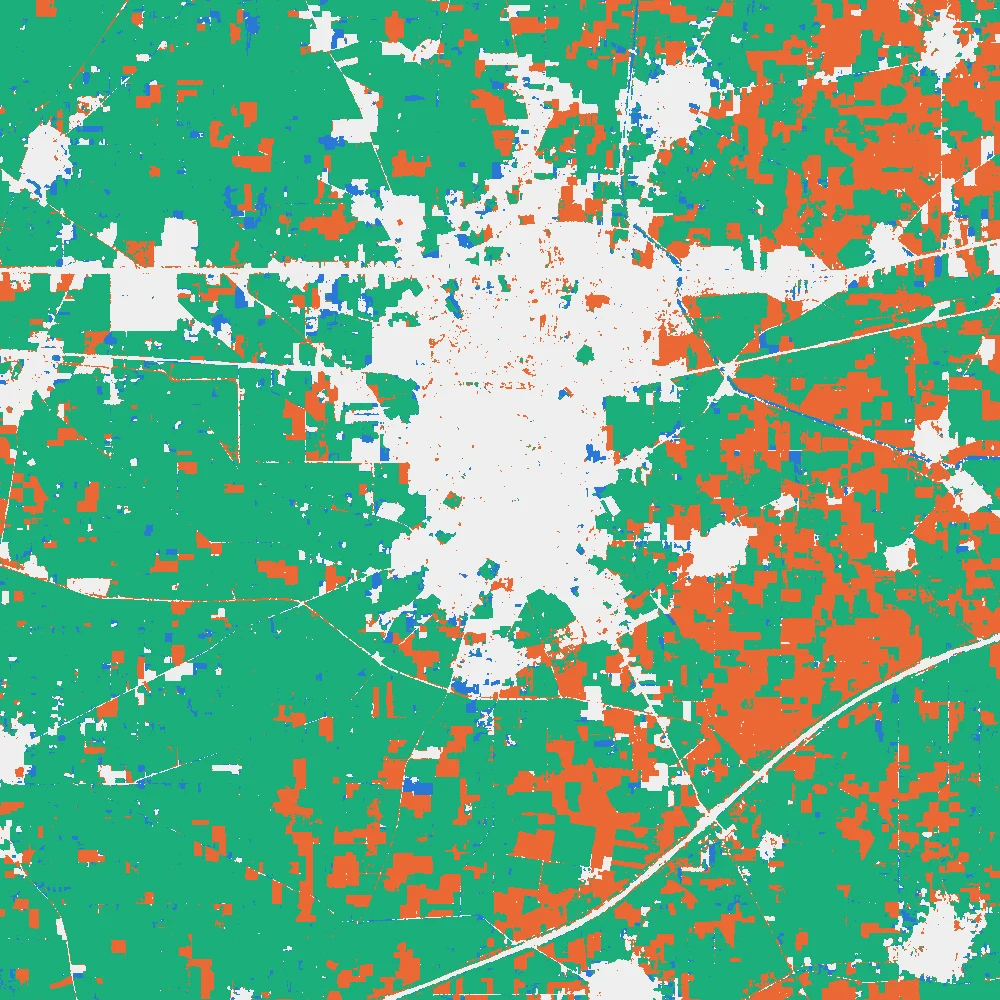
Site A has two peaks, a winter one and a monsoon one, which fits the rice and wheat calendar of the region. The town is flat, and C changes little. Across the square, about six in ten cells are above 0.6 in both February or March and August or September. The tutorials show how to get these numbers by hand in QGIS and by code in Python.
The twelve maps are below. Click a month to open it full screen, or switch to Play the year.
The curves of the three places are in the next chart. Hover a month, and click a name to hide a line.
Show the numbers as a table
| Month | A | B | C |
|---|---|---|---|
| Jan | 0.67 | 0.11 | 0.56 |
| Feb | 0.86 | 0.11 | 0.52 |
| Mar | 0.85 | 0.09 | 0.44 |
| Apr | 0.35 | 0.09 | 0.56 |
| May | 0.12 | 0.06 | 0.44 |
| Jun | 0.06 | 0.07 | 0.42 |
| Jul | 0.10 | 0.07 | 0.49 |
| Aug | 0.74 | 0.11 | 0.57 |
| Sep | 0.79 | 0.16 | 0.60 |
| Oct | 0.72 | 0.10 | 0.64 |
| Nov | 0.13 | 0.07 | 0.46 |
| Dec | 0.43 | 0.08 | 0.65 |
And the map of which cells are green in which season:
A workflow you can trust
- Decide the question, the area and the period. They set the cell size, the revisit you need and the index.
- Collect surface reflectance from one source, on one grid.
- Mask cloud, shadow, snow and bad cells with the quality layer.
- Calculate the same index for every image.
- Build composites for a window that suits the question. Record how many scenes went into each one.
- Check the gaps: for each period, the share of cells that have a value.
- Decide what to do with the gaps, and write it down.
- Stack the composites in date order, and check the order with a place you know.
- Read the curves at a few places you can judge, and compare them with a crop calendar or with single images.
- Calculate the summaries, such as the peak, the swing and the season, and report how they were made.
Common mistakes
- Comparing maps that use different colour scales.
- Stacking the images in the wrong order.
- Mixing sensors or processing versions without matching them.
- Treating a filled value as a measurement.
- Reading a trend from one or two years.
- Reading a crop name from a curve that nobody checked in the field.
- Forgetting that a monthly composite hides what happens inside the month.
- Taking the mean of a raster that still holds a NoData number such as -9999.
Glossary
| Term | Meaning |
|---|---|
| Time series | Measurements of one thing at different times, kept in order |
| Raster time series | A stack of images of the same area on the same grid in date order |
| Composite | One image made from the clear observations of a window of time |
| Median | The middle value of a sorted list, not moved much by one bad value |
| Gap | A cell and date for which no clear observation exists |
| Phenology | The timing of seasonal events in plants, such as green-up, peak and senescence |
| Swing | The highest value of the year minus the lowest |
| Climatology | The average value of a period, such as a month, over many years |
| Anomaly | A value minus the climatology of the same period |
Practise it
The tutorial Raster time series with NDVI in QGIS builds the series, plays it, reads curves and maps the swing and the seasons with menus. The tutorial Raster time series with Python does the same steps in code, and adds gap filling and smoothing.
Test yourself
1. Why is a median a safer composite than a single image?
A single image may be hit by cloud or haze that the mask missed. The median of several clear views is the middle value, so one bad value hardly moves it.
2. A fill gives a value of 0.45 where the real NDVI was 0.74. What does this tell you?
A straight-line fill cannot see fast changes, such as a crop going from bare to green in a month. A filled value is an estimate, and it can be well off.
3. Why is a year of monthly data not enough to show a trend?
A trend is a change in one direction over several years. One year shows a seasonal pattern. Another year may differ in rain, sowing dates or cloud, so you cannot tell a trend from a normal difference between years.