

This guide has 2 routes. Pick one, or read both. Each route is complete on its own.
How far is each hospital from a main road? Which hospital is nearest to a town? How many are within 2 km of a village? Questions of distance and nearness come up in access, site selection and service planning. Two tools answer almost all of them. A nearest-feature join finds the closest feature of another layer and the distance to it. A buffer draws a zone of a given distance around a feature, and you count what lies inside.
The data is the hospitals of the tables and joins guide, in ludhiana_hospitals.csv of ludhiana_workflow_data.zip, and the main roads of OpenStreetMap, which the code downloads.
Distances need metres
A distance in degrees is not a distance. A degree of longitude near Ludhiana is about 95 km, and a degree of latitude is about 111 km, so a circle of radius 0.01 degrees is an ellipse on the ground. Every tool in this guide measures in the units of the CRS. Before you measure, reproject all the layers to the same projected CRS in metres, such as UTM zone 43 north, EPSG:32643, as in the reprojection guide.
Get the data
You need Python with requests, numpy, pandas, geopandas and shapely.
import requests
import numpy as np
import pandas as pd
import geopandas as gpd
from shapely.geometry import LineString

# Step 1: the hospitals, as points in longitude and latitude, then in UTM zone 43 north (metres)
table = pd.read_csv("ludhiana_workflow_data/ludhiana_hospitals.csv", encoding="utf-8")
hospitals = gpd.GeoDataFrame(table, geometry=gpd.points_from_xy(table["longitude"], table["latitude"]), crs="EPSG:4326").to_crs(32643)

# Step 2: the district, for its box, in the same CRS
district = gpd.read_file("ludhiana_workflow_data/ludhiana_district.geojson")
west, south, east, north = district.total_bounds
print(len(hospitals), "hospitals | CRS: EPSG", hospitals.crs.to_epsg())
515 hospitals | CRS: EPSG 32643
Now the main roads of the same box from OpenStreetMap, as in the OpenStreetMap guide.
# Step 1: motorways, trunk, primary and secondary roads in the box. out geom returns the coordinates of every vertex.
query = f'[out:json][timeout:120]; way["highway"~"^(motorway|trunk|primary|secondary)$"]({south},{west},{north},{east}); out geom;'
reply = requests.post("https://overpass-api.de/api/interpreter", data={"data": query}, headers={"User-Agent": "timeandspatial-guide/1.0 (write your email address here)"}, timeout=180)
ways = reply.json()["elements"]

# Step 2: a line layer, in longitude and latitude and then in metres
roads = gpd.GeoDataFrame(
    [{"osm_id": w["id"], "highway": w["tags"]["highway"], "name": w["tags"].get("name")} for w in ways],
    geometry=[LineString([(p["lon"], p["lat"]) for p in w["geometry"]]) for w in ways], crs="EPSG:4326",
).to_crs(32643)
print(len(roads), "road segments |", roads["highway"].value_counts().to_dict())
print("length of main roads:", round(float(roads.length.sum()) / 1000), "km")
1114 road segments | {'trunk': 497, 'primary': 334, 'secondary': 283}
length of main roads: 1215 km
Distance to the nearest road
In Python
# Step 1: for every hospital, the nearest road segment and the distance to it, in metres
nearest = gpd.sjoin_nearest(hospitals, roads[["highway", "name", "geometry"]], how="left", distance_col="distance_m", lsuffix="hospital", rsuffix="road")

# Step 2: a hospital that is equally close to two segments appears twice, so keep the first match for each hospital
nearest = nearest[~nearest.index.duplicated(keep="first")]
print("hospitals:", len(hospitals), "| rows after the join:", len(nearest))

# Step 3: the distances
print(nearest["distance_m"].describe().round(0).to_string())
print("within 500 m of a main road:", round(float((nearest["distance_m"] <= 500).mean()) * 100, 1), "percent")
print("farther than 5 km:", int((nearest["distance_m"] > 5000).sum()), "hospitals")
hospitals: 515 | rows after the join: 515
count     515.0
mean      669.0
std      1253.0
min         6.0
25%        93.0
50%       325.0
75%       676.0
max      8508.0
within 500 m of a main road: 63.7 percent
farther than 5 km: 12 hospitals
sjoin_nearest looks for the closest line to each point and writes its attributes and the distance in the column that you name. The distance is in the units of the CRS, so it is in metres here. A point equally close to two roads, such as one at a junction, matches both, so the join can return more rows than there are hospitals. Count the rows and drop the duplicates, as above.
# Step 1: the hospitals farthest from a main road, and the class of the road they are nearest to
far = nearest.nlargest(5, "distance_m")[["name_hospital", "distance_m", "highway"]]
print(far.round(0).to_string(index=False))
                   name_hospital  distance_m   highway
     Government Hospital, Latala      8508.0 secondary
Mata Sham Kaur Memorial Hospital      7987.0     trunk
                  Anant Hospital      7924.0     trunk
        Dilshad Bone Care Centre      7821.0     trunk
                   Gill Hospital      7706.0     trunk
In QGIS
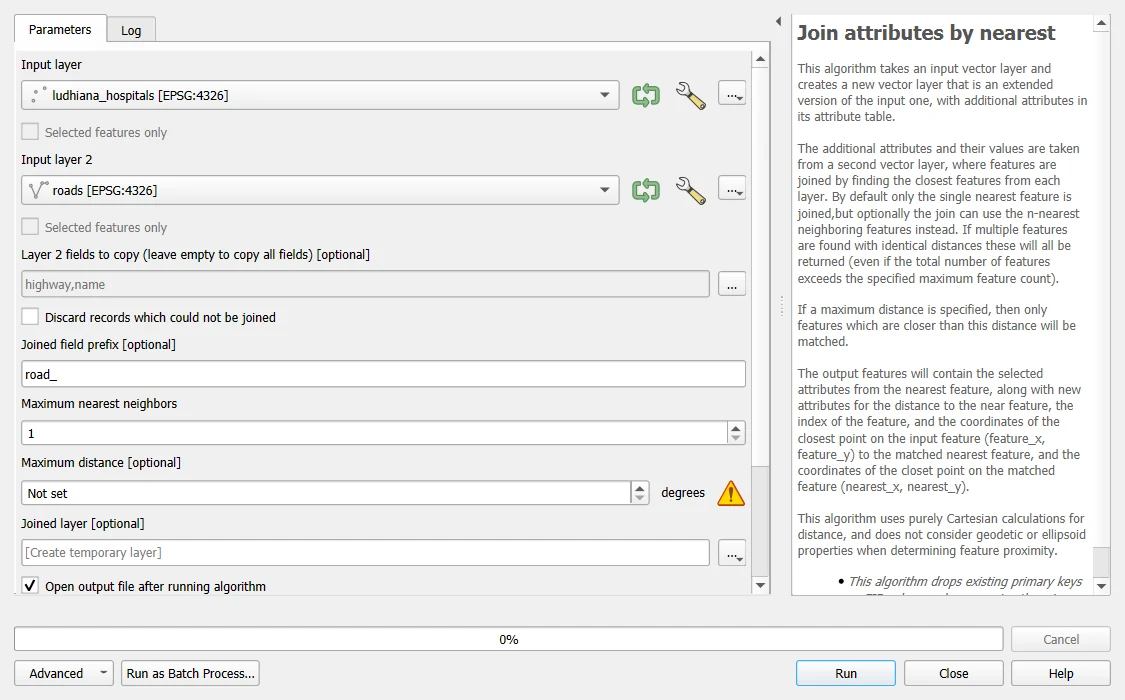
- Add the hospitals and the roads. If their CRS is EPSG:4326, reproject both: open Vector > Data Management Tools > Reproject Layer, set Target CRS to EPSG:32643 and run it for each layer. Distances in QGIS are in the units of the layer, so they are in degrees until you do this.
- Open the Processing Toolbox and search for
Join attributes by nearest. - Set Input layer to the hospitals and Input layer 2 to the roads. Set Maximum nearest neighbors to 1.
- Choose the fields to copy from the roads, or leave empty to copy all. Save the Joined layer.
The output has the fields of the hospitals and the roads, and extra fields for the distance and the coordinates of the nearest point on the road. As in Python, a point equally close to two roads can give two rows. Open the attribute table and check the count. Run the same tool with the towns as the input and the named hospitals as the second layer, and it returns the same nearest hospitals and distances as the Python code: 252 m for Ludhiana, 258 m for Jagraon, 30 m for Khanna and 137 m for Samrala.
The nearest hospital to a town
Joining a layer to itself finds the nearest neighbour inside one layer. For towns and hospitals, the towns are the input and the hospitals the second layer.
# Step 1: four towns of the district, as longitude and latitude, in UTM
towns = gpd.GeoDataFrame(
    {"town": ["Ludhiana", "Jagraon", "Khanna", "Samrala"]},
    geometry=gpd.points_from_xy([75.857, 75.473, 76.217, 76.193], [30.901, 30.788, 30.704, 30.837]), crs="EPSG:4326",
).to_crs(32643)

# Step 2: the nearest hospital to each town, and its distance
named = hospitals[hospitals["name"].notna()]                  # keep the hospitals that have a name
nearest_hospital = gpd.sjoin_nearest(towns, named[["name", "geometry"]], how="left", distance_col="distance_m")
nearest_hospital = nearest_hospital[~nearest_hospital.index.duplicated(keep="first")]
print(nearest_hospital[["town", "name", "distance_m"]].round(0).to_string(index=False))
    town                name  distance_m
Ludhiana     Shilpy Hospital       252.0
 Jagraon     Singla Hospital       258.0
  Khanna Jeevan Jot Hospital        30.0
 Samrala Holistic Healthcare       137.0
The distance is from the point used for the centre of each town to the hospital, in a straight line. In all four towns the nearest mapped hospital is within about 260 m, and in Khanna it is only 30 m away. That is a sign of how many small hospitals and clinics OpenStreetMap lists in town centres, and it says nothing about their size or quality.
Hospitals within a distance: buffers
A buffer is a zone around a feature, made of all the points that are within a given distance of it. A buffer of 2 km around a town is a circle of radius 2 km. Counting what falls inside answers "how many within 2 km?".
# Step 1: a buffer of 2 km around every town. The distance is in metres because the layer is.
rings = towns.copy()
rings["geometry"] = towns.buffer(2000)
print("buffer area of one town:", round(float(rings.area.iloc[0]) / 1e6, 1), "km2 | a circle of radius 2 km has", round(np.pi * 4, 1), "km2")

# Step 2: the hospitals inside each buffer. A spatial join with "within" gives one row for each hospital and town pair.
inside = gpd.sjoin(hospitals, rings[["town", "geometry"]], how="inner", predicate="within")
print(inside.groupby("town").size().reindex(towns["town"]).fillna(0).astype(int).to_string())
buffer area of one town: 12.5 km2 | a circle of radius 2 km has 12.6 km2
town
Ludhiana    38
Jagraon     22
Khanna      30
Samrala     13
The buffer area agrees with the formula for a circle, which is a check that the layer is in metres. The counts are the hospitals within 2 km, in a straight line, of the point of each town.
A set of buffers of different sizes shows how the number grows with distance.
# Step 1: the number of hospitals within 1, 2, 5 and 10 km of Jagraon
jagraon = towns[towns["town"] == "Jagraon"].geometry.iloc[0]
distances_to_jagraon = hospitals.geometry.distance(jagraon)
for radius in [1000, 2000, 5000, 10000]:
    print(f"within {radius // 1000:2d} km of Jagraon: {int((distances_to_jagraon <= radius).sum())} hospitals")
within  1 km of Jagraon: 12 hospitals
within  2 km of Jagraon: 22 hospitals
within  5 km of Jagraon: 33 hospitals
within 10 km of Jagraon: 34 hospitals
The last cell calculates the distance to the town point directly and counts. It gives the same answer as a buffer and does not draw one. For a count, that is simpler. Draw a buffer when you need the zone itself, for a map, or for joining to other layers.
In QGIS
Open Vector > Geoprocessing Tools > Buffer. Set Input layer to the towns, in a CRS of metres, and Distance to 2000 meters. Segments sets how many straight pieces make each quarter of the circle. At the default of 5, QGIS gives a 2 km buffer an area of 12.36 km², about 1.7 percent under the 12.57 km² of a true circle, so raise it to 16 or more for a rounder one. The Python buffer uses 16 pieces and gives 12.5. Tick Dissolve result only if you want one zone for all the towns, and leave it unticked if you want one for each town. Save the Buffered layer. Then use Processing > Count points in polygon, as in the guide on joins, with the buffers as Polygons and the hospitals as Points.
Straight line is not travel distance
All of these distances are straight lines. A hospital 2 km from a town in a straight line may be 4 km by road, or unreachable at night. For access to services, the travel distance or time on the road network is the real measure. That needs a network analysis, with a road layer that is connected and has speeds, which is a topic of its own. A straight-line distance still gives a lower limit, and it is a good first filter.
A second limit comes from the data. OpenStreetMap has the main roads well, but its hospitals are as complete as its volunteers made them, and a hospital that is not mapped is missing from the answer.
Common mistakes
- Measuring in degrees. Reproject to metres first, and check the buffer area against the formula.
- Forgetting that a nearest join can return two rows for a point that is equally near two features.
- Buffering in degrees and getting an ellipse, or a circle of the wrong size.
- Reading a straight-line distance as the travel distance.
- Using the nearest road of any class. Choose the class that matches the question.
- Counting features in a buffer without noting which source the features come from.