

This guide has 2 routes. Pick one, or read both. Each route is complete on its own.
Data is rarely in one place. The coordinates of hospitals are in a CSV, the districts are in a boundary layer, and the heights of the districts are in another table. This guide turns the first into a point layer and combines all three. Two kinds of join do the work.
- A spatial join uses position. It attaches to each point the polygon that contains it, so you can count points per polygon.
- An attribute join uses a shared value. It attaches the rows of a table to the features of a layer by matching a column, such as a district code.
The data is in ludhiana_workflow_data.zip, unzipped next to your notebook. It has ludhiana_hospitals.csv (515 hospitals of OpenStreetMap, © OpenStreetMap contributors), districts_ludhiana_area.gpkg (Ludhiana and its seven neighbours) and district_height_stats.csv (their heights, from the zonal statistics guide).
Make points from a table
A CSV is only text. Before it can be a layer, the software needs to know which two columns are the coordinates and what CRS they are in. A longitude and a latitude in degrees are in EPSG:4326.
In QGIS
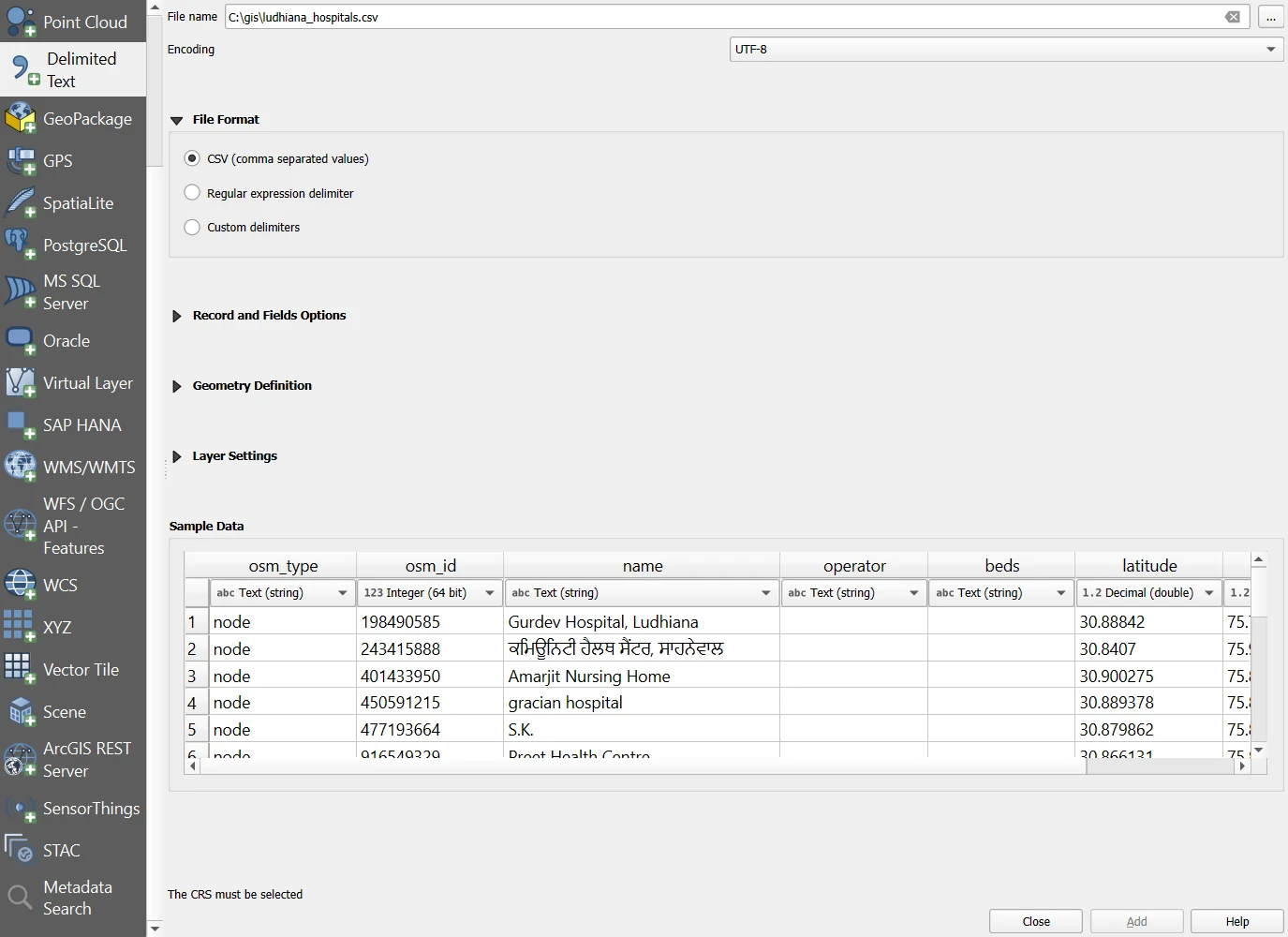
- Open Layer > Add Layer > Add Delimited Text Layer. The Data Source Manager opens on the Delimited Text tab.
- Choose the CSV file under File name. QGIS reads the first rows and shows them under Sample Data, with the type of each column. Check that
latitudeandlongitudeare decimal numbers, and that the Encoding is UTF-8, so that the Punjabi names show properly. - Under File Format, keep CSV (comma separated values).
- Open Geometry Definition. Choose Point coordinates, set X field to
longitudeand Y field tolatitude, and set Geometry CRS to EPSG:4326. Swapping the two fields is the most common mistake, and it puts every point in the wrong hemisphere. - Click Add. The points appear. If a table has no coordinates, choose No geometry (attribute only table) under Geometry Definition, and it is added as a table without a map. The names Point coordinates, X field, Y field and Geometry CRS are those of the QGIS documentation for this dialog.
In Python
import pandas as pd
import geopandas as gpd

# Step 1: read the table. The names include Punjabi script, so the encoding is stated.
hospitals = pd.read_csv("ludhiana_workflow_data/ludhiana_hospitals.csv", encoding="utf-8")
print(hospitals.shape[0], "rows | columns:", hospitals.columns.tolist())

# Step 2: make the points. x is the longitude and y the latitude, in that order.
points = gpd.GeoDataFrame(hospitals, geometry=gpd.points_from_xy(hospitals["longitude"], hospitals["latitude"]), crs="EPSG:4326")
print(points.geometry.iloc[0])

# Step 3: a quick check. The points must fall inside the box of Ludhiana, around 75.4 to 76.3 E and 30.6 to 31.0 N.
print("longitude from", hospitals["longitude"].min(), "to", hospitals["longitude"].max(), "| latitude from", hospitals["latitude"].min(), "to", hospitals["latitude"].max())
515 rows | columns: ['osm_type', 'osm_id', 'name', 'operator', 'beds', 'latitude', 'longitude']
POINT (75.79153 30.88842)
longitude from 75.467384 to 76.278658 | latitude from 30.602272 to 30.98025
If the longitudes and latitudes were swapped, the numbers would show it at once: the longitude would be around 30 and the latitude around 75.
Count points in each polygon: the spatial join
All 515 hospitals are inside Ludhiana, so the count in one district is trivial. To see how a spatial join works, get the hospitals of all eight districts of the area from OpenStreetMap, as in the OpenStreetMap guide.
import requests

# Step 1: the eight districts, and the box around them
districts = gpd.read_file("ludhiana_workflow_data/districts_ludhiana_area.gpkg")
west, south, east, north = districts.total_bounds

# Step 2: every hospital that OpenStreetMap has in that box. Overpass wants south, west, north, east.
query = f'[out:json][timeout:90]; nwr["amenity"="hospital"]({south},{west},{north},{east}); out center;'
reply = requests.post("https://overpass-api.de/api/interpreter", data={"data": query}, headers={"User-Agent": "timeandspatial-guide/1.0 (write your email address here)"}, timeout=180)
elements = reply.json()["elements"]

# Step 3: points from the answer
rows = [{"osm_id": e["id"], "name": e.get("tags", {}).get("name"), "longitude": e.get("lon") or e["center"]["lon"], "latitude": e.get("lat") or e["center"]["lat"]} for e in elements]
region_hospitals = pd.DataFrame(rows)
region_points = gpd.GeoDataFrame(region_hospitals, geometry=gpd.points_from_xy(region_hospitals["longitude"], region_hospitals["latitude"]), crs="EPSG:4326")
print(len(region_points), "hospitals in the box around the eight districts")
2312 hospitals in the box around the eight districts
Now join each hospital to the district that contains it.
# Step 1: the spatial join. predicate="within" keeps a hospital if it lies inside a district.
joined = gpd.sjoin(region_points, districts[["shapeName", "shapeID", "geometry"]], how="left", predicate="within")
print("hospitals inside one of the eight districts:", int(joined["shapeName"].notna().sum()), "| outside all of them (in the box but in other districts):", int(joined["shapeName"].isna().sum()))

# Step 2: count the hospitals of every district
counts = joined.groupby("shapeID").size().rename("hospitals")
print(counts.to_string())
hospitals inside one of the eight districts: 1395 | outside all of them (in the box but in other districts): 917
shapeID
76128533B14984770113274    103
76128533B18834172694083     39
76128533B24759700890118     19
76128533B39051871473194     95
76128533B46195204843409    515
76128533B82601690264832    227
76128533B91211372620495    345
76128533B99919205026025     52
how="left" keeps every point, and gives the district columns the value empty where no district contains the point. Without it, points outside the districts vanish. The box around eight districts also holds pieces of other districts, so some hospitals fall in none of them.
A point that lies exactly on a boundary can fall in two districts, and then the join has two rows for that point. Check that the number of rows has not grown: len(joined) == len(region_points).
# Step 1: did the join keep one row for every hospital?
print("rows before:", len(region_points), "| rows after:", len(joined))
rows before: 2312 | rows after: 2312
In QGIS
Open Processing Toolbox > Count points in polygon. Set Polygons to the districts and Points to the hospitals, and name the Count field hospitals. Save the result under Count. The new layer is the districts with one extra field, and it gives the same counts as the Python code, 515 for Ludhiana. For a join that attaches the polygon attributes to each point, use Vector > Data Management Tools > Join Attributes by Location.
Join a table to the layer: the attribute join
The table district_height_stats.csv has one row for each district, with the mean, the lowest and the highest height and a column shapeID. Join it to the district layer.
# Step 1: the table of heights. The shapeID is read as text, so that long codes are not turned into numbers.
heights = pd.read_csv("ludhiana_workflow_data/district_height_stats.csv", encoding="utf-8", dtype={"shapeID": str})
print(heights[["district", "shapeID", "mean"]].head(3).to_string(index=False))

# Step 2: the attribute join, on the code that both tables have
by_code = districts.merge(heights.drop(columns="district"), on="shapeID", how="left")
print("rows:", len(by_code), "| rows with a height:", int(by_code["mean"].notna().sum()))
       district                 shapeID  mean
Fatehgarh Sahib 76128533B99919205026025 267.0
        Sangrur 76128533B82601690264832 235.4
       Ludhiana 76128533B46195204843409 246.4
rows: 8 | rows with a height: 8
Every district found its row. A code is unique, it has no spelling, and it does not change with the language of the table. That is why a join by code is safe.
Why not join by name?
Names look easier. Often they are written differently in different tables. The district boundaries here come from geoBoundaries. A table that uses GADM names, another source, shows what can go wrong.
import io
import zipfile

# Step 1: the district names of Punjab in GADM, which the other guide downloaded
reply = requests.get("https://geodata.ucdavis.edu/gadm/gadm4.1/json/gadm41_IND_2.json.zip", timeout=120)
archive = zipfile.ZipFile(io.BytesIO(reply.content))
gadm = gpd.read_file(archive.open(archive.namelist()[0]))
punjab_names = pd.DataFrame({"NAME_2": gadm.loc[gadm["NAME_1"] == "Punjab", "NAME_2"].values})
punjab_names["in_gadm"] = True

# Step 2: join the district layer to that list by name
by_name = districts.merge(punjab_names, left_on="shapeName", right_on="NAME_2", how="left")
print("districts matched by name:", int(by_name["in_gadm"].notna().sum()), "of", len(by_name))
print("not matched:", by_name.loc[by_name["in_gadm"].isna(), "shapeName"].tolist())
districts matched by name: 6 of 8
not matched: ['Fatehgarh Sahib', 'Shahid Bhagat Singh Nagar']
Two districts are lost because their names are spelled differently in the two sources: GADM writes FatehgarhSahib and ShahidBhagatSinghNagar with no spaces. A join with how="left" keeps those rows and fills their new fields with empty values, with no error. A join with how="inner" would drop them, and your table would have six districts and not eight, again with no error.
If you must join by name, clean the names first, so that both sides are written alike.
# Step 1: a key that ignores spaces, capitals and punctuation
def clean(name):
    return "".join(ch for ch in str(name).lower() if ch.isalnum())

districts["key"] = districts["shapeName"].map(clean)
punjab_names["key"] = punjab_names["NAME_2"].map(clean)

# Step 2: join on the clean key and count again
by_key = districts.merge(punjab_names[["key", "in_gadm"]], on="key", how="left")
print("districts matched by the clean key:", int(by_key["in_gadm"].notna().sum()), "of", len(by_key))
districts matched by the clean key: 8 of 8
Cleaning the names fixed this case. It will not fix every case: some places are spelled in different ways that no cleaning joins, such as old and new names. A shared code is better.
In QGIS
Open Processing Toolbox > Join attributes by field value. Set Input layer to the districts and Table field to shapeID. Set Input layer 2 to the table, loaded with Add Delimited Text Layer as an attribute table, and Table field 2 to shapeID. Choose the fields to copy, and set Join type to take the attributes of the first matching feature only. Tick Discard records which could not be joined only if you want to lose the rows that did not match. Save the Joined layer. The tool can also write the Unjoinable features from first layer, which lists the rows that did not match. Always look at that list. Joining the heights table to the eight districts by shapeID matches all eight rows, as in Python.
Open the table in QGIS as text if the code column is long. If QGIS reads it as a number, the long digits may be cut or shown in a power of ten, and the codes will not match.
One table with everything
# Step 1: the district layer with the hospital counts and the heights joined on
final = districts.merge(counts.reset_index(), on="shapeID", how="left").merge(heights.drop(columns="district"), on="shapeID", how="left")
final["hospitals"] = final["hospitals"].fillna(0).astype(int)

# Step 2: the area of every district, from the layer in a UTM zone, and the density of hospitals
final["area_km2"] = (final.to_crs(32643).area / 1e6).round(0)
final["hospitals_per_100_km2"] = (final["hospitals"] / final["area_km2"] * 100).round(1)
print(final[["shapeName", "hospitals", "area_km2", "hospitals_per_100_km2", "mean"]].rename(columns={"mean": "mean_height_m"}).to_string(index=False))

# Step 3: save the combined layer
final.drop(columns="key").to_file("districts_combined.gpkg", layer="districts", driver="GPKG")
print("saved:", len(final), "districts | columns:", [c for c in final.columns if c != "geometry"])
                shapeName  hospitals  area_km2  hospitals_per_100_km2  mean_height_m
          Fatehgarh Sahib         52    1146.0                    4.5          267.0
                  Sangrur        227    3584.0                    6.3          235.4
                 Ludhiana        515    3697.0                   13.9          246.4
                Jalandhar        345    2601.0                   13.3          235.1
                     Moga         39    2238.0                    1.7          220.5
                 Rupnagar         19    1368.0                    1.4          309.2
                  Barnala         95    1404.0                    6.8          228.2
Shahid Bhagat Singh Nagar        103    1277.0                    8.1          275.0
saved: 8 districts | columns: ['shapeName', 'shapeID', 'key', 'hospitals', 'count', 'mean', 'median', 'min', 'max', 'std', 'area_km2', 'hospitals_per_100_km2']
The table puts three sources in one place: counts from OpenStreetMap, areas from the boundary layer and heights from the DEM. The density of hospitals is a count per area. A density in OpenStreetMap depends on how well each district has been mapped, so a low number can be a gap in the map and not a gap in hospitals. State the source with the number.
Check every join
- Count the rows before and after. A left join keeps all the rows of the left side, and a spatial join can add rows.
- Count the rows that matched, and print the ones that did not.
- Look at a few rows by eye.
- Check that the code column is the same type on both sides. A code read as a number on one side and as text on the other will not match.
- Look for duplicates in the table you join. Two rows with the same code give two rows in the result.
Common mistakes
- Swapping longitude and latitude, and getting points in the wrong place.
- Giving points in degrees and the polygons in metres to a spatial join. Both layers must share a CRS, and GeoPandas warns when they do not.
- Joining by name and losing districts without an error.
- Reading a long code as a number, so that it loses digits or changes form.
- Using an inner join without counting the rows that were lost.
- Forgetting that a point on a boundary can match two polygons.
- Reading a density from incomplete data as a fact about the world.