

This guide has 2 routes. Pick one, or read both. Each route is complete on its own.
A raster has a CRS, a coordinate reference system, that says how its cells are placed on the Earth. Many free datasets, such as the Copernicus DEM, come in latitude and longitude. That is a geographic CRS: positions are angles, and the unit is the degree. Most analysis needs a projected CRS, where positions are in metres on a flat grid. Reprojecting is the step that moves a raster from one to the other.
The reason is plain. A degree of longitude near Ludhiana is about 95 km, and a degree of latitude is about 111 km. A cell that is one arc second wide is therefore a different length east to west than north to south, and its size changes with latitude. Slope, area, distance and hillshade all need cells of a known size in metres. A projected CRS gives them.
Choose a CRS
For a district or a state, a UTM zone is a good default. UTM, the Universal Transverse Mercator system, divides the world into 60 zones, each 6 degrees of longitude wide, and it keeps distances and areas accurate within a zone. India lies across zones 42 to 46. Ludhiana, at about 75.8 E, is in zone 43.
The EPSG code of a UTM zone, for places north of the equator, is 32600 plus the zone number. Zone 43 north is EPSG:32643, which you may recognise from the Sentinel-2 and Landsat guides. South of the equator the code is 32700 plus the zone number.
For all of India at once, no single UTM zone fits, and analysts use a national or equal-area projection instead. For one district or state, use the UTM zone it sits in. If your study area crosses a zone boundary, pick the zone that holds most of it.
What you need
The data zip from the clipping guide, ludhiana_workflow_data.zip, unzipped next to your notebook. This guide uses dem_ludhiana_clip.tif, the DEM clipped to Ludhiana district, in latitude and longitude (EPSG:4326). You need QGIS 3.34 or newer for route A, and Python with geopandas, numpy and rasterio for route B.
Route A: QGIS
- Add
dem_ludhiana_clip.tifwith Layer > Add Layer > Add Raster Layer. - Open Raster > Projections > Warp (Reproject).
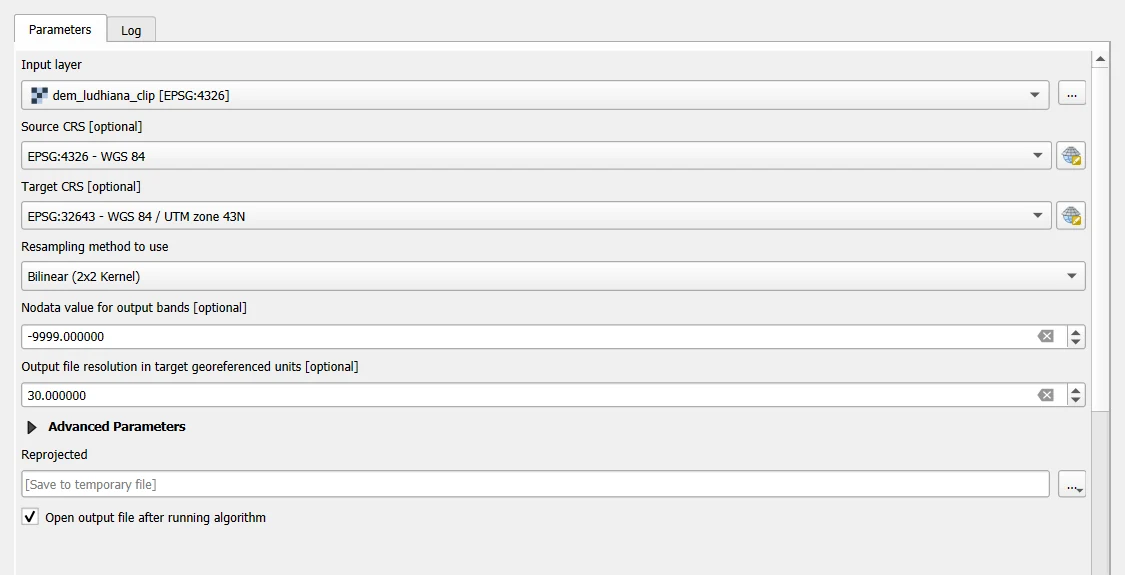
- Set Input layer to the DEM. Set Source CRS to EPSG:4326 if it is empty.
- Click the CRS button next to Target CRS, search for
32643, and choose EPSG:32643 - WGS 84 / UTM zone 43N. - Set Resampling method to use to Bilinear for heights. Use Nearest Neighbour for classes, and read the next section before you choose.
- Set Nodata value for output bands to
-9999. - Set Output file resolution in target georeferenced units to
30, which means 30 m cells. - Save the result under Reprojected as
dem_ludhiana_utm.tifand click Run.
With these settings QGIS gives 3111 by 1732 cells of 30 m, 4,107,515 of them with data, a mean height of 246.42 m, and an area of 3,696.8 km² from the cell count. These agree with the Python result below to within one column of cells at the edge.
Do not use Layer > Set CRS, or Assign projection, for this. They only change the label of a layer, not its cells. A raster that was in degrees and is labelled as metres lands in the wrong place on the Earth.
QGIS shows layers of different CRSs together by reprojecting them on the fly, so you do not need to reproject a raster just to look at it. Reproject when you analyse: slope, area, distance, or when another tool needs metres.
Which resampling method?
Reprojecting moves the cells to a new grid, so each new cell needs a value, taken from the old cells nearby. The method decides how.
- Nearest neighbour copies the value of the closest old cell. It invents no new values, so use it for classes and codes, such as land cover and the scene classification layer.
- Bilinear averages the four nearest cells. It gives a smooth result and suits continuous values such as heights, temperature and reflectance.
- Cubic is smoother again and can overshoot slightly. It suits continuous data when you want a smooth look.
- Average, mode and the other area-based methods are for making cells larger. Use them when you also change the cell size a lot.
The rule: nearest for categories, bilinear for continuous values. Bilinear on a land cover map invents classes that do not exist, and the Python section shows it.
Route B: Python
import math
import numpy as np
import geopandas as gpd
import rasterio
from rasterio.warp import calculate_default_transform, reproject, Resampling

# Step 1: open the clipped DEM and look at what it is now
src = rasterio.open("ludhiana_workflow_data/dem_ludhiana_clip.tif")
print("CRS: EPSG", src.crs.to_epsg(), "| size:", src.width, "x", src.height, "cells | cell size:", round(src.res[0], 6), "degrees")

# Step 2: find the UTM zone from the longitude of the centre of the raster
centre_lon = (src.bounds.left + src.bounds.right) / 2
centre_lat = (src.bounds.bottom + src.bounds.top) / 2
zone = int((centre_lon + 180) // 6) + 1
epsg = (32600 if centre_lat >= 0 else 32700) + zone
print("centre:", round(centre_lon, 2), "E,", round(centre_lat, 2), "N | UTM zone", zone, "| EPSG", epsg)
CRS: EPSG 4326 | size: 3497 x 1665 cells | cell size: 0.000278 degrees
centre: 75.84 E, 30.79 N | UTM zone 43 | EPSG 32643
The zone comes from the longitude. Each zone is 6 degrees wide and zone 1 starts at 180 degrees west, so (lon + 180) // 6 + 1 gives the zone. The latitude only tells whether to use the northern or the southern codes.
# Step 1: work out the grid of the new raster. The cell size is set to 30 m, close to the original 1 arc second.
dst_crs = f"EPSG:{epsg}"
transform, width, height = calculate_default_transform(src.crs, dst_crs, src.width, src.height, *src.bounds, resolution=30)
print("new size:", width, "x", height, "cells | cell size:", transform.a, "x", -transform.e, "m")

# Step 2: an empty array for the new raster, filled with the NoData value
heights = np.full((height, width), -9999, dtype="float32")

# Step 3: move the values. Bilinear resampling for heights; the NoData value is told to both sides.
reproject(
    source=rasterio.band(src, 1), destination=heights,
    src_transform=src.transform, src_crs=src.crs,
    dst_transform=transform, dst_crs=dst_crs,
    src_nodata=-9999, dst_nodata=-9999, resampling=Resampling.bilinear,
)
valid = heights != -9999
print("cells with data:", int(valid.sum()), "| share:", round(float(valid.mean()), 3))
print("height: lowest", round(float(heights[valid].min()), 1), "| mean", round(float(heights[valid].mean()), 1), "| highest", round(float(heights[valid].max()), 1), "m")
new size: 3112 x 1732 cells | cell size: 30.0 x 30.0 m
cells with data: 4107514 | share: 0.762
height: lowest 219.6 | mean 246.4 | highest 294.4 m
The new raster is rotated a little relative to the old one. A UTM grid is not aligned with latitude and longitude, so a raster that was a rectangle in degrees has empty corners in metres. The share of cells with data, 0.762, is lower than the 0.776 of the original box, and the empty cells are the new NoData corners.
Check the result
Two checks show that the new raster is in metres and that the cells are the right size.
# Step 1: area. Every cell is 30 m by 30 m, so the area of the district is the number of cells times 900 square metres.
cells_area_km2 = int(valid.sum()) * 30 * 30 / 1e6

# Step 2: compare with the area of the polygon, calculated in the same UTM zone
district = gpd.read_file("ludhiana_workflow_data/ludhiana_district.geojson").to_crs(epsg)
polygon_area_km2 = district.area.iloc[0] / 1e6
print("area from the cells:", round(cells_area_km2, 1), "km2 | area of the polygon:", round(polygon_area_km2, 1), "km2")

# Step 3: slope in degrees. The size of a cell is 30 m on both sides, so the sums are right.
dz_dy, dz_dx = np.gradient(np.where(valid, heights, np.nan), 30)
slope = np.degrees(np.arctan(np.hypot(dz_dx, dz_dy)))
print("median slope:", round(float(np.nanmedian(slope)), 2), "degrees")
area from the cells: 3696.8 km2 | area of the polygon: 3696.5 km2
median slope: 0.36 degrees
The two areas agree within a few tenths of a square kilometre, which tells you that the cells are the size you set and that the clip did not lose the district. The median slope is a fraction of a degree, which is right for a plain.
The mistake this avoids
If you had calculated the slope on the original raster and passed the cell size in degrees, the heights in metres and the cell size in degrees would have been mixed.
# Step 1: the same heights, but with the cell size in degrees, as if it were in metres
raw = src.read(1, masked=True).astype("float32").filled(np.nan)
dz_dy, dz_dx = np.gradient(raw, src.res[0])
wrong_slope = np.degrees(np.arctan(np.hypot(dz_dx, dz_dy)))
print("median slope with the cell size in degrees:", round(float(np.nanmedian(wrong_slope)), 1), "degrees")
median slope with the cell size in degrees: 89.9 degrees
A slope near 90 degrees on a flat plain is the sign. The numbers were right and the units did not match. Reprojecting first removes the problem, because every length is now in metres.
Resampling classes
# Step 1: a small class raster made from the heights: 10 = low, 20 = middle, 30 = high
classes = np.where(np.isnan(raw), 0, np.digitize(np.nan_to_num(raw), [235, 250]) * 10 + 10).astype("float32")
print("classes in the original:", sorted(np.unique(classes).tolist()))

# Step 2: reproject it twice, with nearest and with bilinear
def warp(array, method):
    out = np.zeros((height, width), dtype="float32")
    reproject(source=array, destination=out, src_transform=src.transform, src_crs=src.crs,
              dst_transform=transform, dst_crs=dst_crs, src_nodata=0, dst_nodata=0, resampling=method)
    return out

nearest = warp(classes, Resampling.nearest)
bilinear = warp(classes, Resampling.bilinear)
print("classes after nearest:", sorted(np.unique(nearest).tolist()))
print("number of different values after bilinear:", len(np.unique(bilinear)))
classes in the original: [0.0, 10.0, 20.0, 30.0]
classes after nearest: [0.0, 10.0, 20.0, 30.0]
number of different values after bilinear: 201769
Nearest keeps the three classes. Bilinear averages neighbouring codes, so a cell between 10 and 30 becomes 20, or 17.3, and the map has values that are not classes. This is the reason for the rule.
Save the result
# Step 1: write the reprojected heights with the new CRS and transform
profile = {
    "driver": "GTiff", "height": height, "width": width, "count": 1, "dtype": "float32",
    "crs": dst_crs, "transform": transform, "nodata": -9999, "compress": "deflate",
}
with rasterio.open("dem_ludhiana_utm.tif", "w", **profile) as dst:
    dst.write(heights, 1)
src.close()

# Step 2: read it back to check
with rasterio.open("dem_ludhiana_utm.tif") as check:
    print("saved: EPSG", check.crs.to_epsg(), "|", check.width, "x", check.height, "cells | cell size", check.res[0], "m")
saved: EPSG 32643 | 3112 x 1732 cells | cell size 30.0 m
Common mistakes
- Using Set CRS or Assign projection instead of reprojecting. That only relabels the layer.
- Reprojecting with bilinear or cubic resampling a raster of classes.
- Choosing the wrong UTM zone. Zone 44 for a place in zone 43 gives a distorted result, with no error message.
- Reprojecting the same raster again and again. Each pass resamples the cells and blurs the data. Keep the original, and reproject once from it.
- Forgetting the NoData value, so the empty corners become real zeros.
- Reprojecting only to look at a raster. QGIS does that on the fly.