

This guide has 2 routes. Pick one, or read both. Each route is complete on its own.
A DEM is a grid of heights. The questions people ask of terrain are about change: how fast the height changes, in which direction, and what the surface looks like. Three maps answer them.
- Slope is the steepness of each cell, as an angle in degrees from 0 for flat to 90 for a wall, or as a percent. It decides where water runs fast, where a road can go and where a landslide can start.
- Aspect is the compass direction that the slope faces, from 0 to 360 degrees, with 0 for north, 90 for east, 180 for south and 270 for west. A south-facing slope gets more sun in the northern hemisphere, which changes vegetation, snow melt and soil moisture.
- Hillshade is a picture of the terrain lit from one direction. It does not measure anything, and it makes a map look three-dimensional. Putting a hillshade under a coloured map makes a basemap that people can read.
The example is a window of the Himalayan foothills around Shimla, where the relief is large and the results are easy to see. A plain, such as Ludhiana, would give a map of almost flat colour.
Before you start: metres
Slope is the change in height divided by the distance. The height is in metres, so the distance must be in metres too. A DEM in latitude and longitude has cells in degrees, and the calculation gives slopes near 90 degrees, as the reprojection guide shows. Reproject the DEM to a UTM zone first. Shimla is in zone 43 north, EPSG:32643.
Get the data
The code finds the Copernicus DEM tile for the box, reads the window, and reprojects it to 30 m cells in the UTM zone. You need Python with requests, numpy and rasterio.
import requests
import numpy as np
import rasterio
from rasterio.windows import from_bounds
from rasterio.warp import calculate_default_transform, reproject, Resampling

# Step 1: the box, as west, south, east, north. Shimla and the hills around it.
box = [77.05, 31.05, 77.30, 31.25]

# Step 2: the Copernicus DEM tile for the box
search = {"collections": ["cop-dem-glo-30"], "bbox": box, "limit": 5}
tile = requests.post("https://earth-search.aws.element84.com/v1/search", json=search, timeout=60).json()["features"][0]
bucket, key = tile["assets"]["data"]["href"].replace("s3://", "").split("/", 1)
address = f"https://{bucket}.s3.amazonaws.com/{key}"

# Step 3: read the window of the box. The tile is in degrees.
with rasterio.open(address) as src:
    window = from_bounds(*box, src.transform).round_offsets().round_lengths()
    heights = src.read(1, window=window).astype("float32")
    window_transform = src.window_transform(window)
    degrees_crs = src.crs
print("window:", heights.shape[1], "x", heights.shape[0], "cells in degrees | height from", round(float(heights.min())), "to", round(float(heights.max())), "m")
window: 900 x 720 cells in degrees | height from 602 to 2858 m
The window runs from about 600 m to 2,860 m, which is a big range for a window of 25 km by 22 km.
# Step 1: the new grid in UTM zone 43 north, with 30 m cells
utm = "EPSG:32643"
bounds = rasterio.transform.array_bounds(heights.shape[0], heights.shape[1], window_transform)
new_transform, width, height = calculate_default_transform(degrees_crs, utm, heights.shape[1], heights.shape[0], *bounds, resolution=30)

# Step 2: move the heights onto it with bilinear resampling. Empty cells at the corners get -9999.
dem = np.full((height, width), -9999, dtype="float32")
reproject(source=heights, destination=dem, src_transform=window_transform, src_crs=degrees_crs,
          dst_transform=new_transform, dst_crs=utm, src_nodata=None, dst_nodata=-9999, resampling=Resampling.bilinear)
dem = np.where(dem == -9999, np.nan, dem).astype("float64")
print("DEM in metres:", width, "x", height, "cells of 30 m | cells without data:", round(float(np.isnan(dem).mean()) * 100, 1), "percent")
DEM in metres: 809 x 755 cells of 30 m | cells without data: 3.8 percent
Save it so that QGIS can use the same file.
# Step 1: write the UTM DEM
profile = {"driver": "GTiff", "height": height, "width": width, "count": 1, "dtype": "float32", "crs": utm,
           "transform": new_transform, "nodata": -9999, "compress": "deflate"}
with rasterio.open("dem_shimla_utm.tif", "w", **profile) as dst:
    dst.write(np.where(np.isnan(dem), -9999, dem).astype("float32"), 1)
print("saved dem_shimla_utm.tif")
saved dem_shimla_utm.tif
Route A: QGIS
Add dem_shimla_utm.tif. The three tools are in the Raster menu, under Analysis.
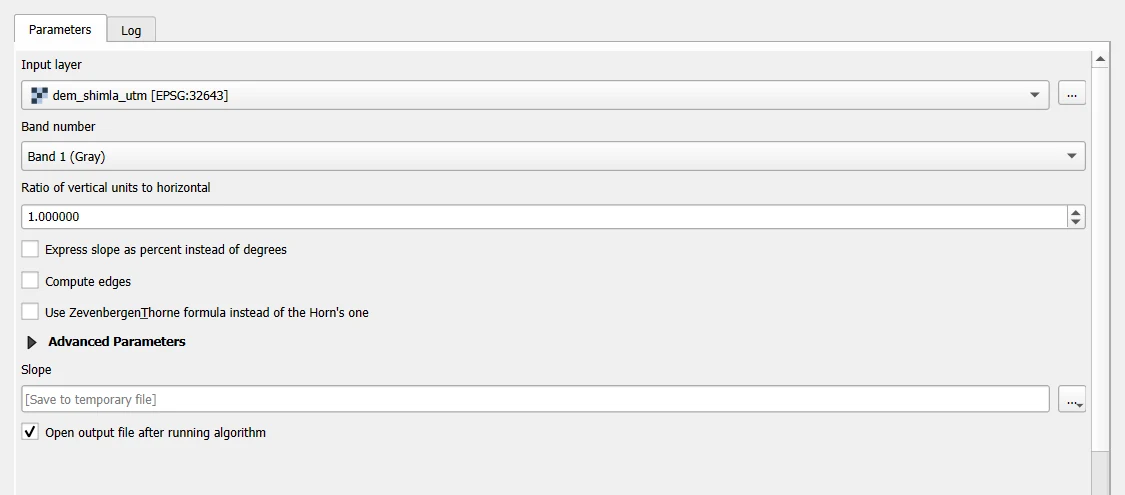
- Slope. Open Raster > Analysis > Slope. Set Input layer to the DEM. Keep Ratio of vertical units to horizontal at 1, because both are in metres. Leave Express slope as percent instead of degrees unticked for degrees. Save the result and click Run.
- Aspect. Open Raster > Analysis > Aspect, set the DEM as the input, and run. Leave Return trigonometric angle instead of azimuth unticked, so that 0 is north and the angle goes clockwise. Cells that are exactly flat have no direction, and they get -9999 unless you tick Return 0 for flat instead of -9999.
- Hillshade. Open Raster > Analysis > Hillshade. The default light is from the north-west, with an Azimuth of the light of 315 degrees and an Altitude of the light of 45 degrees. A Z factor (vertical exaggeration) above 1 makes relief look more dramatic. Keep it at 1 for the truth.
All three offer a choice between two formulas for the heights around a cell: Horn's, which is the default, and Zevenbergen and Thorne's. Keep Horn's unless you have a reason. Both treat a cell on the edge of the raster as empty, unless you tick Compute edges.
Style the slope with Singleband pseudocolor, from light to dark, and put the hillshade underneath with a transparency of the layer above of about 50 percent.
Route B: Python
Slope and aspect come from the heights of the eight neighbours of each cell, arranged in a 3 by 3 window.
a  b  c
d  e  f
g  h  i
Horn's method calculates the change of height from west to east and from north to south, using all eight neighbours, with the nearer ones weighted twice.
# Step 1: the heights of the eight neighbours of every cell, as eight arrays shifted by one cell
def neighbours(z):
    padded = np.pad(z, 1, mode="constant", constant_values=np.nan)       # a ring of NaN so that the edges have neighbours
    a, b, c = padded[:-2, :-2], padded[:-2, 1:-1], padded[:-2, 2:]
    d, f = padded[1:-1, :-2], padded[1:-1, 2:]
    g, h, i = padded[2:, :-2], padded[2:, 1:-1], padded[2:, 2:]
    return a, b, c, d, f, g, h, i

# Step 2: Horn's method. dx is the change of height to the east per metre, dy the change to the south per metre.
def horn(z, cell):
    a, b, c, d, f, g, h, i = neighbours(z)
    dx = ((c + 2 * f + i) - (a + 2 * d + g)) / (8 * cell)
    dy = ((g + 2 * h + i) - (a + 2 * b + c)) / (8 * cell)
    return dx, dy

cell = 30                                                    # metres
dx, dy = horn(dem, cell)
print("dx and dy calculated for", dx.size, "cells")
dx and dy calculated for 610795 cells
dx is positive where the ground rises to the east, and dy is positive where it rises to the south, because the rows of an array run from north to south. Slope and aspect follow.
# Step 1: slope in degrees. The steepness is the length of the vector (dx, dy), turned into an angle.
slope = np.degrees(np.arctan(np.hypot(dx, dy)))

# Step 2: aspect as a compass direction, 0 for north, going clockwise. The slope faces down the hill.
angle = np.degrees(np.arctan2(dy, -dx))
aspect = np.where(angle > 90, 450 - angle, 90 - angle)
aspect = np.where(aspect >= 360, aspect - 360, aspect)
aspect = np.where((dx == 0) & (dy == 0), np.nan, aspect)         # a flat cell has no direction

# Step 3: the typical and the steepest slope
print("slope: median", round(float(np.nanmedian(slope)), 1), "degrees | 95th percentile", round(float(np.nanpercentile(slope, 95)), 1), "| steepest", round(float(np.nanmax(slope)), 1))
slope: median 29.2 degrees | 95th percentile 43.3 | steepest 67.8
A median of about 29 degrees is steep, and it fits the Himalayan foothills.
Hillshade is the brightness of each cell if the sun shines from a chosen direction. A cell that faces the sun is bright and a cell that faces away is dark.
# Step 1: the light. The azimuth is the compass direction of the sun, and the altitude its angle above the horizon.
azimuth, altitude = 315, 45
zenith = np.radians(90 - altitude)
light = np.radians(90 - azimuth)                              # the same direction in the angle convention used above

# Step 2: the hillshade, from 0 (black) to 255 (white)
slope_radians = np.arctan(np.hypot(dx, dy))
aspect_radians = np.arctan2(dy, -dx)
hillshade = 255 * (np.cos(zenith) * np.cos(slope_radians) + np.sin(zenith) * np.sin(slope_radians) * np.cos(light - aspect_radians))
hillshade = np.clip(hillshade, 0, 255)
print("hillshade: lowest", round(float(np.nanmin(hillshade))), "| median", round(float(np.nanmedian(hillshade))), "| highest", round(float(np.nanmax(hillshade))))
hillshade: lowest 0 | median 170 | highest 255
Look at them
import matplotlib
matplotlib.use("Agg")
import matplotlib.pyplot as plt

# Step 1: three panels, the hillshade, the slope and the aspect
fig, axes = plt.subplots(1, 3, figsize=(15, 5.6), constrained_layout=True)
axes[0].imshow(hillshade, cmap="gray", vmin=0, vmax=255)
axes[0].set_title("Hillshade, light from the north-west")
picture = axes[1].imshow(slope, cmap="magma_r", vmin=0, vmax=60)
axes[1].set_title("Slope in degrees")
fig.colorbar(picture, ax=axes[1], shrink=0.75)
picture = axes[2].imshow(aspect, cmap="twilight", vmin=0, vmax=360)
axes[2].set_title("Aspect, degrees from north")
fig.colorbar(picture, ax=axes[2], shrink=0.75)
for ax in axes:
    ax.axis("off")
fig.savefig("terrain_shimla.png", dpi=110)
print("saved")
saved
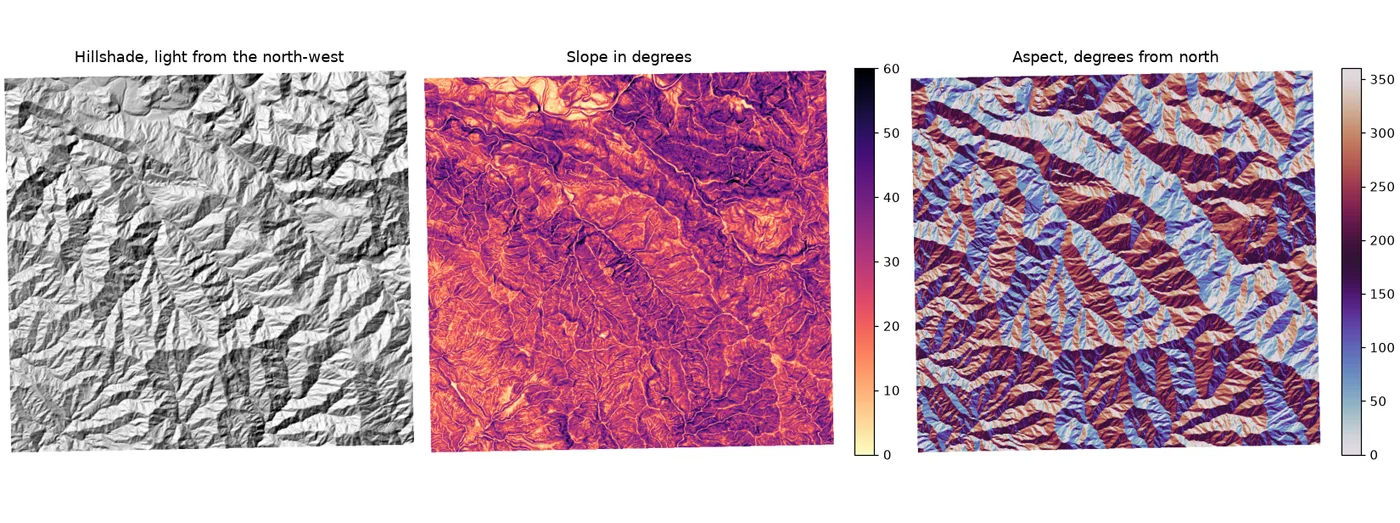
The hillshade shows the ridges and the valleys. The slope is highest on the valley sides and lowest on the ridge tops and the valley floors. The aspect changes colour across every ridge and valley, because the two sides of a ridge face opposite ways.
Count the terrain
import pandas as pd

# Step 1: the share of the area in each slope class
classes = pd.cut(pd.Series(slope[np.isfinite(slope)]), bins=[0, 5, 15, 30, 45, 90], labels=["0 to 5", "5 to 15", "15 to 30", "30 to 45", "over 45"], include_lowest=True)
print((classes.value_counts(normalize=True).sort_index() * 100).round(1).to_string())

# Step 2: the share of the area facing each of eight directions
names = ["north", "north-east", "east", "south-east", "south", "south-west", "west", "north-west"]
sector = ((aspect[np.isfinite(aspect)] + 22.5) // 45 % 8).astype(int)
print((pd.Series(sector).map(dict(enumerate(names))).value_counts(normalize=True).reindex(names) * 100).round(1).to_string())
0 to 5       1.2
5 to 15      8.3
15 to 30    43.9
30 to 45    43.3
over 45      3.3
north         14.1
north-east    13.4
east          10.1
south-east     9.6
south         12.1
south-west    14.7
west          12.6
north-west    13.3
The first table says how much of the window is gentle and how much is steep. The second says which way the slopes face. A river valley has a set of faces that look towards it from each side.
Check against QGIS
The same functions in QGIS, Slope, Aspect and Hillshade, use the same method and the same formulas. On this window, the two routes agree: the slope differs by less than 0.001 degrees, the aspect by less than 0.1 degrees, and the hillshade by less than 2 out of 255. The small differences come from rounding in the output files. If you get a different slope in QGIS, check that you passed the DEM in metres and left the ratio of vertical units to horizontal at 1.
Save the three maps
# Step 1: write slope, aspect and hillshade as one three-band GeoTIFF with the position of the DEM
profile = {"driver": "GTiff", "height": height, "width": width, "count": 3, "dtype": "float32", "crs": utm,
           "transform": new_transform, "nodata": -9999, "compress": "deflate"}
with rasterio.open("terrain_shimla.tif", "w", **profile) as dst:
    for band, (array, label) in enumerate([(slope, "slope degrees"), (aspect, "aspect degrees"), (hillshade, "hillshade 0 to 255")], start=1):
        dst.write(np.where(np.isfinite(array), array, -9999).astype("float32"), band)
        dst.set_band_description(band, label)

# Step 2: read it back to check
with rasterio.open("terrain_shimla.tif") as check:
    print("saved:", check.count, "bands |", check.width, "x", check.height, "cells | CRS EPSG", check.crs.to_epsg())
saved: 3 bands | 809 x 755 cells | CRS EPSG 32643
What to remember
- A DEM from a satellite is a surface model. In a forest or a town, the slope is the slope of the canopy and the roofs, not of the ground.
- Slope from a 30 m DEM smooths small features. A cliff 10 m wide and a gully do not show up as they are.
- Aspect is undefined on flat ground. Treat flat cells as empty, and do not read a direction into them.
- Aspect is a circle. 359 degrees and 1 degree are next to each other, so never average aspects as plain numbers.
- A hillshade is a picture. Its light direction is a choice, and a light from the north-west is the convention because it makes relief look raised and not sunken.
Common mistakes
- Calculating on a DEM in degrees with the heights in metres, and getting slopes near 90 degrees.
- Setting the ratio of vertical units to horizontal wrongly in QGIS.
- Averaging aspect as an ordinary number.
- Reading a hillshade value as a measurement.
- Using a high Z factor and forgetting that the picture is exaggerated.
- Taking a slope from a very coarse DEM for an area of small features.