

This guide has 2 routes. Pick one, or read both. Each route is complete on its own.
A stack is a set of rasters of the same place at different times, with the same grid. A time series for a point takes the value of one place from each raster in the stack and puts the values in order of time. Twelve monthly NDVI rasters give twelve numbers, and the twelve numbers show how the vegetation at that place changed through the year.
This guide uses the monthly NDVI of Jagraon, Punjab, for 2023, from the time series tutorials. Download the zip and unzip it. It holds the twelve rasters in a folder called monthly, and a file sites_points.gpkg with three sites: A, a field of rice and wheat, B, Jagraon town, and C, a field that stays green. Every raster has 1000 by 1000 cells of 10 m, in EPSG:32643, and NoData is -9999. The grid is the same in all twelve, and that is what makes them a stack.
Check the stack first
Two things must be true before a stack works: every raster has the same size and the same coordinate system, and the files sort in time order. A file name with the year and a two-digit month, such as ndvi_2023-07.tif, sorts correctly by name. A name such as ndvi_7.tif sorts after ndvi_12.tif and puts the months in the wrong order.
Route A: QGIS
- Add
sites_points.gpkgwith Layer > Add Layer > Add Vector Layer. - Open Raster > Miscellaneous > Build Virtual Raster. Under Input layers, click the button with three dots, tick the twelve files of the
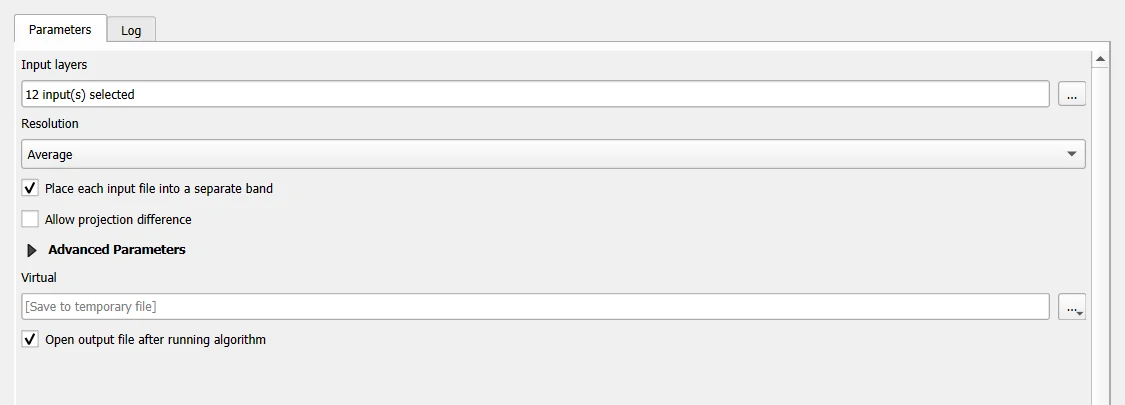
monthlyfolder, and close the list. Tick Place each input file into a separate band. This is the step that makes a stack: without it, QGIS lays the files over each other and keeps one value per cell. Leave the other settings and click Run. - QGIS adds a layer called Virtual with twelve bands. Band 1 is January, and band 12 is December, because the files were taken in name order. Open Layer Properties > Information to check: 12 bands, 1000 by 1000 cells.
- Open Processing Toolbox > Sample raster values. Set Input point layer to
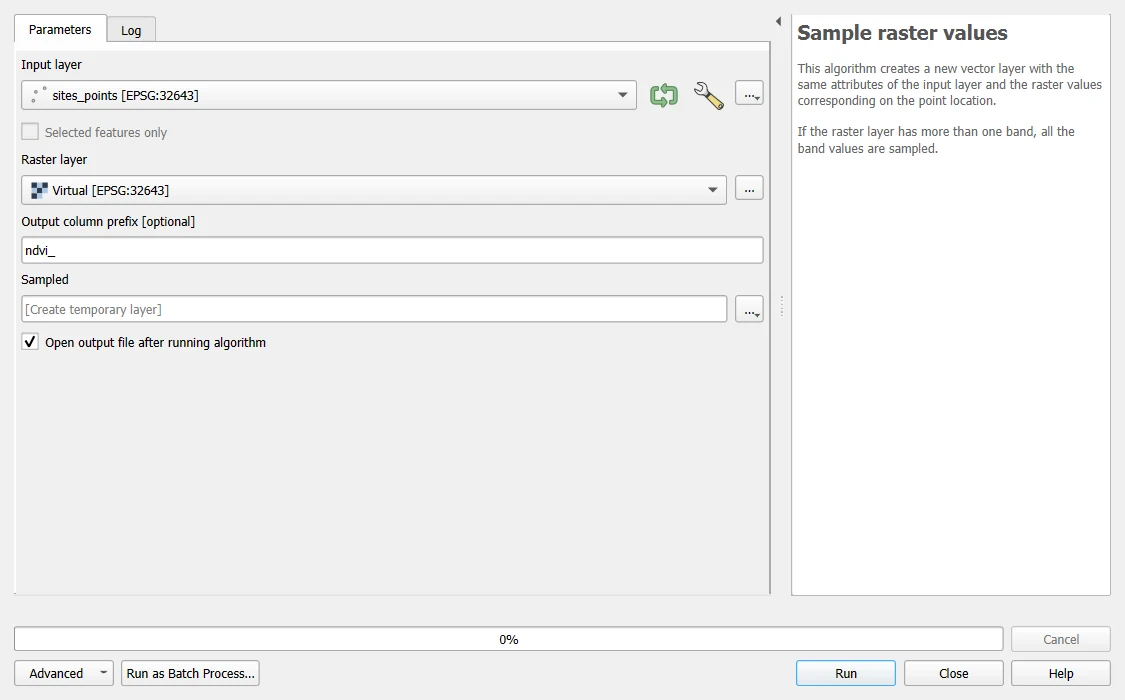
sites_points, Raster layer to the virtual layer, and Output column prefix tondvi_. Click Run. - QGIS adds a layer called Sampled. Open its attribute table. Each site has twelve new columns,
ndvi_1tondvi_12. One row of the table is the time series of one site.
For one place without a points file, use the Identify Features tool on the virtual layer, and in its panel set the mode to Top down or Layer selection. The panel lists the value of each band at the click, from Band 1 to Band 12.
The result of these steps, checked by running the same tool on the same files: the Sampled layer has the fields site, label and ndvi_1 to ndvi_12, and the first row, site A, reads 0.672, 0.862, 0.85, 0.352, 0.122, 0.055, 0.099, 0.743, 0.792, 0.718, 0.126, 0.431.
Route B: Python
You need Python with rasterio, geopandas, numpy and pandas.
from pathlib import Path

import geopandas as gpd
import numpy as np
import pandas as pd
import rasterio

# Step 1: the twelve files in name order, and the three sites
folder = Path("jagraon_ndvi_2023")
files = sorted((folder / "monthly").glob("ndvi_2023-*.tif"))
sites = gpd.read_file(folder / "sites_points.gpkg")
print(len(files), "files from", files[0].name, "to", files[-1].name)
print(sites[["site", "label"]].to_string(index=False))
12 files from ndvi_2023-01.tif to ndvi_2023-12.tif
site                  label
   A   Rice and wheat field
   B           Jagraon town
   C Field that stays green
# Step 1: ask each raster for the value at each site. sample() takes (x, y) pairs in the CRS of the raster.
coords = [(p.x, p.y) for p in sites.geometry]
print("sites CRS: EPSG", sites.crs.to_epsg())

months, values = [], []
for path in files:
    with rasterio.open(path) as src:
        values.append([v[0] for v in src.sample(coords)])
        months.append(path.stem.split("_")[1])

# Step 2: put the numbers in a table, one row per month and one column per site
table = pd.DataFrame(values, index=months, columns=sites["site"].tolist())
table.index.name = "month"
print(table.round(3).T.to_string())
sites CRS: EPSG 32643
month  2023-01  2023-02  2023-03  2023-04  2023-05  2023-06  2023-07  2023-08  2023-09  2023-10  2023-11  2023-12
A        0.672    0.862    0.850    0.352    0.122    0.055    0.099    0.743    0.792    0.718    0.126    0.431
B        0.113    0.112    0.091    0.088    0.060    0.065    0.070    0.112    0.162    0.096    0.067    0.084
C        0.563    0.515    0.443    0.560    0.445    0.423    0.494    0.570    0.600    0.640    0.462    0.650
src.sample takes the coordinates in the CRS of the raster and returns the value of the cell that contains each one. The sites file is in EPSG:32643, the same as the rasters, so the coordinates can be used as they are. If the two differed, you would need to convert the points first with sites.to_crs(src.crs). A mismatch gives values for the wrong place, or NoData.
The same thing from one array
A stack can also live in memory as one array, with the months on the first axis. This is faster when you read many points.
# Step 1: read the twelve rasters into one array. The shape is months, rows, columns.
arrays = []
for path in files:
    with rasterio.open(path) as src:
        arrays.append(src.read(1))
        transform, nodata = src.transform, src.nodata
stack = np.stack(arrays)
print("stack shape:", stack.shape, "| NoData:", nodata)

# Step 2: find the row and column of site A, then read all twelve months at once
with rasterio.open(files[0]) as src:
    row, col = src.index(sites.geometry[0].x, sites.geometry[0].y)
print("site A is in row", row, "column", col)
print("site A, twelve months:", [round(float(v), 3) for v in stack[:, row, col]])
print("same as the table:", bool(np.allclose(stack[:, row, col], table["A"].to_numpy())))
stack shape: (12, 1000, 1000) | NoData: -9999.0
site A is in row 508 column 418
site A, twelve months: [0.672, 0.862, 0.85, 0.352, 0.122, 0.055, 0.099, 0.743, 0.792, 0.718, 0.126, 0.431]
same as the table: True
stack[:, row, col] takes every month at one row and column. It returns the same twelve numbers as the table, as the last line checks.
Find the peak and the low month
# Step 1: for each site, the highest and lowest month and the size of the swing
summary = pd.DataFrame({
    "peak month": table.idxmax(),
    "peak NDVI": table.max().round(2),
    "low month": table.idxmin(),
    "low NDVI": table.min().round(2),
    "range": (table.max() - table.min()).round(2),
})
summary.insert(0, "label", sites.set_index("site")["label"])
print(summary.to_string())
                    label peak month  peak NDVI low month  low NDVI  range
A    Rice and wheat field    2023-02       0.86   2023-06      0.06   0.81
B            Jagraon town    2023-09       0.16   2023-05      0.06   0.10
C  Field that stays green    2023-12       0.65   2023-06      0.42   0.23
The range is the simplest number for how much a place changes in a year. A crop field swings widely, with a high in the growing season and a low after harvest. A town keeps a low and flat curve, and a field that stays green keeps a high one. Here site A peaks at 0.86 in February and drops to 0.06 in June, a range of 0.81. Site B, the town, never goes above 0.16, a range of 0.10. Site C stays between 0.42 and 0.65, a range of 0.23.
One pixel or a small window
One 10 m pixel can be a poor picture of a place. A bird, a bit of shadow or a tree at the edge changes it. A common fix is to take the mean of a small window around the point, here three by three cells, 30 m by 30 m.
# Step 1: the mean of the 3 x 3 cells around site A, month by month. NoData cells are left out.
window = stack[:, row - 1:row + 2, col - 1:col + 2].astype("float64")
window[window == nodata] = np.nan
mean3 = np.nanmean(window, axis=(1, 2))

# Step 2: put the pixel and the window side by side
compare = pd.DataFrame({"pixel": stack[:, row, col], "3x3 mean": mean3}, index=months).round(3)
print(compare.T.to_string())
print("largest gap between pixel and window:", round(float(np.abs(compare["pixel"] - compare["3x3 mean"]).max()), 3))

# Step 3: save the table, so the rasters do not need to be read again
table.round(4).to_csv("jagraon_ndvi_sites_2023.csv")
          2023-01  2023-02  2023-03  2023-04  2023-05  2023-06  2023-07  2023-08  2023-09  2023-10  2023-11  2023-12
pixel       0.672    0.862    0.850    0.352    0.122    0.055    0.099    0.743    0.792    0.718    0.126    0.431
3x3 mean    0.661    0.851    0.847    0.334    0.125    0.056    0.099    0.741    0.788    0.708    0.128    0.415
largest gap between pixel and window: 0.018
In this data the pixel and the window differ by at most 0.018 in any month, so site A sits in a field large enough that one pixel is a fair picture. At the edge of a field the gap would be bigger. Take the window mean when you are not sure.
What a point time series can and cannot tell you
- The monthly raster in this data is the median of the clear scenes of the month, and the shares are listed in
monthly_scenes.csv. A month with four scenes is more reliable than a month with one. - A pixel is not a field. If you want the behaviour of a field, take the mean of all the cells inside it, as in How to calculate zonal statistics.
- Twelve values describe one year. To say that a year was unusual, you need several years to compare.
- A low value in a month can mean a bare field, and it can also mean cloud that the mask missed. Look at the scenes behind the number before you explain it.
Common mistakes
- Files that sort in the wrong order. Use names with a four-digit year and a two-digit month.
- Points in a different CRS from the rasters. The code runs, and the values belong to another place.
- Forgetting "Place each input file into a separate band" in Build Virtual Raster. You then get one band and not twelve.
- Counting bands from zero in Python and from one in QGIS. Band 1 in QGIS is
stack[0]in Python. - Taking a mean that includes -9999.