

This guide has 2 routes. Pick one, or read both. Each route is complete on its own.
A raster says what is at every cell. A point layer says where things are. Combining them answers questions such as: how high is each hospital above sea level, how much rain fell at each station, what was the NDVI of each sample plot. Reading the cell value under each point is called sampling, or extracting, a raster at points.
This guide samples the height of the Copernicus DEM under the hospitals of Ludhiana district. The data is in the zip ludhiana_workflow_data.zip, unzipped next to your notebook: ludhiana_hospitals.csv has 515 hospitals taken from OpenStreetMap, and dem_ludhiana_clip.tif is the DEM clipped to the district, from the clipping guide.
Make points from the table
The hospitals are a table with a longitude and a latitude in two columns. A table is not a layer yet. QGIS and GeoPandas each need to be told which columns hold the coordinates and in which CRS.
In QGIS, open Layer > Add Layer > Add Delimited Text Layer, choose the CSV file, set Geometry definition to Point coordinates, set X field to longitude and Y field to latitude, and set Geometry CRS to EPSG:4326. The guide on tables and joins goes through the dialog.
In Python:
import numpy as np
import pandas as pd
import geopandas as gpd
import rasterio

# Step 1: read the table. The names include Punjabi script, so the encoding is stated.
hospitals = pd.read_csv("ludhiana_workflow_data/ludhiana_hospitals.csv", encoding="utf-8")
print(len(hospitals), "hospitals | columns:", hospitals.columns.tolist())

# Step 2: make points from the longitude and latitude columns. The CRS is EPSG:4326 because the values are degrees.
points = gpd.GeoDataFrame(hospitals, geometry=gpd.points_from_xy(hospitals["longitude"], hospitals["latitude"]), crs="EPSG:4326")
print("CRS: EPSG", points.crs.to_epsg(), "| first point:", points.geometry.iloc[0].wkt)
515 hospitals | columns: ['osm_type', 'osm_id', 'name', 'operator', 'beds', 'latitude', 'longitude']
CRS: EPSG 4326 | first point: POINT (75.79153 30.88842)
Route A: QGIS
- Add
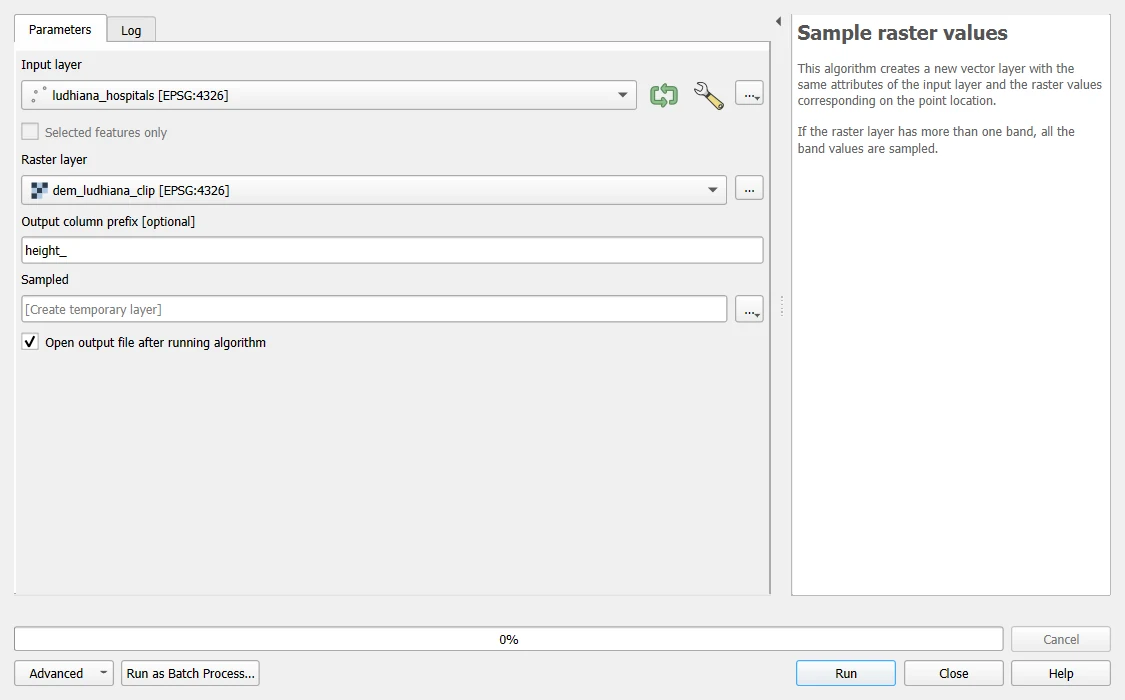
dem_ludhiana_clip.tifand the hospital layer from the section above. - Open the Processing Toolbox and search for
Sample raster values. - Set Input layer to the hospitals and Raster layer to the DEM. Type
height_as the Output column prefix. - Save the output under Sampled as
hospitals_height.gpkgand click Run.
The new layer has all the old fields and a new one, height_1, for band 1 of the raster. For a raster with several bands, such as a time series stack, there is one new field for each band, height_1, height_2 and so on. Open the attribute table to read the values. A point that falls on a NoData cell gets a NULL value. On these 515 hospitals QGIS and the Python code below give identical heights.
Route B: Python
Sample with rasterio
# Step 1: open the DEM and check that it is in the same CRS as the points
src = rasterio.open("ludhiana_workflow_data/dem_ludhiana_clip.tif")
print("raster CRS: EPSG", src.crs.to_epsg(), "| NoData:", src.nodata)

# Step 2: the points as a list of (x, y) pairs, in the CRS of the raster. masked=True hides NoData.
coordinates = list(zip(points.geometry.x, points.geometry.y))
values = np.array([v[0] for v in src.sample(coordinates, masked=True)], dtype="float64")

# Step 3: how many points got a value?
print("points with a height:", int(np.isfinite(values).sum()), "of", len(values))
raster CRS: EPSG 4326 | NoData: -9999.0
points with a height: 515 of 515
src.sample takes a list of coordinates and returns the cell value under each one. The coordinates must be in the CRS of the raster. If the points were in another CRS, convert them first with points.to_crs(src.crs).
All 515 hospitals got a height here. They lie inside the district, on cells with data. In other data some points get no value: a point can fall on a NoData cell, or outside the raster. To see what that looks like, try three test points: one inside the district, one in the empty corner of the raster, outside the district, and one far outside the raster.
# Step 1: three test points as (longitude, latitude)
tests = [(75.80, 30.90), (75.37, 31.00), (77.50, 30.50)]
labels = ["inside the district", "in the empty corner, outside the district", "far outside the raster"]

# Step 2: sample them. A masked value means there is nothing to read, and it becomes NaN.
for label, point in zip(labels, tests):
    answer = list(src.sample([point], masked=True))[0][0]
    print(f"{label:42s} -> {'no value' if np.ma.is_masked(answer) else round(float(answer), 1)}")
inside the district                        -> 245.9
in the empty corner, outside the district  -> no value
far outside the raster                     -> no value
A point outside the raster, and a point on a NoData cell, both come back as no value. When your own points return no value, look at where they are before you drop them. Points at the edge of a clipped raster are expected. A cluster of them in the middle of the raster would mean a CRS mistake.
# Step 1: the hospitals without a height, if any
points["height_m"] = values
print("hospitals without a height:", int(points["height_m"].isna().sum()))
hospitals without a height: 0
The same by row and column
A second way finds the row and column of every point, then reads the whole raster once. It is faster for many points.
# Step 1: the row and column of the cell under every point
rows, cols = rasterio.transform.rowcol(src.transform, points.geometry.x.values, points.geometry.y.values)
rows, cols = np.array(rows), np.array(cols)

# Step 2: keep the points that fall inside the raster
inside = (rows >= 0) & (rows < src.height) & (cols >= 0) & (cols < src.width)
dem = src.read(1).astype("float64")
by_index = np.full(len(points), np.nan)
by_index[inside] = dem[rows[inside], cols[inside]]
by_index[by_index == src.nodata] = np.nan

# Step 3: do the two ways agree?
same = np.isclose(values, by_index, equal_nan=True)
print("points inside the raster:", int(inside.sum()), "| the two ways agree for", int(same.sum()), "of", len(points), "points")
points inside the raster: 515 | the two ways agree for 515 of 515 points
The two ways give the same answer. The first is short and clear. The second works well when you have thousands or millions of points.
Use the heights
# Step 1: the heights of the hospitals, and of the whole district for comparison
district_cells = dem[dem != src.nodata]
print("hospitals: lowest", round(float(points["height_m"].min()), 1), "| median", round(float(points["height_m"].median()), 1), "| highest", round(float(points["height_m"].max()), 1), "m")
print("district:  lowest", round(float(district_cells.min()), 1), "| median", round(float(np.median(district_cells)), 1), "| highest", round(float(district_cells.max()), 1), "m")

# Step 2: the five hospitals at the greatest height
print(points.nlargest(5, "height_m")[["name", "height_m"]].to_string(index=False))
hospitals: lowest 234.5 | median 251.3 | highest 272.8 m
district:  lowest 218.8 | median 246.0 | highest 298.3 m
                          name   height_m
Dr Shamsher Singh Eye Hospital 272.824432
        Govt. Dispensary Burma 271.818878
               Satinder Clinic 270.597961
           Holistic Healthcare 270.347717
 Gill Hospital and Scan Centre 270.171936
The hospitals sit at heights typical of the district, which is a plain, so the heights change little. Height is a poor feature for telling hospitals apart here. For rainfall, NDVI or a land cover class, the same steps give values that do vary.
Save the result
# Step 1: write the points with their heights to a GeoPackage
src.close()
points.to_file("hospitals_height.gpkg", layer="hospitals", driver="GPKG")
check = gpd.read_file("hospitals_height.gpkg", layer="hospitals")
print("saved:", len(check), "points | with a height:", int(check["height_m"].notna().sum()))
saved: 515 points | with a height: 515
Sampling a raster that is not a DEM
The steps are the same for any raster. A few cautions apply.
- A categorical raster, such as land cover, gives a code. Look the code up in the legend. Do not average codes.
- A raster with a scale and offset, such as Sentinel-2 reflectance stored as whole numbers, needs the conversion after sampling, as in the download guides.
- A point is one cell. The cell may not be typical of the place, especially at 30 m or coarser. For a robust value, take the mean of a small window or buffer around the point, as in the zonal statistics guide.
- Points that fall exactly on the border between two cells are assigned to one of them. The result can change by one cell if the coordinates change a little.
Common mistakes
- Giving points in latitude and longitude to a raster in metres, which sends every point off the raster.
- Putting the latitude where the longitude belongs:
points_from_xytakes x (longitude) first. - Reading a NoData value of -9999 as a real height.
- Dropping the points without a value without looking at where they are.
- Averaging class codes.
- Forgetting that a raster with several bands gives several values for each point.