

This guide has 2 routes. Pick one, or read both. Each route is complete on its own.
A raster has millions of cells, and a report wants a few numbers: one for each district, each field or each catchment. Zonal statistics produce them. For every polygon of a layer, the tool collects the cells of the raster that fall inside it and summarises them: the mean, the lowest, the highest, the sum, the count. The polygons are the zones.
This guide calculates the mean height of Ludhiana district and its seven neighbours from the Copernicus DEM.
Get the data
The districts come from geoBoundaries, as in the boundaries guide. The DEM tiles come from the Copernicus DEM, as in the mosaic guide. To keep the file small, the DEM is read at a quarter of its resolution, with cells of about 120 m, which is fine for district means.
You need Python with requests, numpy, pandas, geopandas and rasterio.
import math
import requests
import numpy as np
import pandas as pd
import geopandas as gpd
import rasterio
from rasterio.merge import merge

# Step 1: the districts of India from geoBoundaries (simplified file)
meta = requests.get("https://www.geoboundaries.org/api/current/gbOpen/IND/ADM2/", timeout=60).json()
meta = meta[0] if isinstance(meta, list) else meta
india = gpd.read_file(meta["simplifiedGeometryGeoJSON"])

# Step 2: Ludhiana and the districts that touch it
ludhiana = india[india["shapeName"] == "Ludhiana"].iloc[0].geometry
zones = india[india.touches(ludhiana) | (india["shapeName"] == "Ludhiana")].reset_index(drop=True)
print(len(zones), "districts:", zones["shapeName"].tolist())
print("box around them (west, south, east, north):", [round(float(v), 2) for v in zones.total_bounds])
8 districts: ['Fatehgarh Sahib', 'Sangrur', 'Ludhiana', 'Jalandhar', 'Moga', 'Rupnagar', 'Barnala', 'Shahid Bhagat Singh Nagar']
box around them (west, south, east, north): [74.91, 29.73, 76.74, 31.62]
Now the DEM for the box around them.
# Step 1: find the DEM tiles that touch the box of the districts
west, south, east, north = zones.total_bounds
search = {"collections": ["cop-dem-glo-30"], "bbox": [west, south, east, north], "limit": 20}
tiles = requests.post("https://earth-search.aws.element84.com/v1/search", json=search, timeout=60).json()["features"]
print(len(tiles), "tiles")

# Step 2: open the tiles online
def web_address(s3_address):
    bucket, key = s3_address.replace("s3://", "").split("/", 1)
    return f"https://{bucket}.s3.amazonaws.com/{key}"

files = [rasterio.open(web_address(t["assets"]["data"]["href"])) for t in tiles]

# Step 3: a coarse grid of 4 times the cell size, laid on the grid of the tiles so that nothing is shifted
cell = files[0].res[0] * 4
origin_x = min(f.bounds.left for f in files)
origin_y = max(f.bounds.top for f in files)
box_on_grid = (
    origin_x + math.floor((west - origin_x) / cell) * cell, origin_y - math.ceil((origin_y - south) / cell) * cell,
    origin_x + math.ceil((east - origin_x) / cell) * cell, origin_y - math.floor((origin_y - north) / cell) * cell,
)

# Step 4: join the tiles at the coarse cell size, and write the result
heights, transform = merge(files, bounds=box_on_grid, res=cell, nodata=-9999)
for f in files:
    f.close()
profile = {"driver": "GTiff", "height": heights.shape[1], "width": heights.shape[2], "count": 1, "dtype": "float32",
           "crs": "EPSG:4326", "transform": transform, "nodata": -9999, "compress": "deflate"}
with rasterio.open("dem_region_120m.tif", "w", **profile) as dst:
    dst.write(heights)
print("DEM:", heights.shape[2], "x", heights.shape[1], "cells of", round(cell * 111320 * math.cos(math.radians(30.8))), "m by", round(cell * 110574), "m | empty cells:", int((heights == -9999).sum()))
9 tiles
DEM: 1650 x 1701 cells of 106 m by 123 m | empty cells: 0
Save the districts too, so the QGIS route can use the same files.
# Step 1: keep the columns that matter and write the districts
zones = zones[["shapeName", "shapeID", "geometry"]]
zones.to_file("districts_ludhiana_area.gpkg", layer="districts", driver="GPKG")
print(zones[["shapeName", "shapeID"]].to_string(index=False))
                shapeName                 shapeID
          Fatehgarh Sahib 76128533B99919205026025
                  Sangrur 76128533B82601690264832
                 Ludhiana 76128533B46195204843409
                Jalandhar 76128533B91211372620495
                     Moga 76128533B18834172694083
                 Rupnagar 76128533B24759700890118
                  Barnala 76128533B39051871473194
Shahid Bhagat Singh Nagar 76128533B14984770113274
Route A: QGIS
- Add
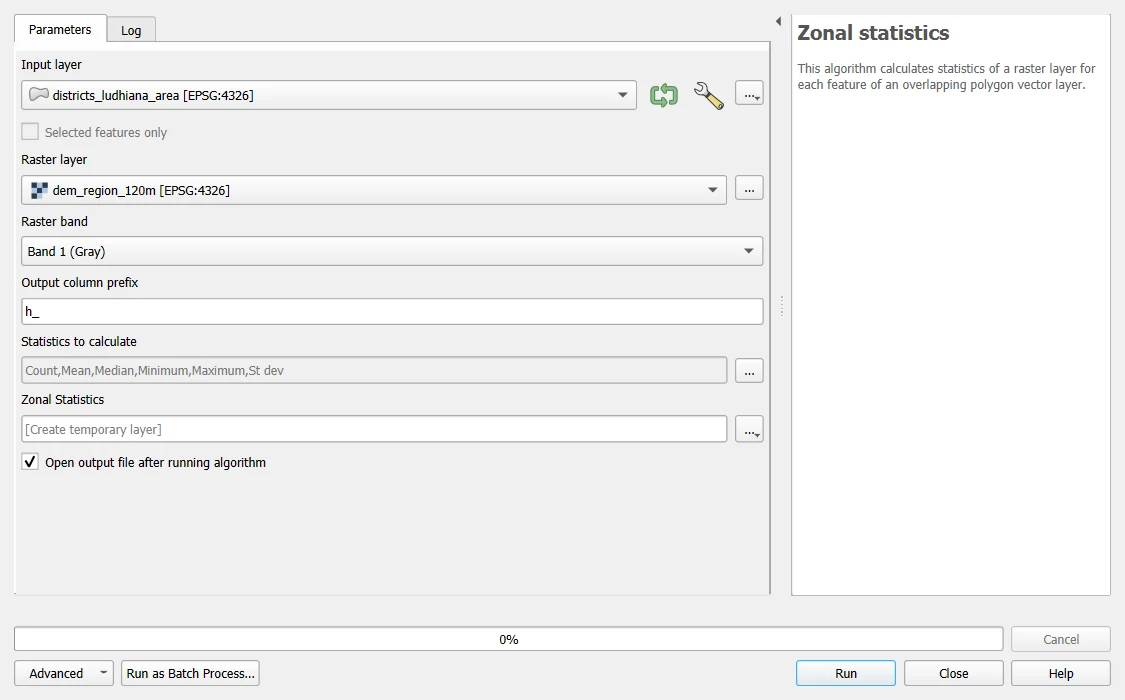
districts_ludhiana_area.gpkganddem_region_120m.tifwith Layer > Add Layer. - Open the Processing Toolbox and search for
Zonal statistics. Choose the tool that writes a new layer, Zonal statistics. - Set Input layer to the districts and Raster layer to the DEM. Keep Raster band at 1.
- Type
h_as the Output column prefix. - Under Statistics to calculate, tick Count, Mean, Median, Minimum, Maximum and Standard deviation.
- Save the output under Zonal Statistics as
districts_height.gpkgand click Run.
The output layer has the fields of the districts and, for each chosen statistic, a new field, such as h_mean and h_max. Open the attribute table to read them. On these districts the QGIS tool gives the same cell counts as the Python code below, and means, medians, lowest and highest heights that agree to the 0.1 m at which the table below is rounded. QGIS counts a cell if its centre is inside the polygon. It treats NoData cells as missing, so they do not enter the mean.
Route B: Python
The function takes a raster and a polygon, collects the cells inside the polygon, and returns the numbers.
from rasterio.mask import mask

# Step 1: a function that summarises the raster inside one polygon
def zonal(src, polygon, all_touched=False):
    cells, _ = mask(src, [polygon], crop=True, nodata=-9999, all_touched=all_touched)
    values = cells[0][cells[0] != -9999]               # keep the cells that hold data
    return {"count": int(values.size), "mean": float(values.mean()), "median": float(np.median(values)), "min": float(values.min()), "max": float(values.max()), "std": float(values.std())}

# Step 2: run it for every district
src = rasterio.open("dem_region_120m.tif")
rows = [{"district": row.shapeName, "shapeID": row.shapeID, **zonal(src, row.geometry)} for row in zones.itertuples()]
table = pd.DataFrame(rows).round(1)
print(table.drop(columns="shapeID").to_string(index=False))
                 district  count  mean  median   min   max  std
          Fatehgarh Sahib  87364 267.0   267.0 252.3 292.1  7.1
                  Sangrur 272202 235.4   235.2 219.6 262.3  7.7
                 Ludhiana 282399 246.4   246.0 221.0 284.9 11.2
                Jalandhar 199562 235.1   236.8 212.0 268.0  9.0
                     Moga 170899 220.5   220.5 206.2 238.6  4.9
                 Rupnagar 104716 309.2   294.5 252.5 937.7 47.1
                  Barnala 106805 228.2   228.1 218.4 243.9  4.2
Shahid Bhagat Singh Nagar  97877 275.0   256.1 239.1 503.8 45.0
Each row is one district. The mean is the typical height, and the minimum and the maximum show the range. A plain gives a small spread: Moga and Barnala vary by only 4 to 5 m around their means. Rupnagar and Shahid Bhagat Singh Nagar have the largest ranges, up to 938 m and 504 m, because their north-eastern parts reach the foothills of the Shivalik range, and that lifts their means.
The cell rule
Which cells belong to a polygon? By default, a cell belongs if its centre is inside. A different rule, all_touched, counts every cell that the polygon touches, even by a corner. The choice matters for small polygons.
# Step 1: the number of cells and the mean for Ludhiana with each rule
ludhiana_row = zones[zones["shapeName"] == "Ludhiana"].iloc[0]
centre_rule = zonal(src, ludhiana_row.geometry)
touched_rule = zonal(src, ludhiana_row.geometry, all_touched=True)
print("centre rule:   ", f"{centre_rule['count']:,}", "cells | mean", round(centre_rule["mean"], 2), "m")
print("all touched:   ", f"{touched_rule['count']:,}", "cells | mean", round(touched_rule["mean"], 2), "m")
centre rule:    282,399 cells | mean 246.42 m
all touched:    284,384 cells | mean 246.4 m
For a district of about 3,700 km² the two rules differ by about 2,000 cells out of 282,000, which is 0.7 percent, and the mean is the same to a tenth of a metre. For a polygon only a few cells across, such as a field on a 30 m raster, the rules can give very different answers, so know which one your tool uses.
NoData
A cell with no data must not count. If you left the -9999 values in, the mean would be dragged down to a nonsense number.
# Step 1: the mean of Ludhiana if the NoData cells are counted by mistake
cells, _ = mask(src, [ludhiana_row.geometry], crop=True, nodata=-9999)
wrong_mean = cells[0].astype("float64").mean()
print("mean with the -9999 cells included:", round(float(wrong_mean), 1), "m | correct mean:", round(centre_rule["mean"], 1), "m")
mean with the -9999 cells included: -2069.4 m | correct mean: 246.4 m
A mean of a few hundred metres is plausible for a district at 246 m. A negative mean of thousands of metres means that NoData cells entered the average. The mistake is easy to make with a clipped raster, where the area outside the polygon is NoData.
Save the table
# Step 1: write the statistics to a CSV, with the district code. The next guide joins this table to the district layer.
table.to_csv("district_height_stats.csv", index=False, encoding="utf-8")
src.close()
check = pd.read_csv("district_height_stats.csv", encoding="utf-8")
print("saved:", len(check), "rows | columns:", check.columns.tolist())
saved: 8 rows | columns: ['district', 'shapeID', 'count', 'mean', 'median', 'min', 'max', 'std']
The table keeps the shapeID of every district. A code is safer than a name for joining, as the guide on tables and joins shows.
What the numbers mean
- A mean height is a typical height, not the height of any place. It hides hills inside a plain.
- Every cell has the same weight. Cells in degrees are not equal in area at high latitudes. For a district of one latitude the difference is small. Over a large range of latitudes, reproject first or weight by area.
- The raster is coarser than the polygon edge. Cells on the boundary are in or out as a whole.
- Different statistics answer different questions. The mean describes the whole zone. The maximum finds the highest point. The standard deviation says how varied the zone is. The sum, for a raster of counts such as population, gives the total.
Common mistakes
- Including NoData cells in the average.
- Using polygons and a raster in different CRSs.
- Forgetting the cell rule, and comparing numbers from two tools that use different rules.
- Using the mean of a categorical raster. Count the cells of each class instead.
- Using a name to join the result back to the layer.
- Summarising a raster that is far coarser than the polygons, so that every polygon holds one or two cells.