

A land use and land cover map answers a simple question: what covers the ground at each place? This part builds one for a 20 km by 20 km piece of Bengaluru, using six bands of a Sentinel-2 image and about 440 labelled samples. It uses the two methods that every beginner should know: K-means, which needs no labels, and Random Forest, which learns from labelled samples. The same task is done in QGIS, by hand, in the QGIS tutorial on land cover classification with Landsat.
The theory behind both methods is in the study note Image Classification Methods. Read its sections on K-means, Random Forest and accuracy assessment first if the words are new. This part assumes Part 16 and Part 19, so you should know how to open a raster with rasterio, and a little pandas.
What you need
- Python with rasterio, GeoPandas, pandas, NumPy, Matplotlib and scikit-learn. Install scikit-learn with
pip install scikit-learnif you do not have it. A Jupyter notebook is the easiest place to work. - The data: bengaluru_lulc_s2.zip (36 MB). Unzip it next to your notebook, so that you have a folder called
bengaluru_lulc_s2.
| File | What it is |
|---|---|
s2_bengaluru_2026.tif | Six bands of Sentinel-2 surface reflectance, from a median of the dry season (January to March 2026) scenes, 10 m cells, 2000 by 2000 cells |
training_samples.csv | 439 labelled samples: the six band values and the class, from points across the Bengaluru region |
validation_points.gpkg | 87 reference points inside the image, a fresh random sample labelled by the author without seeing any map, never used for training |
The bands are blue, green, red, near infrared (NIR), shortwave infrared 1 and shortwave infrared 2, which are Sentinel-2 bands B2, B3, B4, B8, B11 and B12. The values are reflectance multiplied by 10,000. The image is a median of the cloud-free scenes in the dry season, so it has no cloud, and it also shows what a dry season does to the land: fields are bare and brown, and many are hard to tell from built-up land.
The samples were labelled on a high resolution basemap, one place at a time, in four classes. Every point was then checked by eye against this 10 m image. Points whose spot was mixed (for example trees between houses) were removed, and points that clearly showed another class were relabelled.
| Class | Code | Meaning |
|---|---|---|
| Water | 1 | Lakes and tanks |
| Built-up | 2 | Buildings, roads and paved ground |
| Vegetation | 3 | Trees, parks and green crops |
| Open land | 4 | Bare soil, dry fields and cleared plots |
The training samples and the reference points were labelled at different times and never mixed. The reference points are a fresh random sample inside the image, drawn after the training samples were fixed, and the labeller saw no classification while choosing classes. Points that could not be assigned to one class were marked unclear and dropped. Keeping the two sets apart is deliberate, and the last sections come back to why.
1. Open the image
import numpy as np
import pandas as pd
import geopandas as gpd
import rasterio
import matplotlib.pyplot as plt

# Step 1: open the six-band image and read the facts about it
with rasterio.open("bengaluru_lulc_s2/s2_bengaluru_2026.tif") as src:
    print("bands:", src.count, "| size:", src.width, "x", src.height, "cells")
    print("cell size:", src.res[0], "m | CRS: EPSG", src.crs.to_epsg(), "| data type:", src.dtypes[0])

    # Step 2: read all bands and turn the numbers into reflectance between 0 and 1
    image = src.read().astype("float32") / 10000
    transform = src.transform
    left, bottom, right, top = src.bounds

# Step 3: give each band its own name, so that the code below is easy to read
blue, green, red, nir, swir1, swir2 = image
print("image shape:", image.shape)
print("mean red:", round(float(red.mean()), 3), "| mean NIR:", round(float(nir.mean()), 3))
bands: 6 | size: 2000 x 2000 cells
cell size: 10.0 m | CRS: EPSG 32643 | data type: uint16
image shape: (6, 2000, 2000)
mean red: 0.133 | mean NIR: 0.227
image is a three-dimensional array with the shape (bands, rows, columns). Dividing by 10,000 turns the stored whole numbers into reflectance. float32 matters: integer arithmetic on uint16 bands gives wrong index values, as Part 19 showed.
2. Look at the image
Two colour composites help. In the true colour image you see the scene as an eye would. In the false colour image, shortwave infrared 1, near infrared and red go into the red, green and blue channels, which separates the surfaces much better.
# Step 1: a helper that stretches reflectance to 0 to 1 so that a picture has good contrast
def stretch(band, low, high):
    return np.clip((band - low) / (high - low), 0, 1) ** 0.8

# Step 2: build the two composites by stacking three bands on the last axis
true_colour = np.dstack([stretch(red, 0.02, 0.30), stretch(green, 0.02, 0.30), stretch(blue, 0.02, 0.30)])
false_colour = np.dstack([stretch(swir1, 0.05, 0.45), stretch(nir, 0.05, 0.45), stretch(red, 0.02, 0.25)])

# Step 3: draw them side by side with real coordinates (kilometres)
extent = (left / 1000, right / 1000, bottom / 1000, top / 1000)
fig, axes = plt.subplots(1, 2, figsize=(12, 6))
axes[0].imshow(true_colour, extent=extent)
axes[0].set_title("True colour: red, green, blue")
axes[1].imshow(false_colour, extent=extent)
axes[1].set_title("False colour: SWIR1, NIR, red")
for ax in axes:
    ax.set_xlabel("Easting (km)")
axes[0].set_ylabel("Northing (km)")
fig.savefig("lulc_s2_colour.png", dpi=130, bbox_inches="tight")
print("saved")
saved
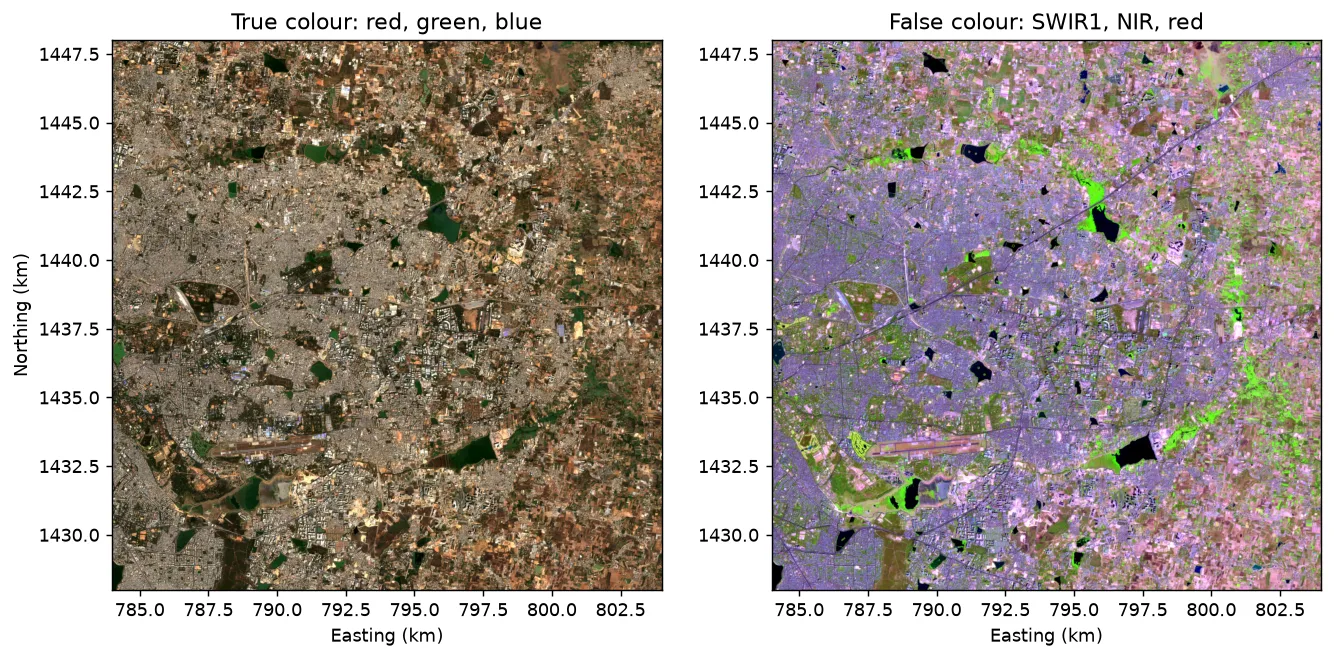
Read the false colour image like a legend. Lakes are black, because water absorbs near and shortwave infrared. Vegetation is green, because it reflects near infrared strongly. Built-up land is purple-grey, and bare dry fields are pink. In the true colour image all of this is a similar brown, which is why the extra bands are worth having.
3. Add spectral indices
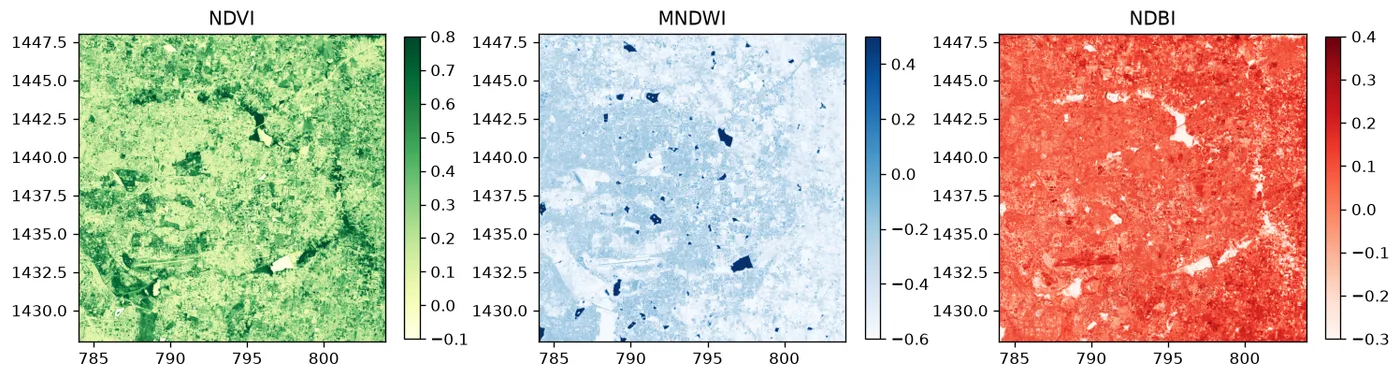
An index combines bands into one number that is high for one kind of surface. Three are used here, from the spectral indices note: NDVI for vegetation, MNDWI for water and NDBI for built-up and bare surfaces. A classifier can learn a ratio from the raw bands alone, but giving it the ratio makes the job easier, especially for a small training set.
# Step 1: a function that returns the six bands plus three indices (nine features in all)
def make_features(blue, green, red, nir, swir1, swir2):
    eps = 1e-6                                   # avoids dividing by zero over very dark cells
    ndvi = (nir - red) / (nir + red + eps)       # high over green vegetation
    mndwi = (green - swir1) / (green + swir1 + eps)   # above 0 over open water
    ndbi = (swir1 - nir) / (swir1 + nir + eps)   # high over built-up land and dry bare soil
    return [blue, green, red, nir, swir1, swir2, ndvi, mndwi, ndbi]

feature_names = ["blue", "green", "red", "nir", "swir1", "swir2", "ndvi", "mndwi", "ndbi"]

# Step 2: apply it to the whole image
features = make_features(blue, green, red, nir, swir1, swir2)
ndvi, mndwi, ndbi = features[6:]
print("NDVI range:", round(float(ndvi.min()), 2), "to", round(float(ndvi.max()), 2))
print("MNDWI range:", round(float(mndwi.min()), 2), "to", round(float(mndwi.max()), 2))
print("NDBI range:", round(float(ndbi.min()), 2), "to", round(float(ndbi.max()), 2))

# Step 3: draw the three indices
fig, axes = plt.subplots(1, 3, figsize=(15, 5))
for ax, layer, title, cmap, vmin, vmax in zip(
    axes, [ndvi, mndwi, ndbi], ["NDVI", "MNDWI", "NDBI"], ["YlGn", "Blues", "Reds"], [-0.1, -0.6, -0.3], [0.8, 0.5, 0.4]
):
    im = ax.imshow(layer, cmap=cmap, vmin=vmin, vmax=vmax, extent=extent)
    ax.set_title(title)
    fig.colorbar(im, ax=ax, shrink=0.7)
fig.savefig("lulc_s2_indices.png", dpi=120, bbox_inches="tight")
print("saved")
NDVI range: -0.58 to 0.94
MNDWI range: -1.0 to 0.88
NDBI range: -0.82 to 0.74
saved
4. From an image to a table
A classifier does not know about rows and columns of an image. It reads a table in which each pixel is one row and each feature is one column. NumPy turns the image into that table with one line.
# Step 1: flatten every feature layer into one long column, then put the columns side by side
pixels = np.stack([layer.ravel() for layer in features], axis=1)
print("table shape (pixels, features):", pixels.shape)

# Step 2: look at the first rows as a pandas table
print(pd.DataFrame(pixels[:5], columns=feature_names).round(3))
table shape (pixels, features): (4000000, 9)
    blue  green    red    nir  swir1  swir2   ndvi  mndwi   ndbi
0  0.070  0.099  0.136  0.223  0.323  0.253  0.244 -0.529  0.182
1  0.081  0.120  0.168  0.254  0.311  0.246  0.204 -0.442  0.101
2  0.080  0.110  0.145  0.242  0.291  0.227  0.252 -0.453  0.092
3  0.074  0.098  0.126  0.236  0.287  0.220  0.304 -0.489  0.097
4  0.058  0.079  0.106  0.216  0.298  0.224  0.345 -0.581  0.159
The table has four million rows, one for each 10 m cell, and nine columns. Whatever the classifier decides for a row, we can put back in the image later, because reshape reverses ravel.
5. Unsupervised: K-means
K-means needs no labels. It places k centres in the nine-dimensional space, gives every pixel to its nearest centre, moves each centre to the mean of its pixels, and repeats. We ask for 10 clusters, more than the 4 classes we want, and merge them afterwards. A cluster is a group of similar pixels and nothing more.
K-means measures straight line distance, so a feature with large numbers would dominate. StandardScaler rescales each feature to a mean of 0 and a spread of 1 first. To save time, the model is fitted on a random sample of 50,000 pixels, and then it labels all four million.
from sklearn.cluster import KMeans
from sklearn.preprocessing import StandardScaler

# Step 1: learn the scaling from all pixels
scaler = StandardScaler().fit(pixels)

# Step 2: pick 50,000 random pixels and fit K-means on them
rng = np.random.default_rng(42)                  # fixed seed, so the result can be repeated
sample = rng.choice(len(pixels), size=50_000, replace=False)
kmeans = KMeans(n_clusters=10, n_init=5, random_state=42)
kmeans.fit(scaler.transform(pixels[sample]))

# Step 3: give every pixel in the image its cluster number, and put it back in the image shape
cluster_map = kmeans.predict(scaler.transform(pixels)).reshape(red.shape)
print("clusters found:", np.unique(cluster_map))

# Step 4: describe each cluster by the mean of three features
summary = pd.DataFrame({
    "share_%": np.bincount(cluster_map.ravel()) / cluster_map.size * 100,
    "mean_ndvi": [ndvi[cluster_map == k].mean() for k in range(10)],
    "mean_mndwi": [mndwi[cluster_map == k].mean() for k in range(10)],
    "mean_ndbi": [ndbi[cluster_map == k].mean() for k in range(10)],
}).round(2)
print(summary)
clusters found: [0 1 2 3 4 5 6 7 8 9]
   share_%  mean_ndvi  mean_mndwi  mean_ndbi
0    12.92       0.57       -0.54      -0.05
1     7.80       0.15       -0.39       0.12
2    11.84       0.10       -0.17       0.02
3    11.56       0.30       -0.51       0.17
4     1.50       0.02        0.56      -0.36
5     3.58       0.73       -0.49      -0.28
6    15.69       0.25       -0.49       0.13
7     2.59       0.05       -0.13       0.03
8    18.05       0.14       -0.27       0.08
9    14.47       0.42       -0.48       0.01
The table is what you would use to name the clusters by hand. A cluster with a high MNDWI is water, and one with a high NDVI is vegetation. The middle clusters, with low NDVI and a positive NDBI, are the problem: built-up land and dry bare fields look alike in the dry season, and K-means cannot tell them apart without help.
The help here comes from the labelled samples. Each sample is given the cluster it falls in, and each cluster takes the class that most of its samples have. This is a quick way to name clusters, and the samples are used only for the names.
# Step 1: read the labelled samples and build the same nine features for them
train = pd.read_csv("bengaluru_lulc_s2/training_samples.csv")
band_columns = ["blue", "green", "red", "nir", "swir1", "swir2"]
train_features = np.stack(make_features(*[train[c].to_numpy("float32") for c in band_columns]), axis=1)
train_class = train["class_id"].to_numpy()
print(train["class_name"].value_counts())

# Step 2: find the cluster of every sample, and count samples of each class in each cluster
train_clusters = kmeans.predict(scaler.transform(train_features))
counts = pd.crosstab(train_clusters, train["class_name"])
print(counts)

# Step 3: each cluster takes the class that is most common in it
class_names = {1: "Water", 2: "Built-up", 3: "Vegetation", 4: "Open land"}
name_to_id = {name: code for code, name in class_names.items()}
lookup = np.zeros(10, dtype="uint8")             # 0 means no class, for a cluster without samples
for cluster, class_name in counts.idxmax(axis=1).items():
    lookup[cluster] = name_to_id[class_name]
print("cluster to class:", lookup.tolist())

# Step 4: replace each cluster number in the image by its class code
kmeans_map = lookup[cluster_map]
class_name
Built-up      136
Open land     132
Vegetation    108
Water          63
Name: count, dtype: int64
class_name  Built-up  Open land  Vegetation  Water
row_0
0                  3          3          19      0
1                 14         22           1      0
2                 21          7           1      0
3                 11          4          39      1
4                  0          0           0     62
5                  0          7           7      0
6                 22         63          15      0
7                  8          1           1      0
8                 48          5           1      0
9                  9         20          24      0
cluster to class: [3, 4, 2, 3, 1, 4, 4, 2, 2, 3]
train_features has the same nine columns in the same order as pixels, and it is also float32. The model was fitted on float32 numbers, and giving it float64 would raise an error about a buffer type, a common stumbling block.
6. Supervised: Random Forest
Random Forest learns directly from the labelled samples. Many decision trees are grown, each on a random part of the samples, and every tree votes for a class. The majority wins.
Before the final model, a quick test shows how it behaves. Setting aside 30 percent of the samples and scoring the model on them is the usual first check.
from sklearn.ensemble import RandomForestClassifier
from sklearn.model_selection import train_test_split

# Step 1: keep 30 percent of the samples aside, with the same class shares in both parts
x_train, x_test, y_train, y_test = train_test_split(
    train_features, train_class, test_size=0.3, random_state=42, stratify=train_class
)

# Step 2: train on 70 percent and score on the 30 percent the model has never seen
forest_test = RandomForestClassifier(n_estimators=100, random_state=42, n_jobs=-1)
forest_test.fit(x_train, y_train)
print("accuracy on the held-out samples:", round(forest_test.score(x_test, y_test), 3))

# Step 3: train the final model on all the samples, and classify every pixel in the image
forest = RandomForestClassifier(n_estimators=100, random_state=42, n_jobs=-1)
forest.fit(train_features, train_class)
forest_map = forest.predict(pixels).reshape(red.shape).astype("uint8")
print("classified cells:", forest_map.size, "| classes found:", np.unique(forest_map))
accuracy on the held-out samples: 0.742
classified cells: 4000000 | classes found: [1 2 3 4]
n_estimators is the number of trees, and n_jobs=-1 uses every processor core. random_state makes the run repeatable. The score on the held-out samples is a first check. It is not the accuracy of the map, and the next section shows why.
7. Draw the maps
from matplotlib.colors import ListedColormap
from matplotlib.patches import Patch

# Step 1: one colour per class, in the order of the codes 0 (none), 1, 2, 3, 4 (blue, purple, teal-green and sand stay apart for colour-blind readers)
colours = ["#ffffff", "#2a78d6", "#7b3294", "#1baf7a", "#e6c35c"]
cmap = ListedColormap(colours)

# Step 2: draw K-means and Random Forest side by side
fig, axes = plt.subplots(1, 2, figsize=(13, 6.5))
for ax, result, title in zip(axes, [kmeans_map, forest_map], ["K-means, clusters named from samples", "Random Forest"]):
    ax.imshow(result, cmap=cmap, vmin=0, vmax=4, extent=extent, interpolation="nearest")
    ax.set_title(title)
    ax.set_xlabel("Easting (km)")
axes[0].set_ylabel("Northing (km)")

# Step 3: a legend with the class names
handles = [Patch(color=colours[code], label=name) for code, name in class_names.items()]
axes[1].legend(handles=handles, loc="lower right", frameon=True)
fig.savefig("lulc_s2_maps.png", dpi=120, bbox_inches="tight")
print("saved")
saved
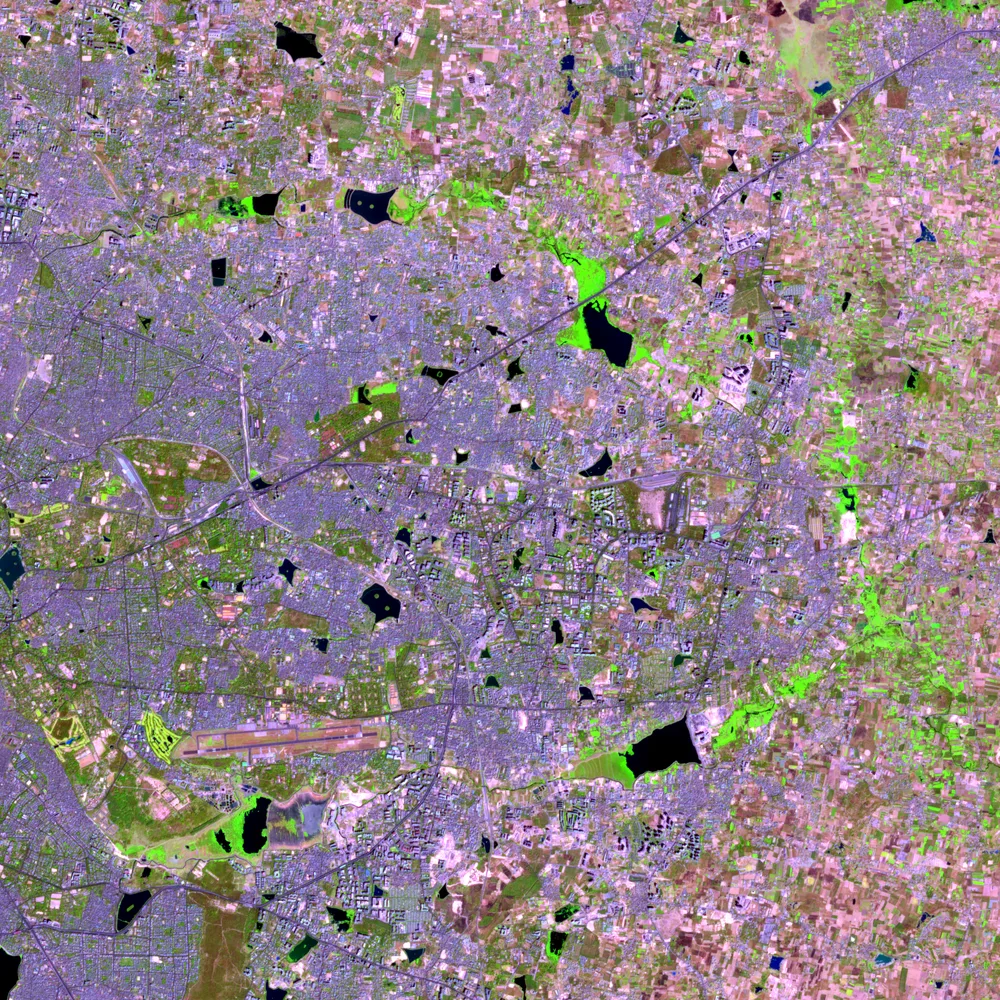
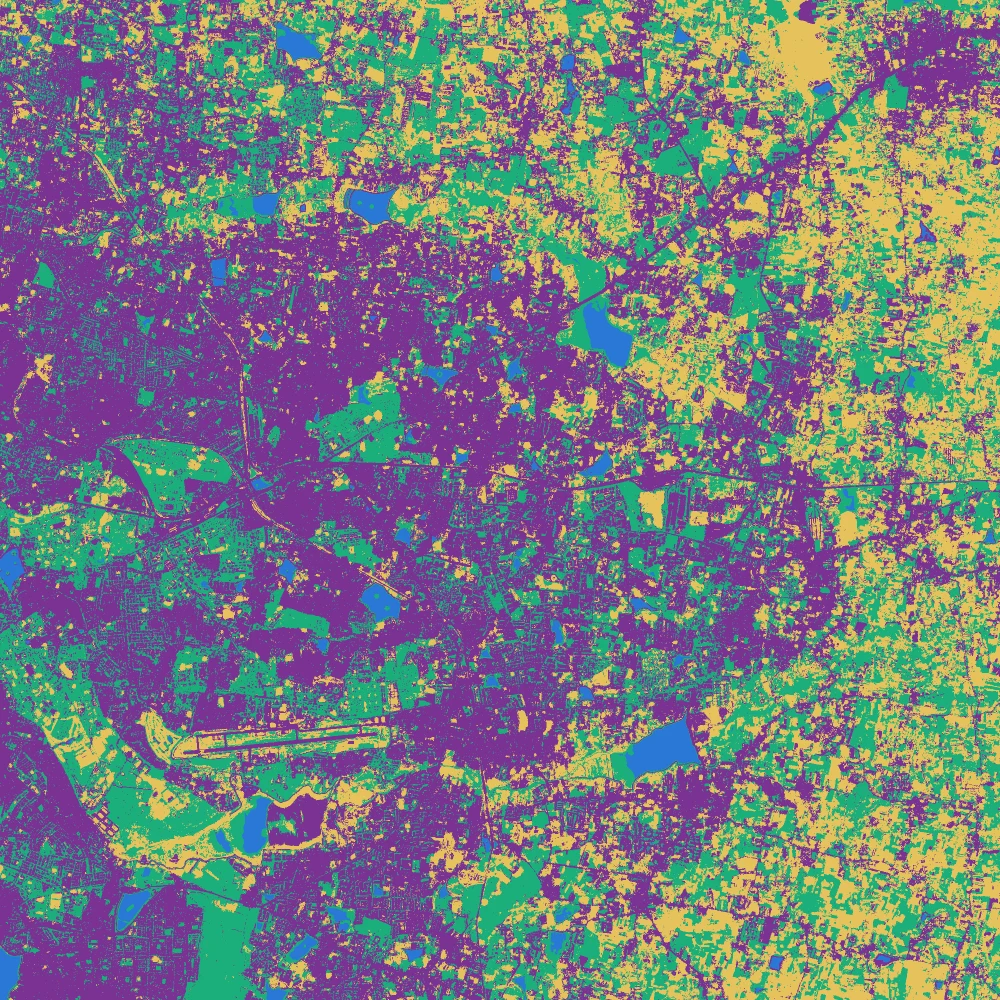
Drag the white line to compare the satellite image with the map made from it, and switch between K-means and Random Forest. The two maps share the same broad pattern: a built-up core in purple, lakes in blue, green patches that follow parks and valleys, and open land to the east and south. They disagree in the middle ground, where built-up land, dry fields and sparse trees mix.
8. Check the maps against independent points
A plausible-looking map can still be wrong. The reference points tell us how often it is right. They are 87 places inside the image whose class was decided from a high resolution basemap and which were never used for training or for naming clusters.
# Step 1: read the reference points and find the row and column of the image cell under each point
points = gpd.read_file("bengaluru_lulc_s2/validation_points.gpkg")
rows, cols = rasterio.transform.rowcol(transform, points.geometry.x.to_numpy(), points.geometry.y.to_numpy())
reference = points["class_id"].to_numpy()
print("reference points:", len(points))
print(points["class_name"].value_counts())

# Step 2: a function that builds the confusion matrix and the three accuracy measures
def accuracy_report(reference, mapped):
    matrix = pd.crosstab(pd.Series(mapped, name="mapped"), pd.Series(reference, name="reference"))
    matrix = matrix.reindex(index=[1, 2, 3, 4], columns=[1, 2, 3, 4], fill_value=0)
    correct = np.diag(matrix.to_numpy())
    overall = correct.sum() / matrix.to_numpy().sum()
    users = correct / matrix.sum(axis=1).clip(lower=1).to_numpy()        # correct divided by the row total
    producers = correct / matrix.sum(axis=0).clip(lower=1).to_numpy()    # correct divided by the column total
    table = pd.DataFrame({"users": users, "producers": producers}, index=list(class_names.values())).round(2)
    matrix.index = matrix.columns = list(class_names.values())
    return matrix, overall, table

# Step 3: apply it to both maps
for label, result in [("K-means", kmeans_map), ("Random Forest", forest_map)]:
    matrix, overall, table = accuracy_report(reference, result[rows, cols])
    print(f"--- {label}: overall accuracy {overall:.2f}")
    print(matrix)
    print(table)
reference points: 87
class_name
Vegetation    33
Built-up      24
Open land     20
Water         10
Name: count, dtype: int64
--- K-means: overall accuracy 0.69
            Water  Built-up  Vegetation  Open land
Water           8         0           1          0
Built-up        0        15           2          2
Vegetation      2         4          24          5
Open land       0         5           6         13
            users  producers
Water        0.89       0.80
Built-up     0.79       0.62
Vegetation   0.69       0.73
Open land    0.54       0.65
--- Random Forest: overall accuracy 0.75
            Water  Built-up  Vegetation  Open land
Water           9         0           1          0
Built-up        1        22           5          4
Vegetation      0         1          21          3
Open land       0         1           6         13
            users  producers
Water        0.90       0.90
Built-up     0.69       0.92
Vegetation   0.84       0.64
Open land    0.65       0.65
Read each matrix with the mapped class in the rows and the reference class in the columns. The numbers on the diagonal are the points where the map and the reference agree. User's accuracy is the diagonal cell divided by the row total, and it says how often a mapped class is right. Producer's accuracy is the diagonal cell divided by the column total, and it says how many of the real points of a class the map found.
The same numbers are below as a chart. Switch between the two methods and hover a cell to see how many points it holds. The bars show user's and producer's accuracy.
Three things help when you read these numbers.
- The overall accuracy on the reference points and the score on the held-out training samples are close here (about 75 and 74 percent). They need not be. Held-out samples come from the same places as the training samples, so they often flatter the model, and fresh points are the fair test. When the two agree, the training samples are likely to cover what the map has to handle. When they differ by a lot, trust the reference points.
- Eighty-seven points are better than a few dozen and still small. One point moves the overall accuracy by about 1 percentage point, and the uncertainty is about plus or minus 10 points. The numbers per class are rougher: vegetation has 33 points, built-up 24, open land 20 and water 10. Use 50 or more points per class for a map you want to publish. This part is a lesson, not a product.
- The reference points were drawn by class of ground, with extra points on water, so the overall accuracy is indicative and not an estimate for the whole window.
The difference between the two methods (about 6 points) is smaller than the uncertainty, so it would be wrong to say that one is better from this test. What you can say is where the maps fail. Open land is confused with built-up land and with vegetation in both, and the Random Forest finds more of the built-up points than K-means does.
9. Which features mattered?
A Random Forest reports how much each feature helped to split the samples. It helps to see what the model leaned on.
# Step 1: pair every feature with its importance and sort
importance = pd.Series(forest.feature_importances_, index=feature_names).sort_values()
print(importance.round(3))

# Step 2: draw a horizontal bar chart
fig, ax = plt.subplots(figsize=(6, 4))
importance.plot.barh(ax=ax, color=["#1baf7a" if name in ("ndvi", "mndwi", "ndbi") else "#2a78d6" for name in importance.index])
ax.set_xlabel("Importance")
ax.set_title("What the Random Forest used")
fig.savefig("lulc_s2_importance.png", dpi=120, bbox_inches="tight")
print("saved")
ndbi     0.050
ndvi     0.083
red      0.090
green    0.098
blue     0.104
swir2    0.118
nir      0.128
swir1    0.150
mndwi    0.179
dtype: float64
saved
The water index and shortwave infrared 1 come out highest, which fits the false colour picture, where those bands separate water, vegetation and built-up land. The importances are spread fairly evenly, and none of the nine features does the job alone. The importance shows how much the model used a feature, so treat it as a clue and not as proof that the feature is the right one.
10. Areas of each class
# Step 1: count the cells of each class. One cell is 10 m by 10 m, which is 100 square metres
cell_area_km2 = 10 * 10 / 1_000_000
areas = pd.DataFrame({
    "kmeans_km2": np.bincount(kmeans_map.ravel(), minlength=5)[1:] * cell_area_km2,
    "forest_km2": np.bincount(forest_map.ravel(), minlength=5)[1:] * cell_area_km2,
}, index=list(class_names.values())).round(1)

# Step 2: add the shares of the whole 400 square kilometre window
areas["forest_share_%"] = (areas["forest_km2"] / areas["forest_km2"].sum() * 100).round(1)
print(areas)
print("window area:", round(areas["forest_km2"].sum(), 1), "km2")
            kmeans_km2  forest_km2  forest_share_%
Water              6.0         6.9             1.7
Built-up         129.9       181.4            45.4
Vegetation       155.8       116.2            29.0
Open land        108.3        95.5            23.9
window area: 400.0 km2
Class areas from a map depend on its errors. With producer's and user's accuracies like these, the real area of built-up land or open land could differ from the map by many square kilometres. Area-weighted estimators, described in the study note and in the Olofsson reference, give the corrected area and its confidence interval. Quote the areas here as map areas.
The same areas are below as a chart.
11. Save the map
# Step 1: write the Random Forest map as a GeoTIFF that keeps the CRS and position of the image
with rasterio.open("bengaluru_lulc_s2/s2_bengaluru_2026.tif") as src:
    profile = src.profile
profile.update(count=1, dtype="uint8", nodata=0, compress="deflate")
with rasterio.open("lulc_random_forest_2026.tif", "w", **profile) as dst:
    dst.write(forest_map, 1)
    dst.write_colormap(1, {0: (255, 255, 255, 0), 1: (42, 120, 214, 255), 2: (123, 50, 148, 255), 3: (27, 175, 122, 255), 4: (230, 195, 92, 255)})

# Step 2: read it back to check that it survived
with rasterio.open("lulc_random_forest_2026.tif") as check:
    print("saved:", check.width, "x", check.height, "|", check.dtypes[0], "| CRS EPSG", check.crs.to_epsg(), "| NoData", check.nodata)
saved: 2000 x 2000 | uint8 | CRS EPSG 32643 | NoData 0.0
The colour table stored in the file means QGIS opens the map with the same colours. Drag lulc_random_forest_2026.tif into QGIS to put it over a basemap and check places you know.
What limits the accuracy, and what would help?
About three in four reference points are right, which is reasonable for four classes from a single dry season image. Dry season images of Indian cities are hard to classify, and the main errors here are typical.
- Dry fields, cleared plots and built-up land are all pale and have similar spectra. A second image from the wet season, when crops are green, would separate them better than any algorithm. You can stack two dates as extra features with the same code.
- A cell of 10 m can still hold a roof, a tree and a road. The reference points are single places, and the cell around them is a mixture.
- Texture helps. The local standard deviation of NIR in a 5 by 5 window is high over built-up land and low over a bare field, and
scipy.ndimage.uniform_filtermakes it in a few lines. It needs training samples taken from the same image, such as polygons drawn on it, because the table of samples used here holds only band values. - More samples for the weak classes help most. The training set has few labelled water points, and an extra 60 clean ones were added from a global land cover product to make up the number.
- Judge each change on the reference points, and keep those points out of every decision, or the accuracy figure stops being independent.
Run this part as a notebook
The code on this page is also a Jupyter notebook, with the theory in text cells, the code, guided practice, an independent assignment and hidden solutions. Download the Part 21 notebook, put it next to the unzipped bengaluru_lulc_s2 folder, and run the cells from top to bottom.
Practice
- Change the number of K-means clusters from 10 to 6 and to 16, name the clusters again and check the overall accuracy each time. Does more clusters help?
- Train the Random Forest on the six bands only, without the three indices. How do the overall accuracy and the importance table change?
- Change
n_estimatorsfrom 100 to 20 and to 300. How do the result and the time change? - Replace the Random Forest by a decision tree,
DecisionTreeClassifier(max_depth=6), and byKNeighborsClassifier(n_neighbors=7)after scaling. Which gives the best overall accuracy on the reference points, and which gives the best held-out score?
Common mistakes
- Reading the score on held-out training samples as the accuracy of the map.
- Using the same reference points to tune the model and to report its accuracy.
- Giving the model
float64samples after fitting it onfloat32pixels, or the reverse. - Building the features for the samples in a different order from the features of the image.
- Forgetting to scale the features before K-means.
- Quoting class areas without the accuracy next to them.
- Naming clusters by looking at one colour on a map instead of at their values.