

This is the last part of the series. It uses what you learned in the others, on one real question, with real data. There is no new tool to learn. The skill is joining the tools into something that works from the first line to the last.
The question: how do Bengaluru's five city corporations compare on hospitals, green space, roads and vegetation? The answer is a scorecard: one table with one row per corporation and one column per measure.
Each measure uses the tool that suits it best.
| Measure | Question | Tool |
|---|---|---|
| Hospitals per 100 km² | How many places tagged as hospitals, relative to the area? | GeoPandas spatial join, then pandas |
| Park and lake share | How much of each corporation is mapped as park or lake? | GeoPandas overlay |
| Road length per km² | How dense is the road network? | GeoPandas overlay |
| Mean NDVI | How green does it look from space? | GDAL rasterize and NumPy |
| The scorecard | Everything in one place | pandas |
| The outputs | A CSV, a GeoPackage, a GeoJSON and a map | pandas, GeoPandas, GDAL |
You need Parts 7 to 13, and it helps if you did Part 19, where the NDVI came from. Use the Jupyter kernel that has GDAL, as in Part 12.
What you need
Download bengaluru_final_project.zip (9 MB) and unzip it next to your notebook, so that you have a folder called bengaluru_final.
| File | What it is |
|---|---|
corporations.gpkg | The five city corporations, with the share of park and lake in the column pct |
osm.gpkg | OpenStreetMap layers hospitals, parks, lakes and roads |
ndvi_2025.tif | NDVI from Landsat 8 on 29 March 2025, made in Part 19 |
All layers are in EPSG:32643, which is in metres. The data is from OpenStreetMap contributors and from USGS Landsat, which is in the public domain.
1. Load everything and check it
Before you calculate anything, load the data and look at it. Most mistakes in an analysis start with data that was never checked.
import numpy as np
import pandas as pd
import geopandas as gpd
import matplotlib.pyplot as plt
from osgeo import gdal

gdal.UseExceptions()          # report GDAL problems as Python errors

# Step 1: read the layers. gpd.read_file takes a layer name for a GeoPackage with several layers.
corp = gpd.read_file("bengaluru_final/corporations.gpkg", layer="corporations")
hospitals = gpd.read_file("bengaluru_final/osm.gpkg", layer="hospitals")
parks = gpd.read_file("bengaluru_final/osm.gpkg", layer="parks")
lakes = gpd.read_file("bengaluru_final/osm.gpkg", layer="lakes")
roads = gpd.read_file("bengaluru_final/osm.gpkg", layer="roads")

# Step 2: a small table of what we have: how many features, what shape, which CRS
layers = {"corporations": corp, "hospitals": hospitals, "parks": parks, "lakes": lakes, "roads": roads}
overview = pd.DataFrame({
    "features": {name: len(g) for name, g in layers.items()},
    "geometry": {name: g.geom_type.iloc[0] for name, g in layers.items()},
    "epsg": {name: g.crs.to_epsg() for name, g in layers.items()},
})
print(overview)

# Step 3: every layer must share one CRS, or the overlays below would be wrong
assert overview["epsg"].nunique() == 1, "the layers do not share a CRS"
print("All layers use EPSG:", overview["epsg"].iloc[0])
              features      geometry   epsg
corporations         5  MultiPolygon  32643
hospitals         1160         Point  32643
parks             1987  MultiPolygon  32643
lakes             1721  MultiPolygon  32643
roads            13890    LineString  32643
All layers use EPSG: 32643
The assert line is a safety check. If a layer were in a different coordinate system, the script would stop here with a clear message, and not produce a wrong scorecard further down.
A note about the hospitals. They are every point that OpenStreetMap tags as a hospital, and that includes small private hospitals and nursing homes, not only large public ones. A count of these is a count of mapped places, which depends on how well volunteers mapped an area. Keep that in mind when you read the numbers.
2. Hospitals per corporation
A spatial join gives each hospital the name of the corporation it is in. Then pandas counts them.
# Step 1: give each hospital the short name of the corporation that contains it.
# how="inner" drops hospitals that fall outside every corporation.
located = gpd.sjoin(hospitals, corp[["short", "geometry"]], how="inner", predicate="within")
print(len(hospitals), "hospitals,", len(located), "inside a corporation")

# Step 2: count them per corporation. groupby makes one group per name, and size counts the rows in each.
counts = located.groupby("short").size().rename("hospitals")

# Step 3: start the scorecard. One row per corporation, with the short name as its index (its row label).
scorecard = corp[["short", "name", "km2"]].set_index("short")

# Step 4: add the counts. join matches the rows by index. A corporation with no hospital would get NaN, so fill with 0.
scorecard = scorecard.join(counts)
scorecard["hospitals"] = scorecard["hospitals"].fillna(0).astype(int)

# Step 5: a fair comparison needs a rate, not a count, because the corporations differ in size
scorecard["hospitals_per_100km2"] = (scorecard["hospitals"] / scorecard["km2"] * 100).round(1)
print(scorecard[["km2", "hospitals", "hospitals_per_100km2"]])
1160 hospitals, 1116 inside a corporation
           km2  hospitals  hospitals_per_100km2
short
Central   77.9        255                 327.3
East     163.7        138                  84.3
North    159.8        175                 109.5
South    152.3        211                 138.5
West     163.6        337                 206.0
Compare the counts with the rates. West has the most hospitals, 337, but Central has the highest rate: 255 hospitals in only 77.9 km² is 327 per 100 km². A bigger corporation has more hospitals just by being bigger, and the rate removes that. This is why the scorecard uses per 100 km² and not the raw count. The km2 column comes from the corporation layer, which was measured in a metre-based CRS.
3. Parks, lakes and roads with GeoPandas
For the green share, we want the area of each corporation that is covered by a park or a lake.
# Step 1: put the parks and the lakes into one layer, and merge all their shapes into one shape.
# Parks and lakes overlap each other, and the merge makes sure that no area is counted twice.
green = pd.concat([parks[["geometry"]], lakes[["geometry"]]])
green_shape = green.geometry.union_all()

# Step 2: how much of each corporation lies inside that shape? intersection cuts the corporation by it.
inside = corp.geometry.intersection(green_shape)

# Step 3: area in km2 (the CRS is in metres, so areas are in m2), then the share of each corporation
scorecard["green_km2"] = (inside.area.values / 1_000_000).round(2)
scorecard["green_pct"] = (inside.area.values / corp.geometry.area.values * 100).round(2)

# Step 4: a check. The corporations layer already has a column with this number, calculated in QGIS.
check = scorecard[["green_pct"]].join(corp.set_index("short")["pct"])
check["difference"] = (check["green_pct"] - check["pct"]).round(2)
print(check)
         green_pct   pct  difference
short
Central       5.63  5.63         0.0
East          6.67  6.67         0.0
North         4.75  4.75         0.0
South         4.73  4.73         0.0
West          3.20  3.20         0.0
The last step is a check against an independent source. The column pct was calculated in QGIS for the map series, and our Python result should match it. A difference of 0.00 everywhere means that the method is right. If it did not match, we would have a bug to find before going any further.
Now the roads: the length of road inside each corporation.
# Step 1: cut the road lines at the corporation borders and keep the name of the corporation on each piece
pieces = gpd.overlay(roads[["geometry"]], corp[["short", "geometry"]], how="intersection")

# Step 2: length of each piece in km (the CRS is in metres), then add the pieces up per corporation
pieces["km"] = pieces.geometry.length / 1000
road_km = pieces.groupby("short")["km"].sum().rename("road_km")

# Step 3: add to the scorecard, with road density: km of road per km2 of corporation
scorecard = scorecard.join(road_km)
scorecard["road_km"] = scorecard["road_km"].round(0)
scorecard["road_km_per_km2"] = (scorecard["road_km"] / scorecard["km2"]).round(1)
print(scorecard[["km2", "road_km", "road_km_per_km2"]])
           km2  road_km  road_km_per_km2
short
Central   77.9    418.0              5.4
East     163.7    453.0              2.8
North    159.8    563.0              3.5
South    152.3    629.0              4.1
West     163.6    755.0              4.6
overlay with intersection cuts lines at polygon borders and tags each piece with the polygon it falls in. A road that crosses from one corporation to another is split in two, and each part is counted where it belongs. length on a line gives its length in the CRS units, which are metres here.
4. Mean NDVI with GDAL
In Part 19, rasterio took the zonal statistics. Here GDAL does the same job in another way, as a check that two tools agree. The idea: turn the corporations into a raster with the same cells as the NDVI, where each cell holds the number of the corporation it is in. Then, for each number, take the NDVI cells that carry it.
# Step 1: open the NDVI raster with GDAL and read its values. GeoTransform tells us where the grid sits.
ndvi_ds = gdal.Open("bengaluru_final/ndvi_2025.tif")
ndvi = ndvi_ds.GetRasterBand(1).ReadAsArray()
gt = ndvi_ds.GetGeoTransform()                 # (left, cell width, 0, top, 0, minus cell height)
left, top = gt[0], gt[3]
right = left + gt[1] * ndvi_ds.RasterXSize
bottom = top + gt[5] * ndvi_ds.RasterYSize
print("NDVI grid:", ndvi.shape, "| cell size:", gt[1], "m")

# Step 2: give each corporation a number (1 to 5) and save the shapes to a small file for GDAL
zones = corp[["short", "geometry"]].copy()
zones["zone_id"] = range(1, len(zones) + 1)
zones.to_file("zones.gpkg", layer="zones", driver="GPKG")

# Step 3: Rasterize burns the zone number into every cell inside each shape.
# outputBounds and the cell size copy the NDVI grid exactly, so cell [row, column] means the same place in both rasters.
gdal.Rasterize(
    "zones.tif", "zones.gpkg",
    attribute="zone_id",
    outputBounds=[left, bottom, right, top],        # min x, min y, max x, max y
    xRes=gt[1], yRes=-gt[5],                        # cell size, as positive numbers
    outputType=gdal.GDT_Int16,
    noData=0,                                       # cells outside every corporation
    outputSRS="EPSG:32643",
)
zones_ds = gdal.Open("zones.tif")           # keep the dataset in a variable. If you chain gdal.Open(...).GetRasterBand(...)
zone_grid = zones_ds.GetRasterBand(1).ReadAsArray()   # in one line, Python can close the file too early and the read fails
print("zone grid:", zone_grid.shape, "| same shape as NDVI:", zone_grid.shape == ndvi.shape)
NDVI grid: (1274, 1304) | cell size: 30.0 m
zone grid: (1274, 1304) | same shape as NDVI: True
The shape check is the important one. If the two grids did not match cell for cell, the statistics would silently mix up places. GDAL gives us full control, as you can see: we chose the bounds and the cell size ourselves.
# Step 4: for each zone number, take the NDVI cells in that zone, ignoring cells without a value (NaN)
mean_ndvi = {}
for _, row in zones.iterrows():
    in_zone = (zone_grid == row["zone_id"]) & ~np.isnan(ndvi)
    mean_ndvi[row["short"]] = round(float(ndvi[in_zone].mean()), 3)

scorecard["mean_ndvi"] = pd.Series(mean_ndvi)
print(scorecard[["mean_ndvi"]])
         mean_ndvi
short
Central      0.357
East         0.313
North        0.334
South        0.321
West         0.316
Part 19 gave 0.357, 0.313, 0.334, 0.321 and 0.316 for Central, East, North, South and West, and GDAL gives exactly the same numbers. Two different tools, two different ways of deciding which cells belong to a polygon, one answer. That is reassuring. On other data a tiny difference is possible, because the tools may treat cells on a polygon's edge slightly differently.
5. The scorecard
Everything is in one table now. Look at it, and rank it.
# Step 1: choose and order the columns, and rename them so that they read well
card = scorecard[["name", "km2", "hospitals", "hospitals_per_100km2", "green_pct", "road_km_per_km2", "mean_ndvi"]].reset_index()
card = card.rename(columns={"short": "corporation"})
print(card.to_string(index=False))

# Step 2: rank each measure (1 = highest value)
for column in ["hospitals_per_100km2", "green_pct", "road_km_per_km2", "mean_ndvi"]:
    card["rank_" + column] = card[column].rank(ascending=False).astype(int)
print(card[["corporation"] + [c for c in card.columns if c.startswith("rank_")]].to_string(index=False))
corporation                               name   km2  hospitals  hospitals_per_100km2  green_pct  road_km_per_km2  mean_ndvi
    Central Bengaluru Central City Corporation  77.9        255                 327.3       5.63              5.4      0.357
       East    Bengaluru East City Corporation 163.7        138                  84.3       6.67              2.8      0.313
      North   Bengaluru North City Corporation 159.8        175                 109.5       4.75              3.5      0.334
      South   Bengaluru South City Corporation 152.3        211                 138.5       4.73              4.1      0.321
       West    Bengaluru West City Corporation 163.6        337                 206.0       3.20              4.6      0.316
corporation  rank_hospitals_per_100km2  rank_green_pct  rank_road_km_per_km2  rank_mean_ndvi
    Central                          1               2                     1               1
       East                          5               1                     5               5
      North                          4               3                     4               2
      South                          3               4                     3               3
       West                          2               5                     2               4
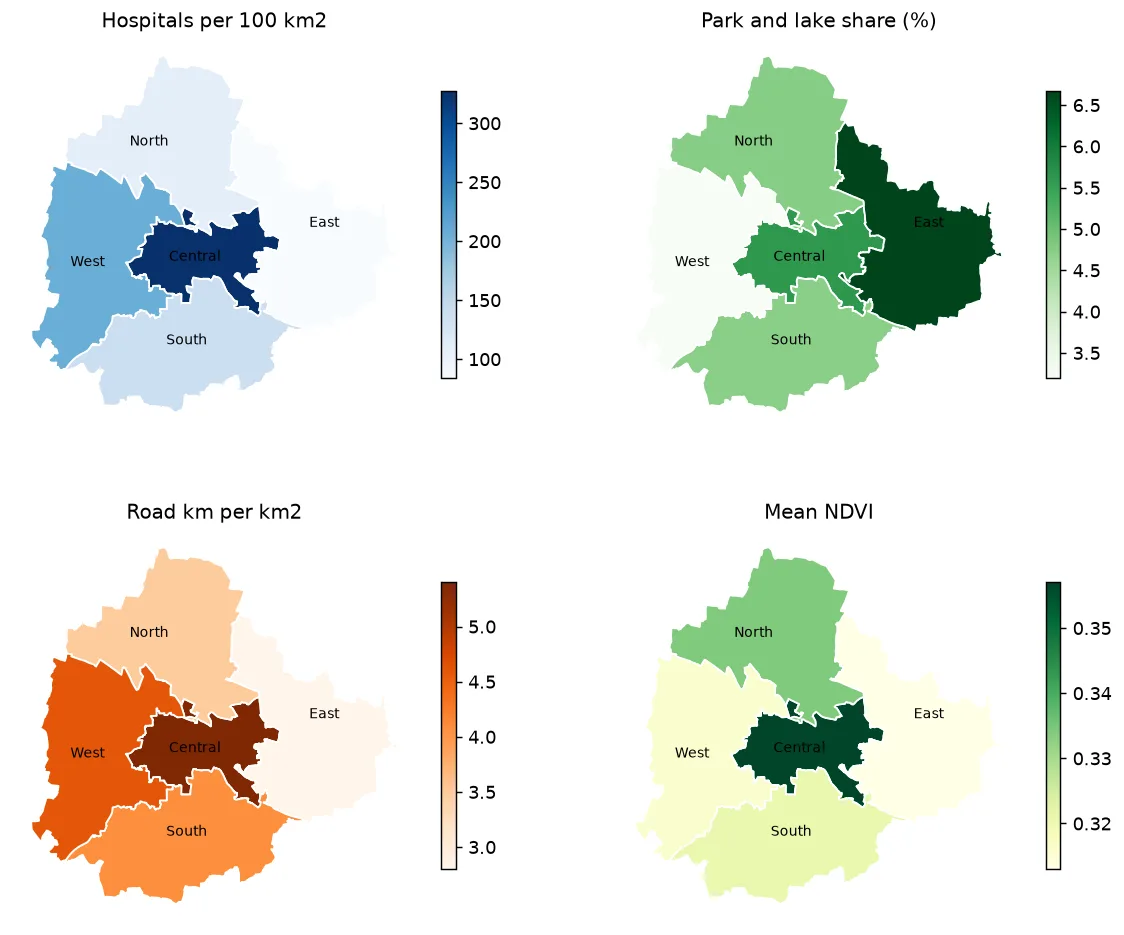
Read the ranks across a row. Central is first on hospital rate, road density and NDVI. East is last on those same three, yet it is first on park and lake share. The hospital rate and the road density give exactly the same order, which makes sense: both are high where the city is dense and built up. The green share goes the other way. So no corporation is first on everything, and each measure tells a different part of the story.
Be careful with a single "overall score" that adds the ranks together. It would treat a hospital and a tree as equal, and it would hide the very differences that the table shows.
6. Check the scorecard
Before you save, test what you have. This is the habit that separates a result from a guess.
# Step 1: a function with the rules that a correct scorecard must follow
def check_scorecard(table):
    problems = []
    if len(table) != 5:
        problems.append(f"expected 5 corporations, found {len(table)}")
    if table.isna().any().any():
        problems.append("the table has missing values")
    if not table["green_pct"].between(0, 100).all():
        problems.append("a green share is outside 0 to 100")
    if not table["mean_ndvi"].between(-1, 1).all():
        problems.append("a mean NDVI is outside -1 to 1")
    if table["hospitals"].sum() > len(hospitals):
        problems.append("more hospitals than were in the data")
    return problems

# Step 2: run it. An empty list means that every rule passed.
problems = check_scorecard(card)
print("problems:", problems if problems else "none")
problems: none
Each rule is one line, and each would catch a real mistake: a lost row, a failed join, a wrong unit, a double count. When you build your own project, think of such rules as you go, and add them here.
7. Save the results in four formats
One result, four uses.
# Step 1: a CSV for people who use Excel. pandas writes it.
card.to_csv("scorecard.csv", index=False)

# Step 2: a GeoPackage for GIS software. Put the shapes back onto the table, then GeoPandas writes it.
card_geo = corp[["short", "geometry"]].rename(columns={"short": "corporation"}).merge(card, on="corporation")
card_geo.to_file("scorecard.gpkg", layer="scorecard", driver="GPKG")

# Step 3: a GeoJSON for web maps. GDAL's VectorTranslate converts the GeoPackage and, as the web expects, reprojects to longitude and latitude.
gdal.VectorTranslate("scorecard.geojson", "scorecard.gpkg", format="GeoJSON", dstSRS="EPSG:4326")

# Step 4: read each file back, as a check that it was written and has all its rows
print("csv rows:    ", len(pd.read_csv("scorecard.csv")))
print("gpkg rows:   ", len(gpd.read_file("scorecard.gpkg", layer="scorecard")))
print("geojson rows:", len(gpd.read_file("scorecard.geojson")), "| CRS:", gpd.read_file("scorecard.geojson").crs.to_epsg())
csv rows:     5
gpkg rows:    5
geojson rows: 5 | CRS: 4326
The GeoPackage keeps the original coordinate system. The GeoJSON is in EPSG:4326, so it is ready for web mapping libraries. You chose the right tool for each file: pandas for the table, GeoPandas for the GeoPackage, and GDAL for the format conversion with a new CRS.
And a map.
# Step 5: four maps in a 2 x 2 grid, one for each measure, with the corporation names on them
measures = [
    ("hospitals_per_100km2", "Hospitals per 100 km2", "Blues"),
    ("green_pct", "Park and lake share (%)", "Greens"),
    ("road_km_per_km2", "Road km per km2", "Oranges"),
    ("mean_ndvi", "Mean NDVI", "YlGn"),
]
fig, axes = plt.subplots(2, 2, figsize=(11, 9))
for ax, (column, title, colours) in zip(axes.ravel(), measures):      # ravel turns the 2 x 2 grid into a flat list
    card_geo.plot(ax=ax, column=column, cmap=colours, edgecolor="white", legend=True, legend_kwds={"shrink": 0.7})
    for _, row in card_geo.iterrows():
        p = row.geometry.representative_point()
        ax.annotate(row["corporation"], (p.x, p.y), ha="center", fontsize=8)
    ax.set_title(title, fontsize=11)
    ax.set_axis_off()
fig.savefig("scorecard_maps.png", dpi=130, bbox_inches="tight")
print("saved")
saved
8. What the scorecard can and cannot say
Write this part yourself every time. A table is not a conclusion.
- What it shows. How the five corporations differ on four measures, using one set of rules for all of them.
- What it does not show. Quality. A hospital count says nothing about beds or doctors. A green share says nothing about whether people can reach and use the green space.
- Where the data is weak. OpenStreetMap mapping effort differs from place to place, and the hospital points include very small facilities. NDVI is from one day in the dry season.
- Five rows. With five corporations, any ranking is easy to over-read. The table is for orientation, and it is where you start asking why.
A good report puts these four lines next to the numbers.
Run this part as a notebook
The code on this page is also a Jupyter notebook, with the theory in text cells, the code, guided practice, an independent assignment and hidden solutions. Download the Part 20 notebook, put it next to the unzipped bengaluru_final folder, and run the cells from top to bottom. Use the kernel with GDAL.
Practice
- Add a fifth measure: the number of lakes (
lakes) per corporation, with a spatial join. Which corporation has most per km²? - Change the hospital measure to the distance from the centre of each corporation to its nearest hospital. Which tool do you need, and which CRS?
- Add a check to
check_scorecardfor the road density, such as that it stays between 1 and 40 km per km². Is there a value that surprises you? - Do the project again for a different set of regions of your own, with your own layers.
Common mistakes
- Starting to calculate before checking the data and the CRS.
- Comparing counts instead of rates when the regions differ in size.
- Counting an area twice because layers overlap. Merge them first.
- Trusting a number that no second source or tool has confirmed.
- Making a single score from unlike measures.
- Writing the conclusion before looking at the data's weaknesses.
- Saving one format and finding later that another was needed.
Key takeaways
You have reached the end of the series. The same pattern, load and check, calculate in small steps, compare, check again and save, works for almost any analysis. Part 17 shows how to connect it with QGIS, and the map layouts series shows how to turn a result like this into a finished map for each region.