

What a classifier does
Every pixel in a multiband image is a list of numbers, one per band. A Landsat 8 pixel with six bands is a point in a six-dimensional space, which is often called the feature space. Pixels of the same surface land close together in that space, and pixels of different surfaces land apart. A classifier draws boundaries in the feature space and gives each pixel the label of the region it falls in.
Two things decide the quality of the result before any algorithm is chosen: the classes you ask for, and the numbers you give the algorithm to separate them. The method matters less than most people expect.
Choosing the classes
A land use and land cover scheme is a list of classes. A usable scheme follows three rules.
- The classes do not overlap, so a pixel belongs to one class only.
- The classes cover the whole area, so every pixel has a class. A class such as "other" or "open land" takes the leftovers.
- The classes can be told apart in the imagery you have. "Residential" and "commercial" are land uses that look alike from space. "Built-up" is a land cover that does not.
Published schemes give a starting point. The Anderson scheme from the US Geological Survey has levels from broad to detailed. The National Remote Sensing Centre scheme is used for national land use and land cover mapping in India. CORINE is used in Europe, and ESA WorldCover uses eleven classes at 10 m for the whole world. A tutorial with one scene usually needs four to eight classes, because every added class needs training samples and brings more confusion.
Resolution limits the scheme. At 30 m a pixel covers 900 square metres, so a pixel over a street with trees and houses is a mixture, and no classifier can give it one true label.
Unsupervised classification
An unsupervised method groups pixels by similarity and asks you to name the groups afterwards. It needs no training samples, so it is a good first look at an unfamiliar scene.
K-means
K-means is the standard method. You choose the number of clusters k and the algorithm runs these steps.
- Place k starting centres in the feature space, either at random or spread along the data.
- Assign every pixel to the nearest centre, using straight line distance across all bands.
- Move each centre to the mean of the pixels assigned to it.
- Repeat steps 2 and 3 until fewer than a set share of pixels change cluster, or a maximum number of rounds is reached.
The number of clusters is the main decision. If you ask for exactly as many clusters as classes, one cluster often mixes two surfaces. The usual practice is to ask for two to four times as many clusters as classes, for example ten to twenty, and then merge clusters into classes by looking at them over the imagery. A cluster is only a group of similar pixels, and "similar" does not always mean the same land cover.
The GRASS tool i.cluster in QGIS and KMeans in scikit-learn both follow this pattern. The GRASS tool adds a minimum cluster size and a separation setting.
ISODATA
ISODATA is K-means with extra rules. It splits a cluster that is large and spread out, merges two clusters whose centres are close, and removes clusters that are too small. The number of clusters therefore changes while it runs, within a range you set. It is available in ERDAS Imagine and ENVI. The results are close to K-means when the settings are sensible.
Strengths and limits
| Reading | |
|---|---|
| Strengths | No samples, fast, repeatable, shows the natural spectral groups of a scene |
| Limits | The clusters may not match the classes you want, the result changes with k and with the starting centres, and naming clusters takes judgement |
Supervised classification
A supervised method learns from training samples, which are pixels or polygons whose class you know. The learning step builds a model, and the classification step applies the model to every pixel.
Training samples
The samples matter more than the algorithm.
- Draw samples in places you can identify with certainty, using a higher resolution basemap or a field visit.
- Cover the variety of each class. A built-up class made only of grey roofs will miss red tiled roofs and dense slums.
- Use enough pixels per class. A common rule for parametric methods is at least ten times the number of bands, and tree-based methods like hundreds or thousands.
- Keep the class sizes similar, or the classifier favours the large classes.
- Keep a separate set of reference points for testing, and never train on them.
Methods compared
| Method | Idea | Strengths | Limits |
|---|---|---|---|
| Parallelepiped | A box around the range of each class in every band | Very fast and simple | Boxes overlap, and many pixels stay unclassified or get the wrong class |
| Minimum distance | Each pixel gets the class with the nearest mean | Fast, works with few samples | Ignores how spread out a class is, so a variable class such as built-up is under-captured |
| Maximum likelihood | Each class is a bell-shaped cloud with a mean and a covariance, and the pixel goes to the class most likely to have produced it | The classic method, uses spread and band correlation, available in QGIS through GRASS | Assumes a normal distribution, needs many samples per class, and fails if a class has little variation |
| Spectral angle mapper | Compares the shape of the spectrum, not its brightness | Reduces the effect of shadow and illumination | Weak when classes differ mostly in brightness |
| k-nearest neighbours | The label comes from the k closest training pixels | No training step, easy to understand | Slow on large images, sensitive to noisy samples |
| Decision tree | A series of yes or no questions on band values, such as NIR above a threshold | Readable rules, handles any distribution | A single tree overfits |
| Random Forest | Hundreds of trees, each trained on a random part of the samples and bands, and the pixel takes the majority vote | Accurate, robust to noise and to a modest number of samples, reports which features matter | Predictions are flat and can look blocky, and the model is harder to explain than one tree |
| Support vector machine | Finds the boundary with the widest margin between two classes, using a kernel for curved boundaries | Strong with small training sets | Needs tuning, slow on large training sets |
| Gradient boosting | Trees built one after another, each correcting the last | Often the most accurate on tables of numbers | More settings to tune |
| Neural networks and deep learning | Layers of weights learned from data. Convolutional networks read a window of pixels, not one pixel | Best results on high resolution imagery and large labelled datasets | Needs thousands of samples, a GPU, and care to avoid overfitting |
How maximum likelihood decides
For each class the method stores the mean of every band and the covariance between bands from the training pixels. For each pixel it calculates the probability density of that pixel under every class and picks the highest. Two classes with the same mean but different spread get different boundaries, which is the advantage over minimum distance. The method works when the classes have sample sizes well above the number of bands, since the covariance matrix needs enough pixels to be estimated.
How Random Forest decides
Each tree sees a random sample of the training pixels, drawn with replacement, and at each split it looks at a random subset of the features. The trees therefore disagree on details but agree on the broad pattern. A pixel passes through every tree, each tree votes, and the class with the most votes wins. The share of votes is a rough confidence, which can be mapped. Pixels that are left out of a tree's sample are used to estimate the error without a separate test set, which is called the out-of-bag score. Treat it as a quick check, because it still comes from the same area as the training samples.
Seeing the methods on one image
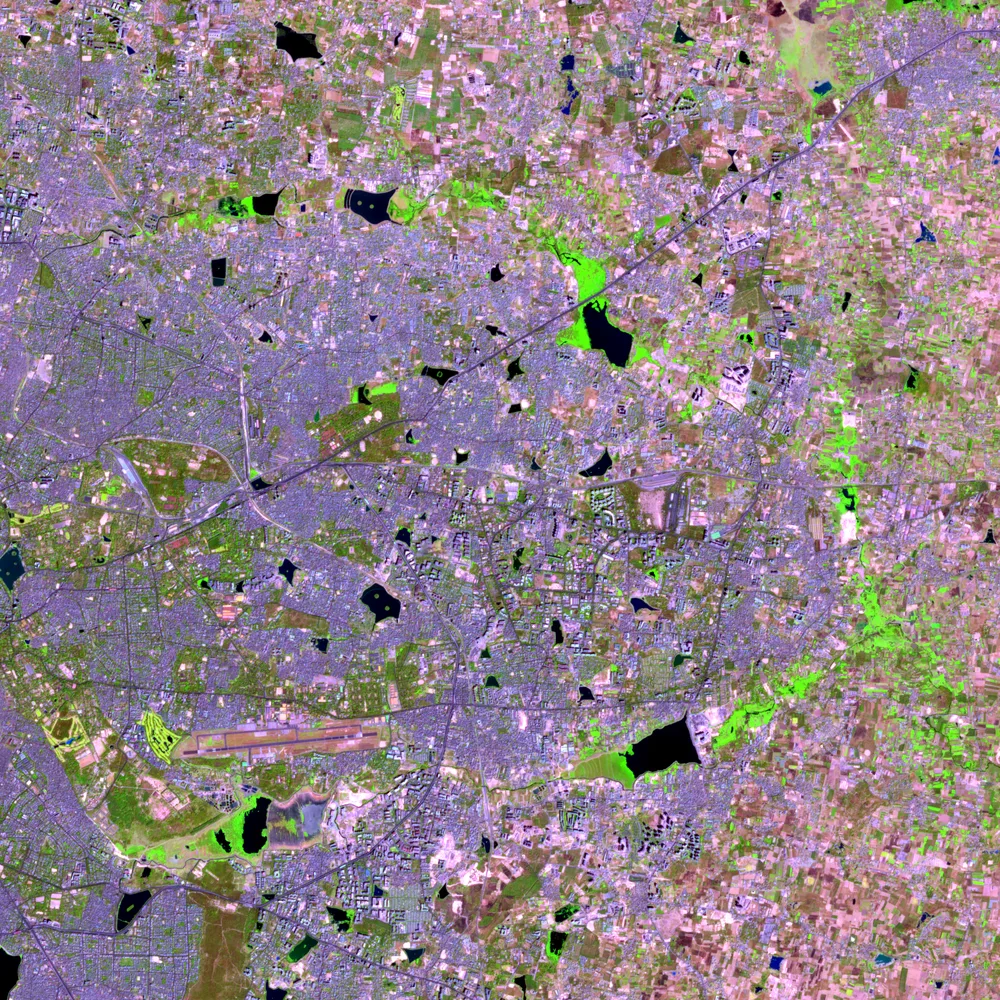
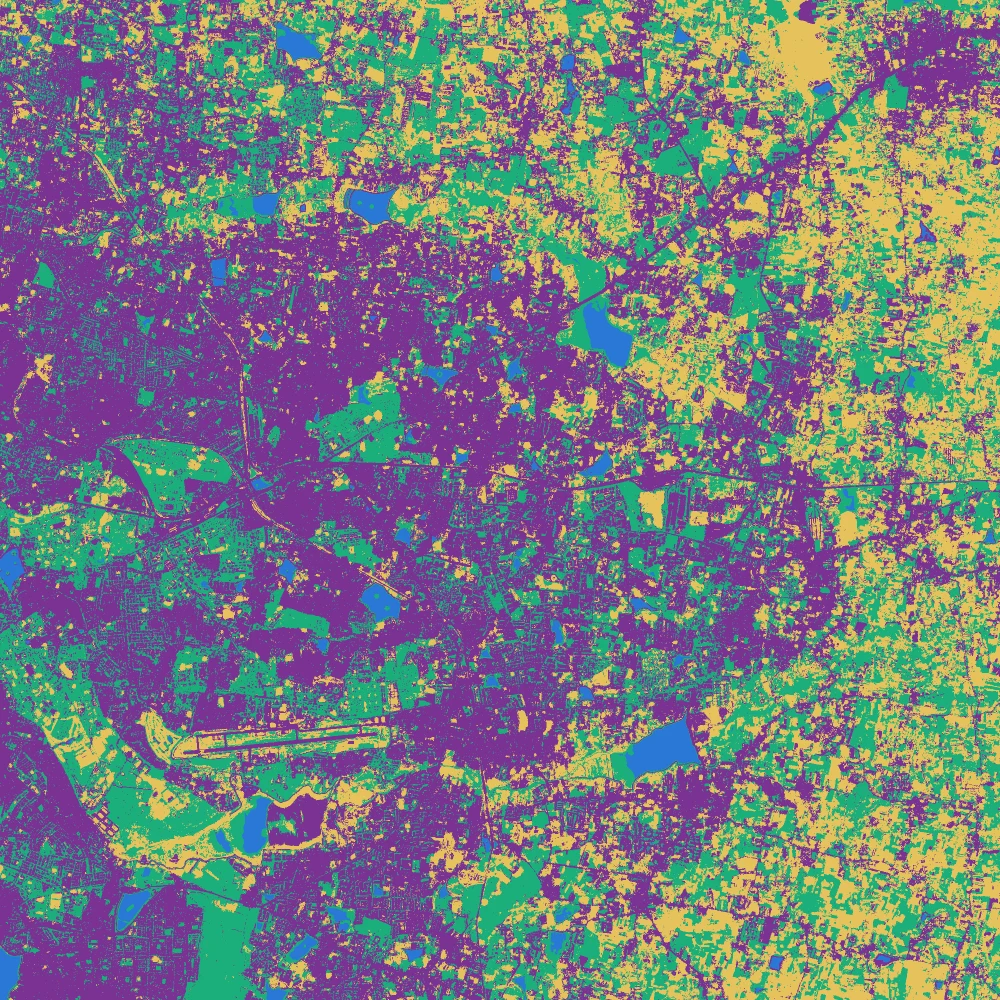
The figure below shows a false colour image of eastern Bengaluru next to the maps that K-means and a Random Forest made from the same six Sentinel-2 bands and three indices. Drag the white line to compare, and switch the method. The two maps share the same broad pattern and differ where built-up land, dry fields and sparse trees mix. The Python tutorial builds both.
Features beyond the raw bands
The input to the classifier does not have to be only the bands. Adding derived layers often helps more than changing the algorithm.
- Spectral indices such as NDVI, NDWI and NDBI turn band differences into single layers. A tree-based method gains most because it can use the ratio directly.
- Texture measures such as the local standard deviation separate a smooth bare field from a built-up block with the same average colour.
- Terrain layers such as slope and elevation separate classes that follow the land, for example plantations on hills.
- Several dates, such as a wet season and a dry season image, separate crops from fallow land and evergreen from deciduous trees. Much of the confusion in a single dry season image comes from dry fields looking like concrete.
Pixel-based, object-based and sub-pixel methods
Everything above classifies one pixel at a time, which is the pixel-based approach. It gives the salt and pepper look in a heterogeneous area.
Object-based image analysis first groups neighbouring pixels into segments, and then classifies segments using their mean colour, shape, size and texture. It suits high resolution imagery, where a roof is many pixels, and it gives cleaner maps. It is available in Orfeo Toolbox, eCognition and as segmentation tools in Python.
Sub-pixel methods such as spectral unmixing estimate the share of each class in a pixel, for example 40 percent built-up and 60 percent vegetation. They suit coarse pixels over mixed ground.
After classification
A pixel-based map often has isolated pixels of a different class. A sieve filter removes groups smaller than a chosen number of pixels, and a majority filter gives each pixel the most common class in its window. Both make the map easier to read and do slightly change the areas, so say which you used.
Accuracy assessment
A map without an accuracy figure is an unchecked claim. The assessment compares the map with reference data that was not used for training.
The confusion matrix
A confusion matrix has the reference class in the columns and the mapped class in the rows. The small example below has three classes and 100 reference points.
| Mapped \ Reference | Water | Built-up | Vegetation | Row total |
|---|---|---|---|---|
| Water | 18 | 1 | 1 | 20 |
| Built-up | 2 | 36 | 12 | 50 |
| Vegetation | 0 | 4 | 26 | 30 |
| Column total | 20 | 41 | 39 | 100 |
The diagonal holds the points where map and reference agree.
- Overall accuracy is the diagonal total divided by all points: (18 + 36 + 26) / 100 = 80 percent.
- User's accuracy is the diagonal cell divided by the row total. It answers the question of a map reader: if the map says built-up here, how often is it built-up on the ground? For built-up it is 36 / 50 = 72 percent.
- Producer's accuracy is the diagonal cell divided by the column total. It answers the question of the map maker: of the real built-up points, how many did the map find? For built-up it is 36 / 41 = 88 percent.
- The commission error is 100 percent minus the user's accuracy, and the omission error is 100 percent minus the producer's accuracy.
A class can score high on one and low on the other. A classifier that labels everything uncertain as built-up has a high producer's accuracy for built-up and a poor user's accuracy.
A real confusion matrix
The matrix below is from the same two maps, checked against 87 independent reference points. Switch the method and hover a cell. A class can score high on user's accuracy and low on producer's accuracy, or the reverse, and the chart shows where each method does that. The sample is small, so read the numbers as indicative.
Kappa and F1
The kappa coefficient compares the overall accuracy with the agreement expected by chance. It was the standard for decades and is still printed by most software, including the GRASS tool r.kappa. Recent guidance argues that it adds little beyond the overall, producer's and user's accuracy, so report those first. The F1 score is the harmonic mean of the user's and producer's accuracy for one class, and it gives a single number per class.
Reference data and sampling
- Use points, or small polygons, that were not part of the training set, and keep them well away from the training areas. Neighbouring pixels are similar, so a test point next to a training pixel flatters the model.
- Label the reference points from a source better than the imagery being classified, such as a high resolution basemap, without looking at the map first.
- Draw the points by stratified random sampling, with a minimum number per class, often 50. A rare class needs its own quota, since simple random sampling may place none in it.
- When the points were drawn in equal numbers per class, the overall accuracy is not an estimate for the whole map. Area-weighted estimators, such as those in the Olofsson guidance, correct for this, and they also give confidence intervals for the class areas.
Why accuracy from a training split is optimistic
Splitting the training samples into a training part and a test part, which most machine learning tutorials do, gives a figure that is nearly always much higher than the accuracy against independent points. The samples were picked as clear examples, and the test pixels sit in the same polygons as the training pixels. The fair figure is the one from points drawn independently across the whole area. A large gap between the two numbers is a signal that the training samples do not represent the map.
Common problems
| Problem | Cause | What helps |
|---|---|---|
| Built-up and bare soil confused | Dry soil and concrete reflect alike in the visible and near infrared bands | SWIR bands, a second season, texture, more samples of both |
| Shadows labelled as water | Both are dark in every band | A shadow class, or masks from a terrain model |
| Mixed pixels | One pixel covers several surfaces | Finer imagery, sub-pixel methods, or fewer and broader classes |
| One class dominates | Unequal training sizes | Balance the samples or weight the classes |
| Clouds and haze | Not removed before classification | Cloud mask and a median composite |
| Map looks good, accuracy low | Classes were judged by eye, not tested | Independent reference points |