

This is the lesson that saves the time. The previous one filled in a template for one corporation. Now a loop does it for all five, and the same script would do fifty, because only the data changes. The Atlas page did this without code. The loop gives you more control: you choose the file names, add checks and decide what happens to each map.
Open scripts/lesson5_batch.py.
Before the steps: imports
# Lesson 5: one map for every corporation. A loop reads the layer and changes the template for each feature.
import re
from pathlib import Path
from qgis.core import (
    QgsProject,
    QgsPrintLayout,
    QgsReadWriteContext,
    QgsLayoutItemMap,
    QgsLayoutItemLabel,
    QgsLayoutExporter,
    QgsExpressionContextUtils,
    QgsCoordinateTransform,
    QgsGeometry,
)
from qgis.PyQt.QtXml import QDomDocument
Step 1: Settings in one place
# Step 1: settings in one place
LAYER_NAME = "Parks and lakes, share of area (%)"
NAME_FIELD = "short"
TITLE_FIELD = "title"
PADDING = 1.15                    # 15 percent of empty space around each corporation

project = QgsProject.instance()
folder = Path(project.homePath())
output_folder = folder / "output" / "batch"
output_folder.mkdir(parents=True, exist_ok=True)
The names of the layer and of the fields are written once, at the top, in capitals. If your data uses other names, you change them here and nowhere else. PADDING is the space around each corporation: 1.15 is 15 percent. The output folder is output/batch next to the project, and parents=True creates output too if it is missing.
Step 2: Check the layer before anything else
# Step 2: check the layer before doing anything else
matches = project.mapLayersByName(LAYER_NAME)
if not matches:
    raise ValueError(f"Layer not found: {LAYER_NAME!r}")
regions = matches[0]
if not regions.isValid():
    raise ValueError(f"Layer is not valid: {LAYER_NAME!r}")
for field in (NAME_FIELD, TITLE_FIELD):
    if regions.fields().indexFromName(field) == -1:
        raise ValueError(f"The layer has no field called {field!r}")
Everything that can be wrong with the input is checked now: the layer exists, it is valid, and it has the fields the script needs. If something is wrong, the script stops here with a message that names the problem. This is much better than making two maps and then crashing on the third. A field name such as district in the data that you copy from another tutorial is a classic cause.
Step 3: Read the template once
# Step 3: read the template once. Each map gets its own fresh copy of the layout.
document = QDomDocument()
document.setContent((folder / "templates" / "parks_and_lakes_template.qpt").read_text(encoding="utf-8"))


def load_layout():
    layout = QgsPrintLayout(project)
    layout.loadFromTemplate(document, QgsReadWriteContext(), True)
    return layout


def safe_filename(value):
    """Replace characters that are not allowed in file names."""
    text = re.sub(r'[<>:"/\\|?*]', "_", str(value).strip())
    return text or "unnamed"
The template is read from disk once, into document. The function load_layout builds a new layout from it each time it is called. Each map gets its own fresh copy. If you reused one layout for all five, any setting from the previous map would carry over into the next one. A fresh copy cannot be affected by the last map. safe_filename is a small function that replaces characters that Windows does not allow in file names, such as a slash or a colon, with an underscore.
Step 4: Convert the extent
# Step 4: the extents must be in the map's coordinate system. Here both are EPSG:32643, but the
# transform makes the script correct for any layer and any map.
probe_layout = load_layout()            # keep the layout in a variable: an item is deleted along with its layout
probe = probe_layout.itemById("main_map")
transform = QgsCoordinateTransform(regions.crs(), probe.crs(), project.transformContext())
Here the two kinds of numbers from Lesson 2 meet again. The extent of a feature is in the layer's coordinate system, and the map frame wants an extent in its own. If they differ, the map shows the wrong place. A QgsCoordinateTransform converts between them. Here both are EPSG:32643, so the transform does nothing, but with it the script is also correct for data in any other coordinate system, such as degrees.
Look at the comment on the first line. The probe layout is kept in a variable on purpose. The map item belongs to its layout, and if the layout is thrown away, the item is deleted with it. Writing load_layout().itemById("main_map") in one line throws the layout away immediately, and the next line fails with RuntimeError: wrapped C/C++ object of type QgsLayoutItemMap has been deleted. I made exactly this mistake while writing the script.
Step 5: The loop
# Step 5: the loop. sorted() gives the same order every time.
done = []
for feature in sorted(regions.getFeatures(), key=lambda f: f[NAME_FIELD]):
    name = feature[NAME_FIELD]
    if not feature.hasGeometry() or feature.geometry().isEmpty():
        print(f"Skipping {name}: no geometry")
        continue

    geometry = QgsGeometry(feature.geometry())          # a copy, so that the layer is not changed
    geometry.transform(transform)
    extent = geometry.boundingBox()
    extent.scale(PADDING)

    layout = load_layout()
    layout.itemById("main_map").zoomToExtent(extent)
    layout.itemById("map_title").setText(feature[TITLE_FIELD])
    QgsExpressionContextUtils.setProjectVariable(project, "focus_name", name)   # the dark outline

    pdf_path = output_folder / (safe_filename(name) + ".pdf")
    result = QgsLayoutExporter(layout).exportToPdf(str(pdf_path), QgsLayoutExporter.PdfExportSettings())
    ok = result == QgsLayoutExporter.Success
    print(("Exported: " if ok else f"FAILED ({result}): ") + pdf_path.name)
    if ok:
        done.append(pdf_path.name)

print(f"{len(done)} of {regions.featureCount()} maps exported to {output_folder}")
Read the loop from the top.
sorted(regions.getFeatures(), key=lambda f: f[NAME_FIELD])visits the features in alphabetical order by name. Without a sort, the order depends on how the data was stored, and your output could change from run to run.- Features without geometry are skipped with a message. In real data, a row with an empty shape is common.
QgsGeometry(feature.geometry())makes a copy of the shape before it is transformed, so the layer's own data is never changed.transformandboundingBoxgive the extent.scale(PADDING)adds the space around it.- A fresh layout is built, the extent and title are set, and
focus_nameis set to the current name, which draws the outline. - The PDF is exported to a file named after the corporation, and the result is reported. Only successful exports are counted.
Run it. This is the output:
Exported: Central.pdf
Exported: East.pdf
Exported: North.pdf
Exported: South.pdf
Exported: West.pdf
5 of 5 maps exported to ...\part-c\output\batch
Five PDFs are in output/batch: Central.pdf, East.pdf, North.pdf, South.pdf and West.pdf. Here they are as images, one at a time.
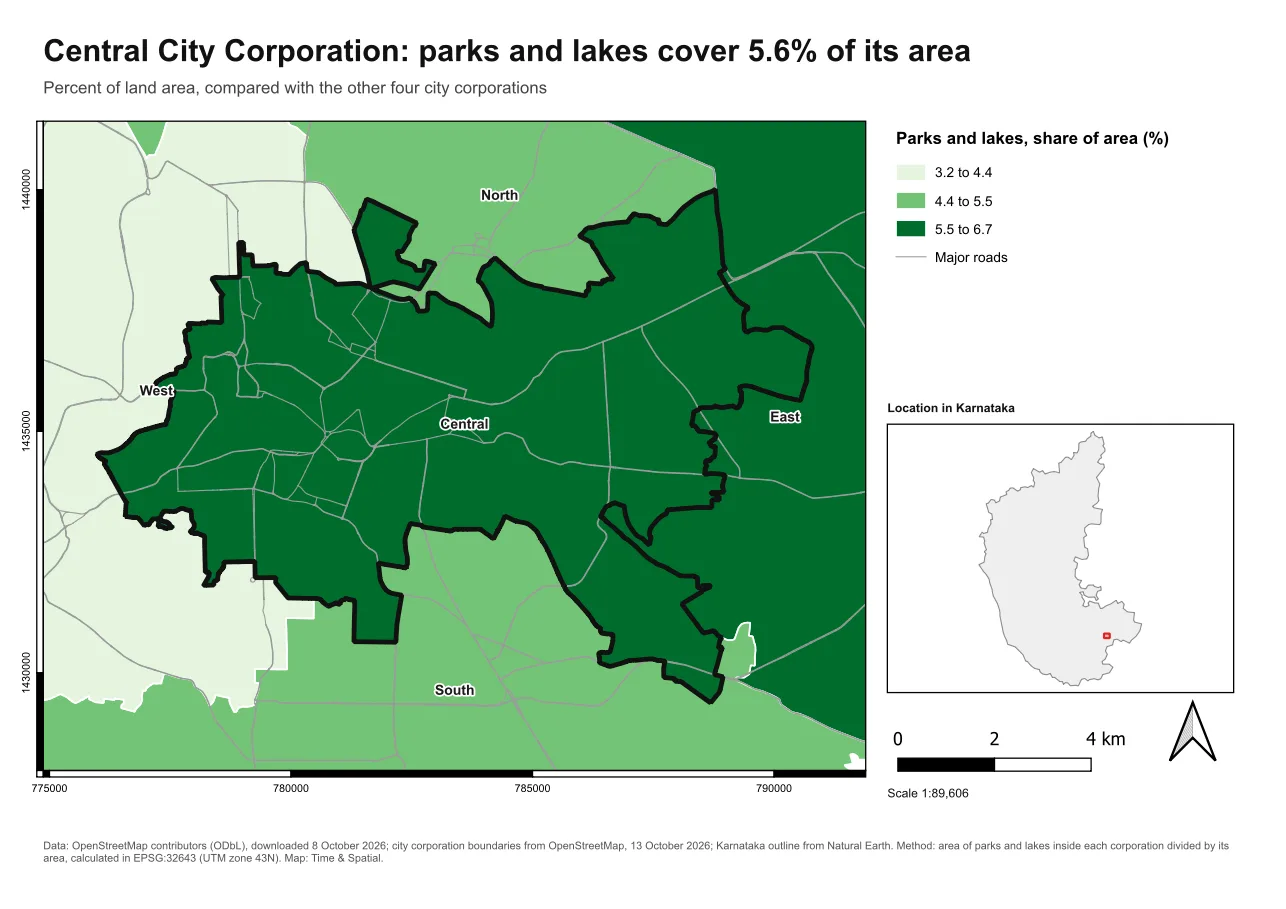
Look at each of them, not only the first. The first one being right does not mean that the fifth is.
When it breaks
| What you see | Why | What to do |
|---|---|---|
ValueError: Layer not found: 'Corporations' | The name in the settings does not match the layer | Copy the name from the Layers panel |
ValueError: The layer has no field called 'district' | A field name in the settings is wrong | Copy the name from the attribute table |
RuntimeError: wrapped C/C++ object of type QgsLayoutItemMap has been deleted | The layout was thrown away while you kept one of its items | Keep the layout in a variable |
KeyError: 'district' inside the loop | The loop reads a field that does not exist | Check the settings and the field names |
| Every map has the same outline | focus_name is not set for each map | Set the variable inside the loop, before the export |
| Two files overwrite each other | Two features have the same name | Check for duplicates, as Lesson 7 does |
| The map is in the wrong place | The extent is in another coordinate system | Use a QgsCoordinateTransform, as in Step 4 |
| Some maps are blank | A feature has no usable geometry | Skip and report them, as the loop does |
Make it your own
- Change
PADDINGto 1.05 and to 1.6. Compare the East maps. Which suits a report? - Make the script export only the corporations whose
pctis above 5. Hint: add anifat the top of the loop. - Add the date to each file name, for example
East_2026-10-14.pdf, withdatetime.date.today(). - Make the script skip a corporation if its PDF already exists.
Common mistakes
- No sort, so the order of the output changes.
- Reusing one layout for all maps, so that settings leak from map to map.
- Using an extent in the wrong coordinate system.
- Not checking the layer and the fields first.
- Counting a map as exported when the export failed.
- Looking at the first map only.
Key takeaways
Next: Export and check the outputs.