

Where vector data can come from
| Source | How you get it | Notes |
|---|---|---|
| Your own digitizing | Trace on imagery in QGIS | You own the result, if the imagery licence allows tracing |
| Google Earth Pro | Draw placemarks, paths and polygons, then save as KML | Features you draw are your own data |
| Google My Maps | Draw online, export as KML | Good for sharing with field teams |
| OpenStreetMap | Download with QuickOSM or Overpass | Open licence (ODbL). Credit OpenStreetMap contributors |
| Bing aerial imagery | View as a basemap, trace for OSM | Microsoft allows tracing Bing imagery to contribute to OSM, and not for other uses |
1. Add web basemaps
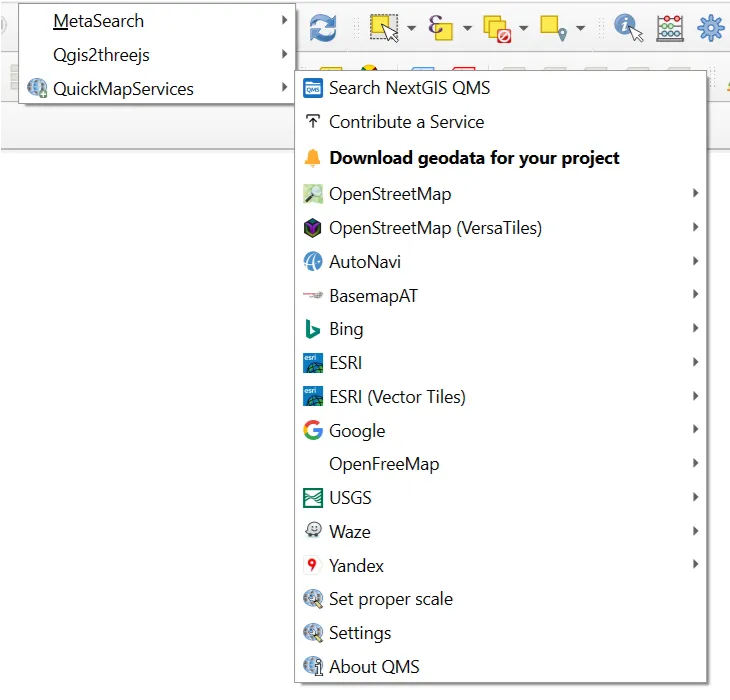
QuickMapServices
- Plugins > Manage and Install Plugins, search QuickMapServices, and install it.
- Open Web > QuickMapServices > Settings > More Services, and click Get contributed pack.
- Return to Web > QuickMapServices and choose OSM > OSM Standard. More basemaps appear in the list.
Add a tile layer yourself (XYZ Tiles)
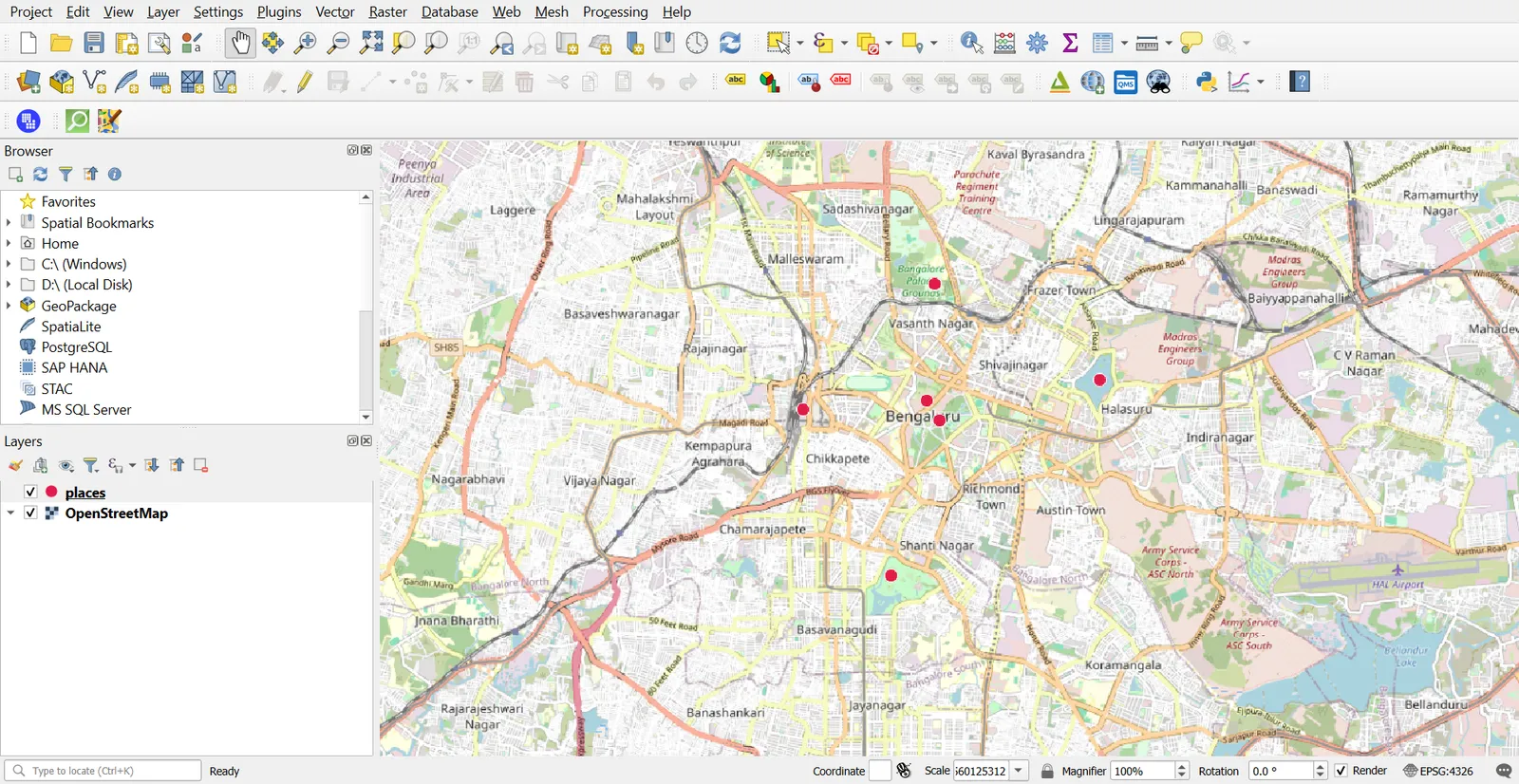
- Open the Browser panel, right-click XYZ Tiles > New Connection.
- Name:
OpenStreetMap. URL:https://tile.openstreetmap.org/{z}/{x}/{y}.png. - Double-click the new entry to add it to the map.
Use basemaps as a background to check position. Basemap tiles are pictures. You cannot select or query their features, and many providers limit heavy use, so do not pull them in bulk.
2. Capture data in Google Earth
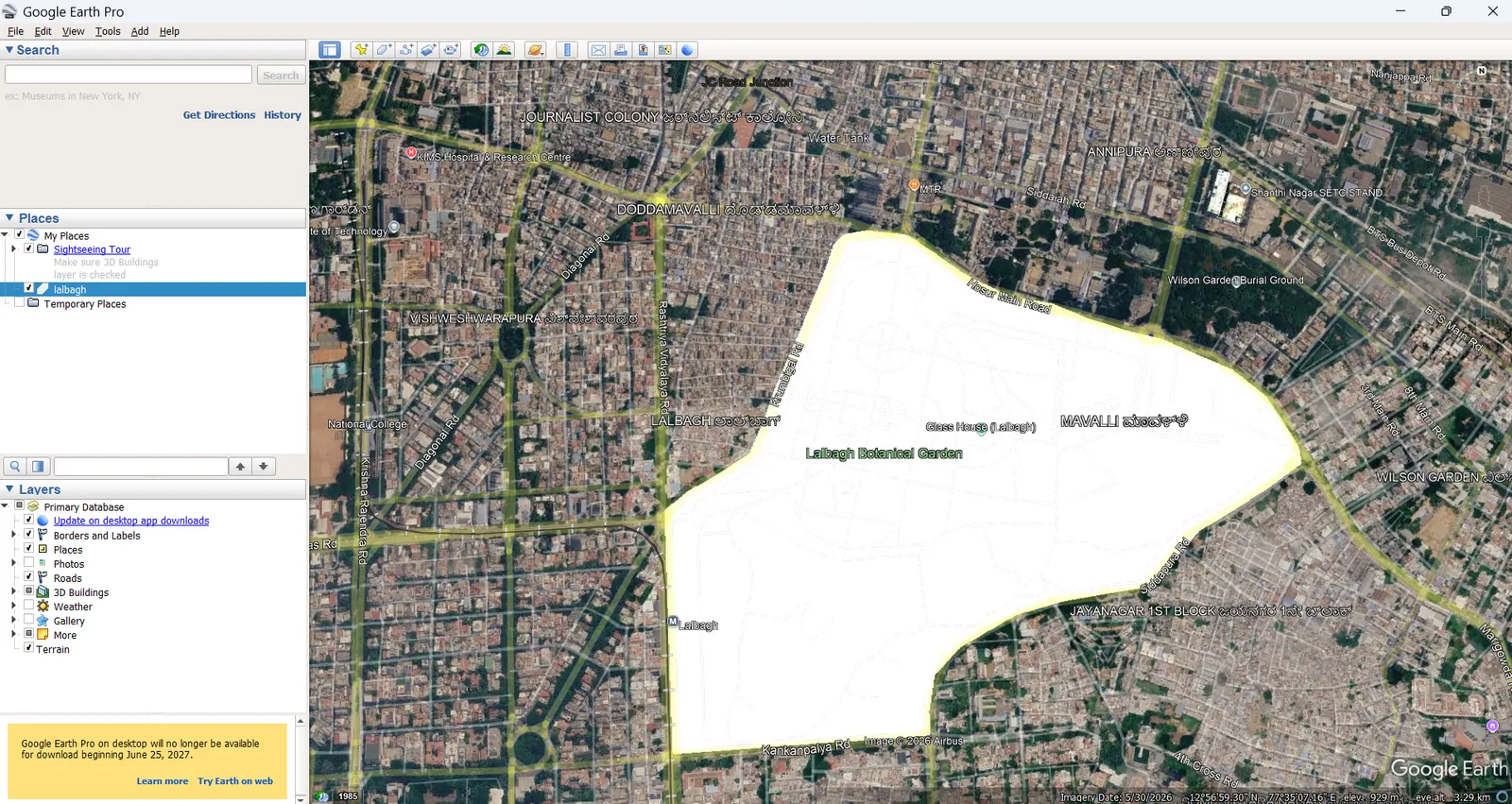
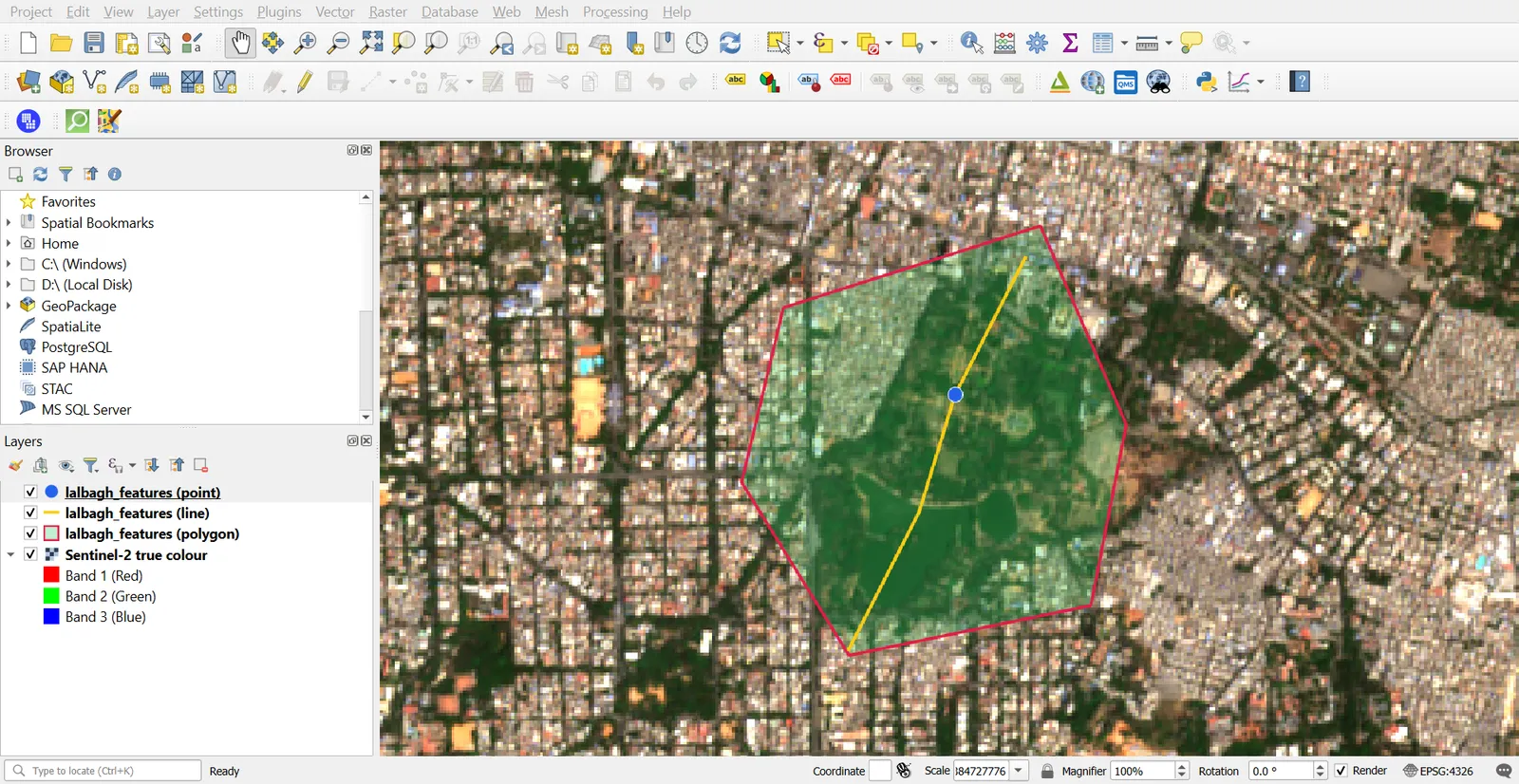
Google Earth Pro on the desktop lets you draw features and save them as KML.
- Install Google Earth Pro from Google, and search for your area (for example, Lalbagh Botanical Garden).
- Use the toolbar tools: Add Placemark for points, Add Path for lines, Add Polygon for areas.
- Name each feature and, optionally, write a description. These become attributes.
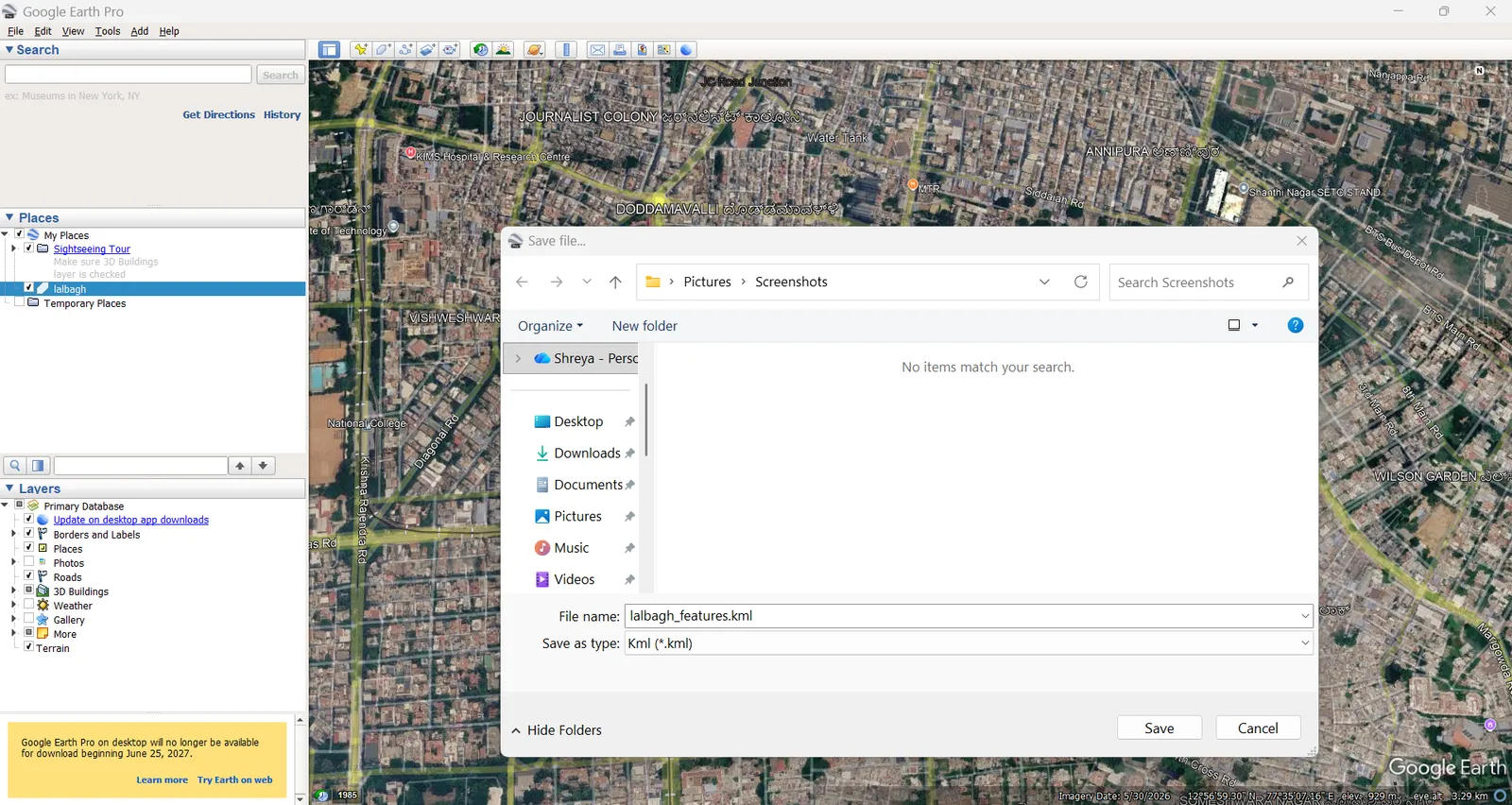
- In the Places panel, right-click the folder holding your features > Save Place As.
- Choose KML, name it
lalbagh_features.kml, and save.
Load the KML in QGIS
- Layer > Add Layer > Add Vector Layer, and choose
lalbagh_features.kml. - QGIS lists the sub-layers (points, lines and polygons are separate). Select the ones you need.
- Click Add.
KML is always in EPSG:4326, so QGIS places it correctly with no extra setup. The name and description columns hold the labels you typed in Google Earth.
Google My Maps
Create a map at mymaps.google.com, draw your features, then use the three-dot menu > Export to KML/KMZ. QGIS reads the KML directly. A KMZ is a zipped KML. QGIS can usually open it directly, and if it does not, rename it to .zip and extract the KML inside.
3. Download OpenStreetMap data
QuickOSM
- Install QuickOSM from the plugin manager. A new menu appears under Vector > QuickOSM.
- Open Vector > QuickOSM > QuickOSM.
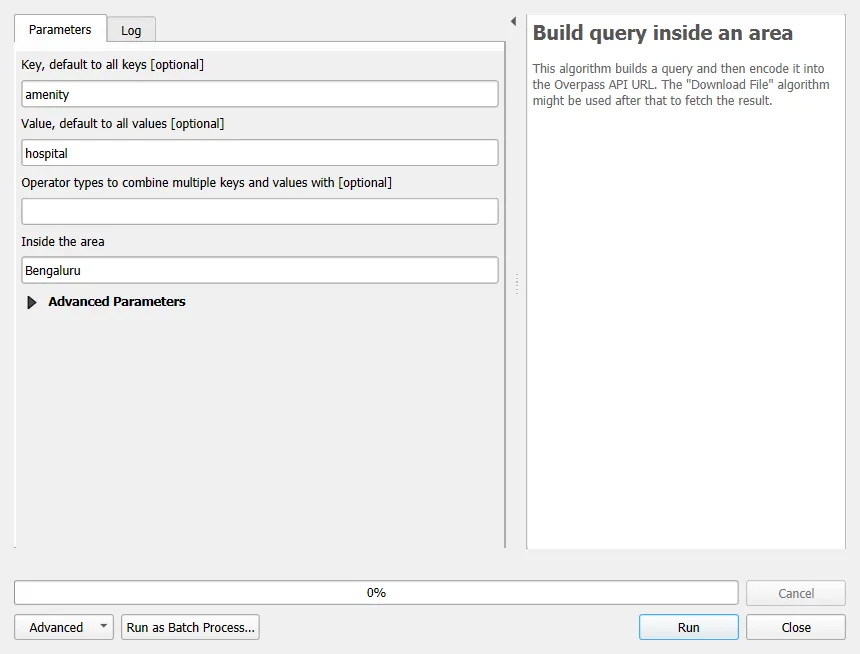
- Key:
amenity. Value:hospital. - In the area options, choose In and type
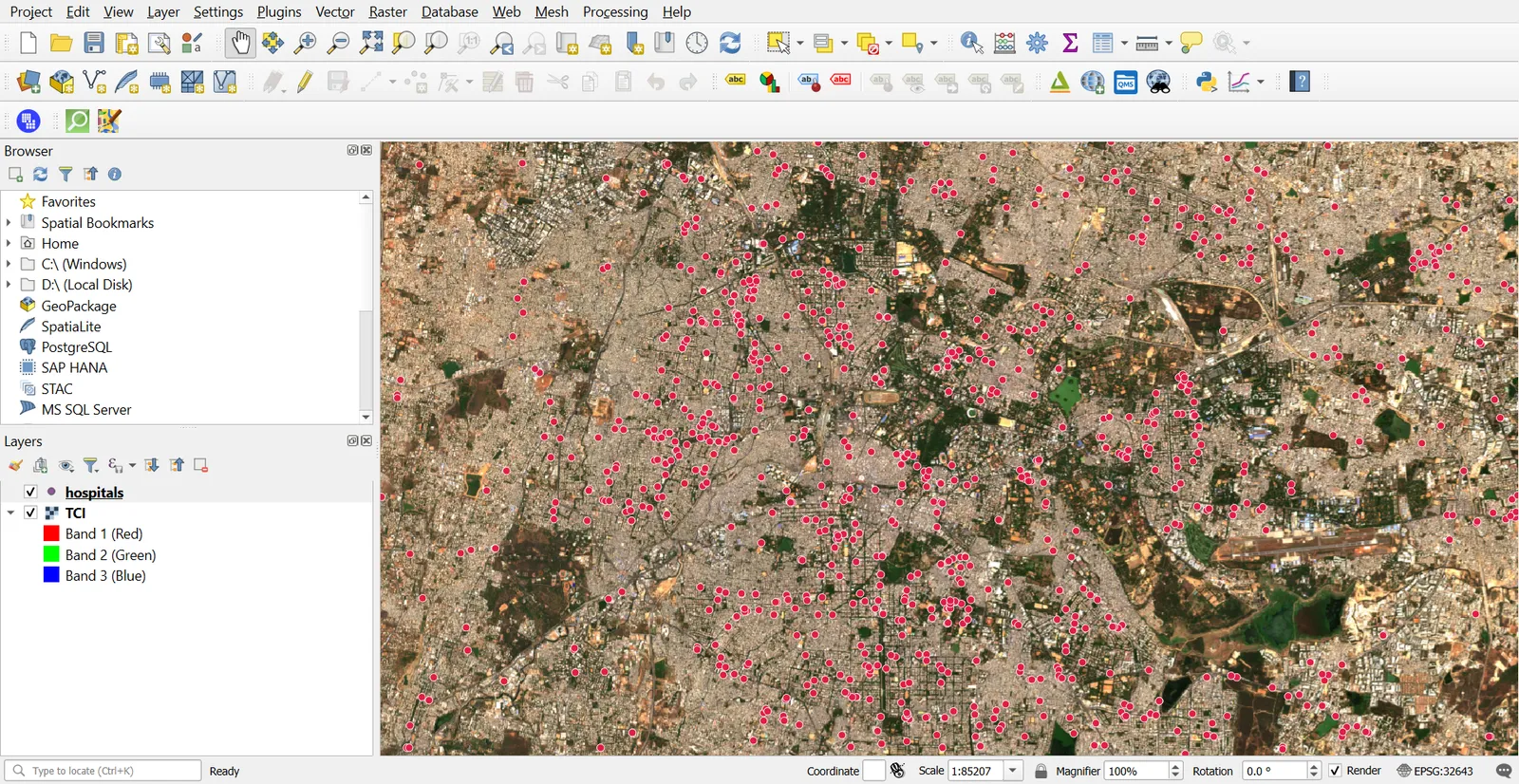
Bengaluru(or use Canvas Extent to limit to the map view). - Click Run Query.
QuickOSM creates up to three layers (points, lines and multipolygons), depending on how the mapped features are stored.
Other useful key and value pairs:
| Feature | Key | Value |
|---|---|---|
| Roads | highway | leave blank, or primary |
| Buildings | building | yes |
| Lakes | natural | water |
| Parks | leisure | park |
| Railway stations | railway | station |
Large areas with building data can return hundreds of thousands of features, so start with a small canvas extent.
Clean and save
OSM layers carry many tag columns, most of them empty. Remove the ones you do not need with Processing > Refactor Fields, then save to GeoPackage. Keep the OpenStreetMap attribution in your map: "© OpenStreetMap contributors".
4. Trace from imagery
To digitize a feature yourself (a building, a pond, a field), use a Sentinel-2 true-colour layer or a basemap you are allowed to trace.
- Create a new GeoPackage layer, as in Part 3.
- Add the basemap underneath.
- Turn on editing, snapping and the Add Polygon Feature tool.
- Zoom to about 1:1,000 and trace the outline.
- Fill in the attribute form, then save edits.
Sentinel-2 has 10 m pixels, so it suits large features such as lakes, fields and runways. It cannot resolve single buildings or narrow roads.
5. Convert between formats
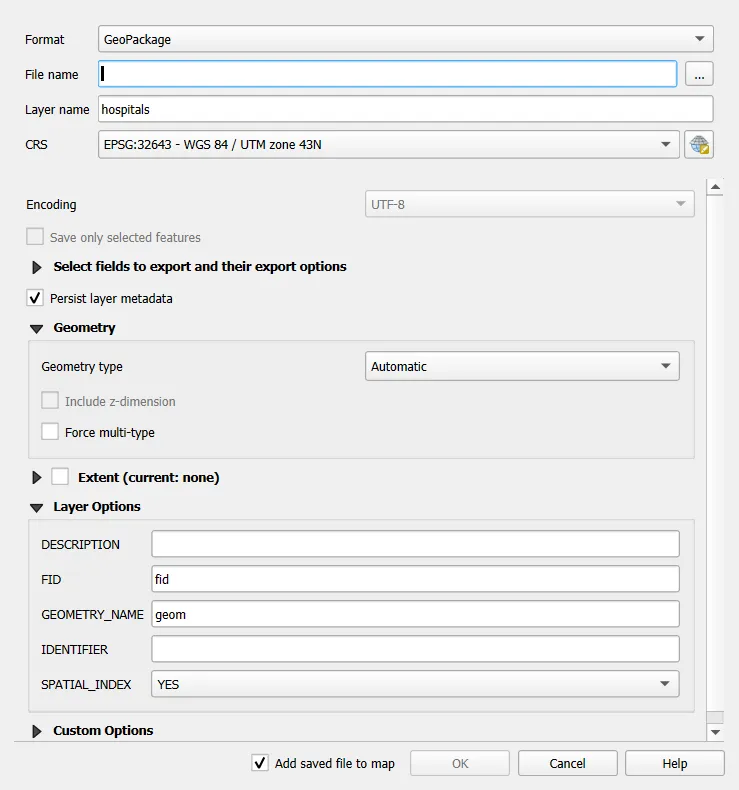
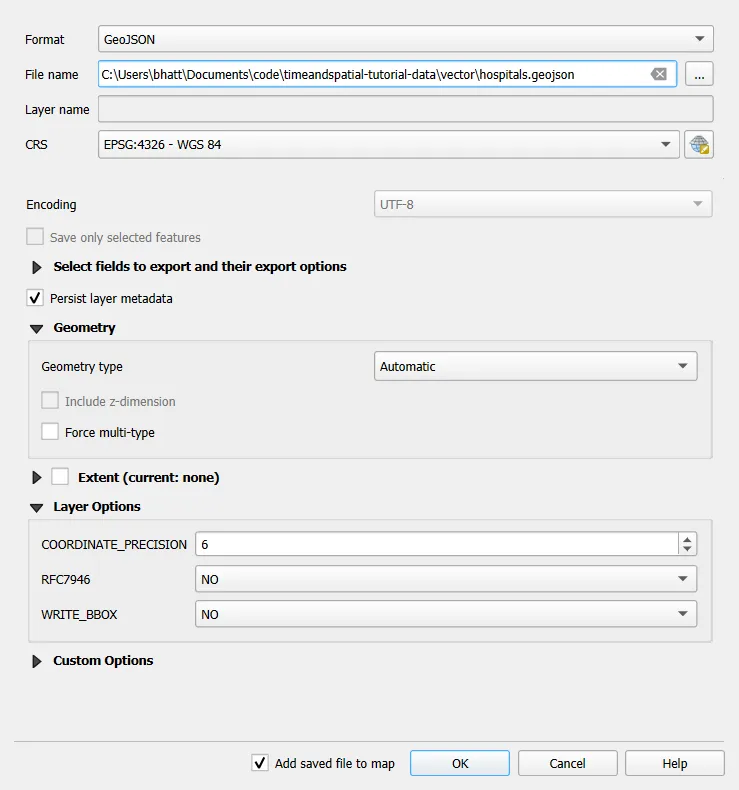
The quickest way to convert is Export > Save Features As.
- Right-click the layer > Export > Save Features As.
- Pick a format, a file name and a CRS.
- Check Select fields to export and Add saved file to map, then click OK.
Format notes
| Format | Extension | What to know |
|---|---|---|
| ESRI Shapefile | .shp, .shx, .dbf, .prj | Several files. Field names up to 10 characters. One geometry type per file |
| GeoPackage | .gpkg | One file. Many layers, rasters and styles. Open standard |
| GeoJSON | .geojson | Text file. Uses EPSG:4326. Easy for web maps. Large files get slow |
| KML | .kml | For Google Earth. EPSG:4326 only. Styles are basic |
| GML | .gml | XML based. Used in data exchange, often with an .xsd schema |
| CSV | .csv | Attributes only, unless you add geometry as WKT or X and Y columns |
Worked conversions
- Shapefile to GeoJSON: Save Features As, format GeoJSON, CRS EPSG:4326. In Layer Options, set COORDINATE_PRECISION to
6to keep the file small. Six decimal places in degrees is about 0.1 m. - GeoPackage to KML: format KML, CRS EPSG:4326. Set NameField to the column holding the name, so Google Earth shows labels.
- Layer to GML: format GML. Keep the generated
.xsdfile with it. - Layer to CSV with coordinates: format CSV, and in Layer Options set GEOMETRY to
AS_XYfor points. The output has X and Y columns.
Convert in bulk
Processing Toolbox > Batch Process on the Save Features As tool (or GDAL > Vector conversion > Convert format) runs the same conversion on many files at once.
Check after converting
- Open the converted file and compare feature count with the original.
- Check that attribute names did not change (Shapefile truncation is the usual cause).
- Confirm the CRS. A GeoJSON or KML will be EPSG:4326 even if the source was projected.
Common mistakes
- Assuming Google Maps data can be reused freely.
- Forgetting the OSM attribution on a published map.
- Querying a whole city for buildings in one go.
- Expecting a KML to keep QGIS styling.
- Converting to Shapefile and losing long field names.
- Not checking the CRS after converting.