

Part 14 used SQL on ordinary columns. PostGIS is an extension for the PostgreSQL database that adds geometry types, spatial functions and spatial indexes. It does inside the database what GeoPandas does in Python, and it handles large datasets that many users share. You will use it with pgAdmin (to write queries) and QGIS (to see the results on a map).
What is PostGIS?
PostGIS gives PostgreSQL:
- the
geometrytype (points, lines, polygons in a flat plane) and thegeographytype (the same on the globe, measured in metres) - hundreds of functions, all starting with
ST_(spatial type), such asST_Distance,ST_BufferandST_Within - spatial indexes that make location queries fast
Setup
Install PostgreSQL with PostGIS (the Windows installer offers PostGIS through Stack Builder, and Docker images such as postgis/postgis work on any system). In pgAdmin, create a database named gis_training, open the Query Tool, and run:
-- Step 1: switch on PostGIS in this database. This adds the spatial types and the ST_ functions. Run it once per database.
CREATE EXTENSION IF NOT EXISTS postgis;

-- Step 2: check that it works. This prints the PostGIS version number.
SELECT PostGIS_Version();
            postgis_version
---------------------------------------
 3.6 USE_GEOS=1 USE_PROJ=1 USE_STATS=1
(1 row)
Put this part's tables in their own schema, so they cannot clash with the gis schema of Part 14, even if you use the same database:
-- A schema is a folder inside the database. We keep this part's tables in their own folder, called "spatial".
CREATE SCHEMA IF NOT EXISTS spatial;

-- Tell PostgreSQL to look in "spatial" first, so we can write "cities" instead of "spatial.cities"
SET search_path TO spatial, public;
Repeat the SET search_path line when you open a new Query Tool tab. The PostGIS functions live in public, which is why it stays in the path.
A single script with every query on this page, with short notes as comments, is available: download the Part 15 SQL script. Open it in the Query Tool, or copy the blocks one at a time.
The first line switches PostGIS on for this database, and the second confirms it works. All queries in this part are written for PostGIS. The queries were run on PostgreSQL 17 with PostGIS 3.6, and the results shown are what they returned. Distances and areas are rounded, because tiny differences between versions are normal.
1. Create a spatial table
-- Step 1: create a table. The last column, geom, holds a point on the map.
-- geometry(Point, 4326) means: the shape is a Point, and its coordinates are longitude/latitude (code 4326).
CREATE TABLE cities (
    city_id    SERIAL PRIMARY KEY,         -- an id that counts up by itself: 1, 2, 3...
    city       TEXT NOT NULL,
    population INTEGER,
    geom       geometry(Point, 4326)
);

-- Step 2: add 8 rows. ST_MakePoint(x, y) makes a point; x is longitude and comes FIRST, then latitude.
-- ST_SetSRID(point, 4326) labels the point with its coordinate system.
INSERT INTO cities (city, population, geom) VALUES
    ('Bengaluru', 8443675,  ST_SetSRID(ST_MakePoint(77.5946, 12.9716), 4326)),
    ('Mysuru',     920550,  ST_SetSRID(ST_MakePoint(76.6394, 12.2958), 4326)),
    ('Mangaluru',  484785,  ST_SetSRID(ST_MakePoint(74.8560, 12.9141), 4326)),
    ('Hubballi',   943857,  ST_SetSRID(ST_MakePoint(75.1240, 15.3647), 4326)),
    ('Chennai',   4646732,  ST_SetSRID(ST_MakePoint(80.2707, 13.0827), 4326)),
    ('Coimbatore',1050721,  ST_SetSRID(ST_MakePoint(76.9558, 11.0168), 4326)),
    ('Mumbai',   12442373,  ST_SetSRID(ST_MakePoint(72.8777, 19.0760), 4326)),
    ('Delhi',    11034555,  ST_SetSRID(ST_MakePoint(77.2090, 28.6139), 4326));
geometry(Point, 4326) declares that the column holds points in EPSG:4326, so PostGIS rejects anything else. ST_MakePoint(x, y) builds a point, with longitude first, as in GeoPandas. It has no CRS, so ST_SetSRID(..., 4326) attaches it. SRID (spatial reference identifier) is PostGIS's name for the EPSG code of the CRS, and the two numbers are the same for the common systems.
Inspect what you stored:
-- Look inside the geometry column. Each ST_ function answers one question about a shape:
SELECT city,
       ST_AsText(geom) AS wkt,     -- the shape written as readable text (WKT)
       ST_SRID(geom)   AS srid,    -- its coordinate system code
       ST_X(geom)      AS lon,     -- x of the point
       ST_Y(geom)      AS lat      -- y of the point
FROM cities
LIMIT 2;                           -- only the first 2 rows
   city    |          wkt           | srid |   lon   |   lat
-----------+------------------------+------+---------+---------
 Bengaluru | POINT(77.5946 12.9716) | 4326 | 77.5946 | 12.9716
 Mysuru    | POINT(76.6394 12.2958) | 4326 | 76.6394 | 12.2958
(2 rows)
WKT (well known text) is the plain text form of a geometry, such as POINT(77.5946 12.9716). It is also what GeoPandas prints. Create the spatial index right away:
-- A spatial index makes map searches fast on big tables. GIST is the index type used for shapes.
-- Make one for every geometry column you search.
CREATE INDEX cities_geom_idx ON cities USING GIST (geom);
A GiST index lets the database find nearby features without comparing every pair. On a table of a few rows you will not see a difference, and on millions of rows the difference is huge. Make one for every geometry column you query.
2. Distance: geometry versus geography
On a geometry column in EPSG:4326, ST_Distance returns degrees, which is not a useful distance. There are two correct ways to get metres.
Cast to geography, which measures on the ellipsoid:
-- Distance from Bengaluru to every other city, in kilometres.
-- "cities a, cities b" uses the same table twice: a = the first city, b = the others.
-- ::geography converts the points to the Earth's curved surface, so distances come out in metres.
-- Dividing by 1000 gives km, and ROUND removes the decimals.
SELECT b.city,
       ROUND(ST_Distance(a.geom::geography, b.geom::geography) / 1000) AS km
FROM cities a, cities b
WHERE a.city = 'Bengaluru' AND b.city <> 'Bengaluru'     -- <> means "not equal to"
ORDER BY km;                                              -- nearest first
    city    |  km
------------+------
 Mysuru     |  128
 Coimbatore |  227
 Chennai    |  291
 Mangaluru  |  297
 Hubballi   |  376
 Mumbai     |  843
 Delhi      | 1732
(7 rows)
::geography is PostgreSQL's cast operator. The distance is the shortest path on the WGS 84 ellipsoid, in metres, and / 1000 turns it into kilometres. It is correct anywhere on Earth.
The second way is to transform to a projected CRS and measure on the plane, which is what Part 10 did in GeoPandas:
-- The same distance, measured on a flat map instead. ST_Transform changes the coordinates to UTM zone 43N
-- (code 32643, in metres) first. The answer is close, but it drifts when cities are far from the zone's centre.
SELECT b.city,
       ROUND(ST_Distance(ST_Transform(a.geom, 32643), ST_Transform(b.geom, 32643)) / 1000) AS km
FROM cities a, cities b
WHERE a.city = 'Bengaluru' AND b.city IN ('Mysuru', 'Mangaluru', 'Hubballi');
   city    | km
-----------+-----
 Mysuru    | 128
 Mangaluru | 297
 Hubballi  | 376
(3 rows)
ST_Transform(geom, 32643) is the SQL form of to_crs. The two methods agree here because the cities lie inside UTM zone 43N. The geography method is simpler for data spread over a large area. A projected CRS is better for area and for many repeated measurements, because the functions run faster.
3. Within a distance and nearest neighbours
ST_DWithin asks whether two features are within a distance. It uses the spatial index, so prefer it over ST_Distance(...) < x.
-- Which cities are within 250 km of Bengaluru?
-- ST_DWithin(shape1, shape2, distance) is True when the two are that close (metres, for geography).
-- It is faster than comparing ST_Distance, because it can use the spatial index.
SELECT b.city,
       ROUND(ST_Distance(a.geom::geography, b.geom::geography) / 1000) AS km
FROM cities a
JOIN cities b ON ST_DWithin(a.geom::geography, b.geom::geography, 250000)    -- 250000 m = 250 km
WHERE a.city = 'Bengaluru' AND b.city <> 'Bengaluru'
ORDER BY km;
    city    | km
------------+-----
 Mysuru     | 128
 Coimbatore | 227
(2 rows)
With geography the distance, 250,000, is in metres. With a projected geometry it is in the CRS units. The three nearest cities to Bengaluru use ORDER BY with LIMIT:
-- The 3 nearest cities to Bengaluru. The <-> sign means "distance between", and ORDER BY it
-- puts the closest first. LIMIT 3 keeps the first three.
SELECT b.city
FROM cities a, cities b
WHERE a.city = 'Bengaluru' AND b.city <> 'Bengaluru'
ORDER BY a.geom::geography <-> b.geom::geography
LIMIT 3;
    city
------------
 Mysuru
 Coimbatore
 Chennai
(3 rows)
The <-> operator is the distance for index based nearest neighbour searches, and it makes this query fast on large tables.
4. Polygons, points and area
The next examples use four district polygons and some hospitals, stored in EPSG:32643 in metres. The data is invented, and the districts are the same ones as in Parts 11 and 13.
-- Test data for the next queries, in metres (UTM 43N). First the districts, as rectangles.
-- ST_MakeEnvelope(left, bottom, right, top, crs) draws a rectangle.
CREATE TABLE districts (
    name TEXT PRIMARY KEY, zone_code INT, density REAL,
    geom geometry(Polygon, 32643)
);
INSERT INTO districts VALUES
    ('North', 1, 320.5, ST_MakeEnvelope(700000, 1430000, 760000, 1460000, 32643)),
    ('South', 2,  85.0, ST_MakeEnvelope(700000, 1400000, 740000, 1430000, 32643)),
    ('East',  3, 140.2, ST_MakeEnvelope(740000, 1400000, 760000, 1430000, 32643)),
    ('West',  2,  60.7, ST_MakeEnvelope(670000, 1400000, 700000, 1460000, 32643));

-- Then 7 hospitals as points. H7 is placed far away on purpose, outside every district.
CREATE TABLE hospitals (
    hospital TEXT PRIMARY KEY, geom geometry(Point, 32643)
);
INSERT INTO hospitals VALUES
    ('H1', ST_SetSRID(ST_MakePoint(715000, 1410000), 32643)),
    ('H2', ST_SetSRID(ST_MakePoint(725000, 1440000), 32643)),
    ('H3', ST_SetSRID(ST_MakePoint(750000, 1415000), 32643)),
    ('H4', ST_SetSRID(ST_MakePoint(685000, 1445000), 32643)),
    ('H5', ST_SetSRID(ST_MakePoint(705000, 1450000), 32643)),
    ('H6', ST_SetSRID(ST_MakePoint(730000, 1420000), 32643)),
    ('H7', ST_SetSRID(ST_MakePoint(800000, 1500000), 32643));

-- A spatial index on each table
CREATE INDEX districts_geom_idx ON districts USING GIST (geom);
CREATE INDEX hospitals_geom_idx ON hospitals USING GIST (geom);
ST_MakeEnvelope(xmin, ymin, xmax, ymax, srid) builds a rectangle, which is a quick way to make test polygons. Real polygons come from a file loaded with QGIS (Database > DB Manager) or ogr2ogr or shp2pgsql.
Area and length use the units of the CRS, which is why the layer is in metres:
-- ST_Area gives the area in square metres here (the CRS is in metres). Divide by 1,000,000 for km2.
SELECT name, ROUND(ST_Area(geom) / 1000000) AS area_km2
FROM districts
ORDER BY name;
 name  | area_km2
-------+----------
 East  |      600
 North |     1800
 South |     1200
 West  |     1800
(4 rows)
pgAdmin can also draw geometry. Run a query that returns a geometry column, then click the map icon in that column's header. A Geometry Viewer tab opens next to the Data Output tab and draws every row of the result.
-- A spatial join: count the hospitals inside each district.
-- ST_Within(a, b) is True when shape a lies completely inside shape b.
-- LEFT JOIN keeps every district, even one with no hospital (its count is then 0).
-- GROUP BY gathers the matching rows of each district into one result row, so COUNT can count them.
SELECT d.name, d.zone_code,
       ROUND(ST_Area(d.geom) / 1000000) AS area_km2,
       COUNT(h.hospital) AS hospitals,
       d.geom                                    -- keep the shape, so QGIS can draw this result as a map
FROM districts d
LEFT JOIN hospitals h ON ST_Within(h.geom, d.geom)
GROUP BY d.name, d.zone_code, d.geom
ORDER BY d.name;
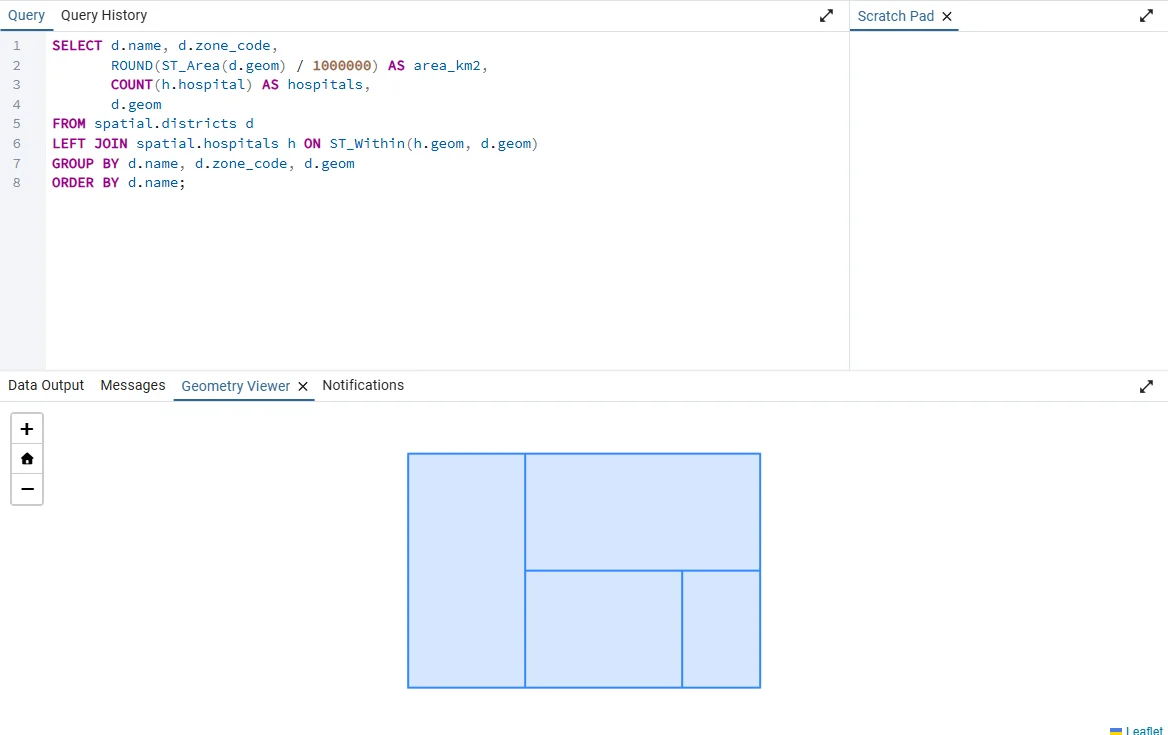
The viewer is a quick check that a query returns the shapes you expect, with a basic map. For real map work, load the table in QGIS (see the last section).
ST_Length does the same for lines. For polygons stored in degrees, cast to geography first: ST_Area(geom::geography) is in square metres.
5. Spatial join: points in polygons
A spatial join uses a spatial function in the ON condition instead of a matching key. This is the SQL form of sjoin in Part 11.
-- The same count without the extra columns: the simplest version of the query above
SELECT d.name, COUNT(h.hospital) AS hospitals
FROM districts d
LEFT JOIN hospitals h ON ST_Within(h.geom, d.geom)
GROUP BY d.name
ORDER BY d.name;
 name  | hospitals
-------+-----------
 East  |         1
 North |         2
 South |         2
 West  |         1
(4 rows)
ST_Within(a, b) is true when a lies inside b. Related functions are ST_Intersects (any shared space, the most common choice and the fastest), ST_Contains (the reverse of within), ST_Touches and ST_Crosses. A LEFT JOIN keeps districts with no hospital and counts them as 0. Find the hospitals that are in no district:
-- Which hospitals fall outside every district? After a LEFT JOIN, hospitals with no matching district
-- have an empty (NULL) district name. "IS NULL" is how SQL tests for empty.
SELECT h.hospital
FROM hospitals h
LEFT JOIN districts d ON ST_Within(h.geom, d.geom)
WHERE d.name IS NULL;
 hospital
----------
 H7
(1 row)
6. Buffer, intersection and dissolve
ST_Buffer(geom, distance) makes a zone around a feature, with the distance in CRS units:
-- ST_Buffer(shape, distance) draws a zone around a shape (here a 5 km circle around hospital H1).
-- We then measure the zone's area, which should be a little under pi x 5 x 5 = 78.5 km2.
SELECT hospital, ROUND(ST_Area(ST_Buffer(geom, 5000)) / 1000000) AS buffer_km2
FROM hospitals
WHERE hospital = 'H1';
 hospital | buffer_km2
----------+------------
 H1       |         78
(1 row)
A circle of radius 5 km has an area of about 78.5 km2, and the buffer is a polygon with many sides, so it is very slightly smaller. Add a flood zone and measure how much of each district it covers:
-- Step 1: make a one-row table with a flood zone, drawn as a rectangle.
-- 'River flood'::text just says "treat this as text".
CREATE TABLE flood AS
SELECT 'River flood'::text AS name, ST_MakeEnvelope(725000, 1400000, 745000, 1460000, 32643) AS geom;

-- Step 2: for each district the flood touches (ST_Intersects), cut out the shared part (ST_Intersection)
-- and measure it.
SELECT d.name,
       ROUND(ST_Area(ST_Intersection(d.geom, f.geom)) / 1000000) AS flooded_km2
FROM districts d
JOIN flood f ON ST_Intersects(d.geom, f.geom)
ORDER BY d.name;
 name  | flooded_km2
-------+-------------
 East  |         150
 North |         600
 South |         450
(3 rows)
ST_Intersection(a, b) returns the shared geometry, and ST_Area measures it. The join with ST_Intersects first removes the districts the flood does not touch (West), which keeps the query fast and avoids empty geometries. ST_Difference(a, b) returns the part of a outside b, and the order of the arguments matters.
Dissolve with the aggregate ST_Union and GROUP BY:
-- ST_Union merges shapes into one (like Dissolve in QGIS). GROUP BY zone_code does it once per zone.
SELECT zone_code,
       COUNT(*) AS districts,
       ROUND(ST_Area(ST_Union(geom)) / 1000000) AS area_km2
FROM districts
GROUP BY zone_code
ORDER BY zone_code;
 zone_code | districts | area_km2
-----------+-----------+----------
         1 |         1 |     1800
         2 |         2 |     3000
         3 |         1 |      600
(3 rows)
ST_Union merges the geometries within each group, the SQL version of dissolve. To save the merged shapes, put the same query in a CREATE TABLE ... AS SELECT and select ST_Union(geom) AS geom.
7. Check and repair geometry
Real data contains invalid geometries, such as polygons that cross themselves. They make functions fail or return wrong results.
-- Step 1: check every shape. A broken shape (for example a bow-tie polygon) can give wrong answers.
SELECT name, ST_IsValid(geom) AS valid, ST_IsValidReason(geom) AS reason
FROM districts;

-- Step 2: repair the invalid ones. Here nothing is broken, so this changes 0 rows.
UPDATE districts SET geom = ST_MakeValid(geom) WHERE NOT ST_IsValid(geom);
 name  | valid |     reason
-------+-------+----------------
 North | t     | Valid Geometry
 South | t     | Valid Geometry
 East  | t     | Valid Geometry
 West  | t     | Valid Geometry
(4 rows)
Run the check after loading data from a file, and repair only the rows that need it. Also check the CRS of every table with SELECT Find_SRID('spatial', 'districts', 'geom'); before combining tables, because mixing SRIDs causes the error Operation on mixed SRID geometries. Use ST_Transform to bring them together.
8. See the result: QGIS and GeoPandas
In QGIS, use Layer > Add Layer > Add PostGIS Layers, pick the connection, and choose the tables in the spatial schema. A saved connection also appears in the Browser panel, where you can drag a table onto the map. Database > DB Manager has an SQL window: run a query that returns a geometry, tick Load as new layer, and choose the geometry column and a unique ID column when asked.
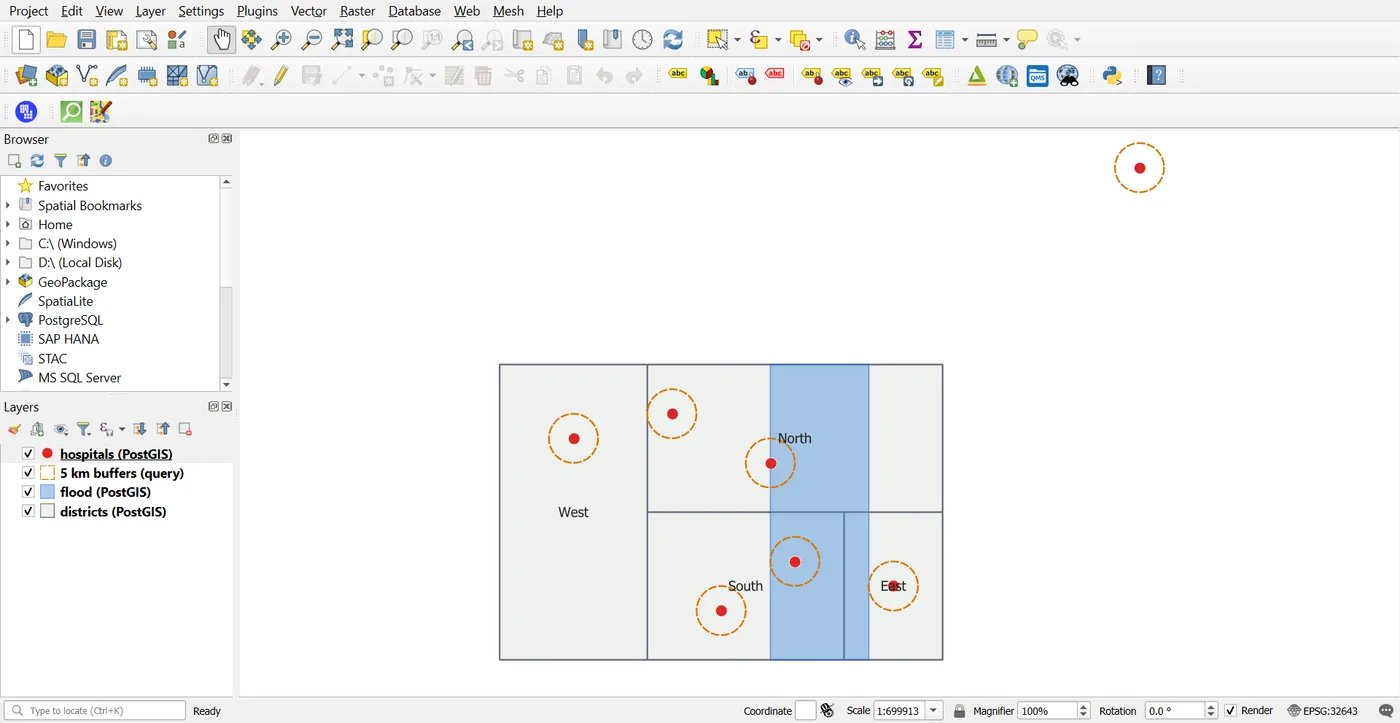
ST_Buffer(geom, 5000) on the hospitalsThe layers in the Layers panel point at the database, not at copies of the data, so an edit made in SQL shows up after the map is refreshed. Hospital H7 lies outside every district, which is the one that the spatial join in section 5 left without a district.
In Python, GeoPandas reads a query straight into a GeoDataFrame and writes tables back. This needs the packages sqlalchemy, psycopg2-binary and geoalchemy2 (pip install sqlalchemy psycopg2-binary geoalchemy2) and your own connection details. Name the driver in the URL, as below, because SQLAlchemy may otherwise look for a different one:
import geopandas as gpd
from sqlalchemy import create_engine

engine = create_engine("postgresql+psycopg2://user:password@localhost:5432/gis_training")

sql = "SELECT name, density, geom FROM spatial.districts WHERE density > 100"
dense = gpd.read_postgis(sql, engine, geom_col="geom")
print(dense.crs, len(dense))

dense.to_postgis("dense_districts", engine, schema="spatial", if_exists="replace")
The first print shows EPSG:32643 2, the CRS and the two districts with a density above 100, and to_postgis creates a new table with its geometry column and the right SRID.
Never put real passwords in a script you share. Read them from an environment variable.
Practice
The tables from this page are enough for all of these. Try each one before you open the solutions.
- List the cities within 400 km of Chennai, with their distance in km.
- Count the hospitals per district and add the number of hospitals per 1,000 km2.
- Find the districts that intersect a 10 km buffer around hospital H1.
- Compare the planar distance (after
ST_Transform) with the geography distance for Bengaluru and Delhi. - Create a table of the dissolved zones with
CREATE TABLE ... AS SELECT, and add a GiST index to it.
Solutions
-- 1: cities within 400 km of Chennai, nearest first
SELECT b.city,
       ROUND(ST_Distance(a.geom::geography, b.geom::geography) / 1000) AS km
FROM cities a
JOIN cities b ON ST_DWithin(a.geom::geography, b.geom::geography, 400000)
WHERE a.city = 'Chennai' AND b.city <> 'Chennai'
ORDER BY km;

-- 2: hospitals per 1,000 km2 in each district (count divided by area in km2, times 1000)
SELECT d.name,
       COUNT(h.hospital) AS hospitals,
       ROUND((COUNT(h.hospital) / (ST_Area(d.geom) / 1000000) * 1000)::numeric, 2) AS per_1000_km2
FROM districts d
LEFT JOIN hospitals h ON ST_Within(h.geom, d.geom)
GROUP BY d.name, d.geom
ORDER BY d.name;

-- 3: districts that touch a 10 km zone around hospital H1
SELECT d.name
FROM districts d
JOIN hospitals h ON h.hospital = 'H1' AND ST_Intersects(d.geom, ST_Buffer(h.geom, 10000))
ORDER BY d.name;

-- 4: Bengaluru to Delhi, measured on a flat map (planar) and on the curved Earth (geography)
SELECT ROUND(ST_Distance(ST_Transform(a.geom, 32643), ST_Transform(b.geom, 32643)) / 1000) AS planar_km,
       ROUND(ST_Distance(a.geom::geography, b.geom::geography) / 1000) AS geography_km
FROM cities a, cities b
WHERE a.city = 'Bengaluru' AND b.city = 'Delhi';

-- 5: save the merged zones as a new table, give it an index, and list the areas
CREATE TABLE zones AS
SELECT zone_code, ST_Union(geom) AS geom
FROM districts
GROUP BY zone_code;

CREATE INDEX zones_geom_idx ON zones USING GIST (geom);

SELECT zone_code, ROUND(ST_Area(geom) / 1000000) AS area_km2 FROM zones ORDER BY zone_code;
Common mistakes
- Using
ST_Distanceon EPSG:4326 geometries and reading the result as metres. - Putting latitude first in
ST_MakePoint. The order is longitude, latitude. - Forgetting
ST_SetSRID, leaving the SRID at 0. - Mixing SRIDs in one query.
- Forgetting the spatial index on large tables.
- Using
ST_Distance(a, b) < xinstead ofST_DWithin, which cannot use the index. - Running
ST_Intersectionon every pair without anST_Intersectsjoin to filter first.
Key takeaways
The QGIS series does the same operations through menus. Take one workflow from it that you know well and repeat it in code on your own data.
Next: Rasterio for beginners.