

A spreadsheet or CSV holds one table. A database holds many related tables, keeps them consistent, and answers questions quickly even with millions of rows. SQL (Structured Query Language) is the language for asking those questions. GIS uses it constantly: GeoPackage files are SQLite databases, PostGIS adds geometry to PostgreSQL, and QGIS, ArcGIS and GDAL all accept SQL.
What is SQL?
SQL describes what you want, and the database decides how to get it. A query reads almost like English:
SELECT city_name, population
FROM cities
WHERE population > 1000000
ORDER BY population DESC;
Read it as: take these columns, from this table, keep rows that match, in this order. A semicolon ends the statement. Keywords such as SELECT are usually written in capitals, which is a habit that makes queries easier to read, and PostgreSQL does not require it.
What you need
- PostgreSQL. Part 15 adds PostGIS to it. The Windows installer from postgresql.org includes pgAdmin.
- pgAdmin 4, the graphical client. It shows your databases as a tree and has a Query Tool where you type SQL.
You do not need anything else. Every query on this page is plain PostgreSQL, so you can copy it into the Query Tool and run it. A single file with all the queries, theory notes and solutions is also available: download the Part 14 SQL script.
Run SQL in pgAdmin
- Open pgAdmin. In the Object Explorer on the left, right-click Servers, choose Register > Server, and give it a name. On the Connection tab enter host
localhost, port5432(the default, yours may differ), userpostgresand the password you set during installation, then Save. - Open the server, right-click Databases, choose Create > Database, and name it
gis_training. - Select
gis_training, then open Tools > Query Tool. - Paste a query into the editor and press F5 (or the Play button). The rows appear in the Data Output tab below, and messages and errors appear in the Messages tab.
Run the blocks on this page in order, because later queries use the tables made by earlier ones. The results shown under each block come from running them on PostgreSQL 17. pgAdmin shows them in a grid, and this page shows the same rows as plain text.
1. Create a schema and tables
A schema is a folder inside a database that groups tables. Put your GIS training tables in one called gis so they stay apart from everything else.
-- A schema is a folder inside the database. We create one called "gis" for this part.
CREATE SCHEMA IF NOT EXISTS gis;

-- Look in "gis" first, so "cities" means gis.cities. Repeat this line in every new Query Tool tab.
SET search_path TO gis, public;
SET search_path tells PostgreSQL to look in gis first, so you can write cities instead of gis.cities. It lasts for the current connection. In pgAdmin, each Query Tool tab is one connection, so repeat this line when you open a new tab.
A table has columns, and each column has a data type.
-- Step 1: create two tables. Each column has a name and a data type (INTEGER, TEXT, NUMERIC...).
-- The words after the type are rules:
--   PRIMARY KEY  every row has a unique, non-empty id
--   NOT NULL     this value cannot be left empty
--   UNIQUE       no two rows can have the same value
--   REFERENCES   the value must exist in another table (links cities to states)
--   CHECK        the value must pass a test (latitude between -90 and 90)
CREATE TABLE states (
    state_id   INTEGER PRIMARY KEY,
    state_name TEXT NOT NULL UNIQUE,
    region     TEXT
);

CREATE TABLE cities (
    city_id    INTEGER PRIMARY KEY,
    city_name  TEXT NOT NULL,
    state_id   INTEGER REFERENCES states (state_id),
    population INTEGER,
    area_km2   NUMERIC(8, 1),                       -- up to 8 digits, 1 after the decimal point
    latitude   DOUBLE PRECISION CHECK (latitude BETWEEN -90 AND 90),
    longitude  DOUBLE PRECISION CHECK (longitude BETWEEN -180 AND 180)
);

-- Step 2: add rows. States first, because cities refer to them.
INSERT INTO states (state_id, state_name, region) VALUES
    (1, 'Karnataka', 'South'),
    (2, 'Tamil Nadu', 'South'),
    (3, 'Maharashtra', 'West'),
    (4, 'Delhi', 'North'),
    (5, 'Goa', 'West');

-- Step 3: add the cities. NULL means "no value". Ooty has no population or area on purpose.
INSERT INTO cities (city_id, city_name, state_id, population, area_km2, latitude, longitude) VALUES
    (1, 'Bengaluru',  1,  8443675,  741, 12.9716, 77.5946),
    (2, 'Mysuru',     1,   920550,  152, 12.2958, 76.6394),
    (3, 'Mangaluru',  1,   484785,  132, 12.9141, 74.8560),
    (4, 'Chennai',    2,  4646732,  426, 13.0827, 80.2707),
    (5, 'Coimbatore', 2,  1050721,  246, 11.0168, 76.9558),
    (6, 'Mumbai',     3, 12442373,  603, 19.0760, 72.8777),
    (7, 'Pune',       3,  3124458,  331, 18.5204, 73.8567),
    (8, 'Delhi',      4, 11034555, 1484, 28.6139, 77.2090),
    (9, 'Panaji',     5,   114759,   21, 15.4909, 73.8278),
    (10, 'Ooty',      2,      NULL, NULL, 11.4102, 76.6950);
CREATE TABLE defines the columns. A PRIMARY KEY identifies each row uniquely. NOT NULL forbids missing values, UNIQUE forbids duplicates, CHECK enforces a rule (a latitude outside the range is rejected) and REFERENCES makes a foreign key, so each city must belong to a state that exists. NUMERIC(8, 1) is an exact decimal with up to 8 digits and one after the point, and DOUBLE PRECISION is the usual type for coordinates. INSERT INTO ... VALUES adds rows. The populations are rounded 2011 census figures for practice, and Ooty has no population or area on purpose.
For automatic IDs, PostgreSQL offers GENERATED ALWAYS AS IDENTITY (or the older SERIAL). The IDs are typed by hand here so that the examples stay predictable.
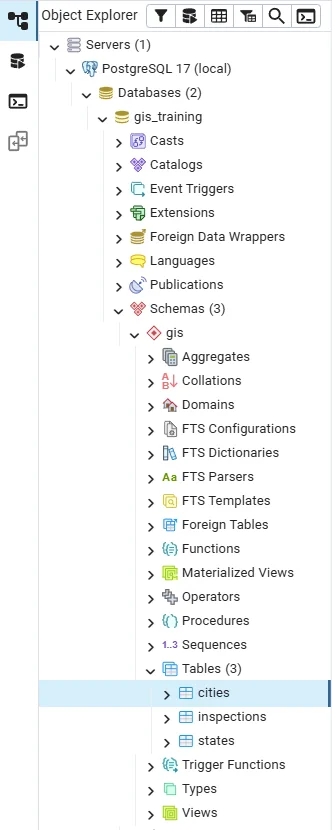
Refresh the Object Explorer (right-click the schema, Refresh) and open Schemas > gis > Tables to see your tables. Right-click a table and choose View/Edit Data > All Rows to browse it.
2. SELECT
-- The simplest query: SELECT = "show me", * = "all columns", FROM = "which table"
SELECT * FROM cities;
 city_id | city_name  | state_id | population | area_km2 | latitude | longitude
---------+------------+----------+------------+----------+----------+-----------
       1 | Bengaluru  |        1 |    8443675 |    741.0 |  12.9716 |   77.5946
       2 | Mysuru     |        1 |     920550 |    152.0 |  12.2958 |   76.6394
       3 | Mangaluru  |        1 |     484785 |    132.0 |  12.9141 |    74.856
       4 | Chennai    |        2 |    4646732 |    426.0 |  13.0827 |   80.2707
       5 | Coimbatore |        2 |    1050721 |    246.0 |  11.0168 |   76.9558
       6 | Mumbai     |        3 |   12442373 |    603.0 |   19.076 |   72.8777
       7 | Pune       |        3 |    3124458 |    331.0 |  18.5204 |   73.8567
       8 | Delhi      |        4 |   11034555 |   1484.0 |  28.6139 |    77.209
       9 | Panaji     |        5 |     114759 |     21.0 |  15.4909 |   73.8278
      10 | Ooty       |        2 |            |          |  11.4102 |    76.695
(10 rows)
* means all columns. Name the columns you want and rename them with AS:
-- Choose columns by name. AS gives a column a nicer heading. LIMIT shows only the first 4 rows.
SELECT city_name AS place, population AS people FROM cities LIMIT 4;
   place   | people
-----------+---------
 Bengaluru | 8443675
 Mysuru    |  920550
 Mangaluru |  484785
 Chennai   | 4646732
(4 rows)
LIMIT restricts the number of rows. In SQL Server the same idea is written TOP 4. Use DISTINCT to see each value once:
-- DISTINCT shows each value once. ORDER BY sorts the result.
SELECT DISTINCT region FROM states ORDER BY region;
 region
--------
 North
 South
 West
(3 rows)
3. WHERE: filter rows
-- WHERE keeps only the rows that pass the test
SELECT city_name, population FROM cities WHERE population > 3000000;
 city_name | population
-----------+------------
 Bengaluru |    8443675
 Chennai   |    4646732
 Mumbai    |   12442373
 Pune      |    3124458
 Delhi     |   11034555
(5 rows)
Combine conditions with AND, OR and NOT, and use the shortcuts IN, BETWEEN and LIKE:
-- Combine tests with AND / OR.
--   IN (1, 2)        matches any value in the list
--   BETWEEN a AND b  matches a range, including both ends
SELECT city_name, population
FROM cities
WHERE state_id IN (1, 2)
  AND population BETWEEN 500000 AND 5000000;
 city_name  | population
------------+------------
 Mysuru     |     920550
 Chennai    |    4646732
 Coimbatore |    1050721
(3 rows)
-- ILIKE matches a text pattern, ignoring capitals. % stands for "any characters".
-- 'm%' means "starts with m".
SELECT city_name FROM cities WHERE city_name ILIKE 'm%';
 city_name
-----------
 Mysuru
 Mangaluru
 Mumbai
(3 rows)
LIKE matches text patterns: % stands for any number of characters and _ for exactly one. LIKE respects letter case in PostgreSQL, and ILIKE ignores it. SQLite and MySQL treat LIKE as case-insensitive by default, so check before you move a query to another database.
4. ORDER BY
-- ORDER BY ... DESC sorts from largest to smallest. LIMIT 3 keeps the top three.
SELECT city_name, population FROM cities ORDER BY population DESC LIMIT 3;
 city_name | population
-----------+------------
 Ooty      |
 Mumbai    |   12442373
 Delhi     |   11034555
(3 rows)
-- Sort by two things: first by state, then (inside each state) by population, largest first
SELECT city_name, state_id, population FROM cities ORDER BY state_id, population DESC;
 city_name  | state_id | population
------------+----------+------------
 Bengaluru  |        1 |    8443675
 Mysuru     |        1 |     920550
 Mangaluru  |        1 |     484785
 Ooty       |        2 |
 Chennai    |        2 |    4646732
 Coimbatore |        2 |    1050721
 Mumbai     |        3 |   12442373
 Pune       |        3 |    3124458
 Delhi      |        4 |   11034555
 Panaji     |        5 |     114759
(10 rows)
DESC means largest first, and you can sort by several columns. The first query holds a surprise: Ooty, which has no population, comes out on top. PostgreSQL treats NULL as larger than any number, so missing values sort last in an ascending sort and first in a descending one. State what you want whenever missing values are possible:
-- In a descending sort, empty (NULL) values come FIRST by default. NULLS LAST puts them at the end.
SELECT city_name, population FROM cities ORDER BY population DESC NULLS LAST LIMIT 3;
 city_name | population
-----------+------------
 Mumbai    |   12442373
 Delhi     |   11034555
 Bengaluru |    8443675
(3 rows)
5. Missing values: NULL
NULL means unknown. It is not zero and not an empty string, and it breaks ordinary comparisons: population = NULL never matches anything. Test with IS NULL.
-- Empty values must be tested with IS NULL. Writing "= NULL" never works.
SELECT city_name FROM cities WHERE population IS NULL;
 city_name
-----------
 Ooty
(1 row)
-- COALESCE(a, b) gives a, or b when a is empty. Here: show 0 instead of an empty value.
SELECT city_name, COALESCE(population, 0) AS population_or_zero
FROM cities
WHERE city_name IN ('Ooty', 'Panaji');
 city_name | population_or_zero
-----------+--------------------
 Panaji    |             114759
 Ooty      |                  0
(2 rows)
COALESCE(a, b) returns the first value that is not NULL. Be careful when you replace a missing value with 0, because averages and ratios change. Often it is better to leave NULL and let the calculation skip it.
6. Calculated columns and CASE
SQL can calculate in the SELECT list. CASE is its if / elif / else.
-- A calculated column, and CASE WHEN: SQL's version of if / elif / else.
-- The first WHEN that is true decides the label.
SELECT city_name,
       ROUND(population / area_km2) AS density,       -- people per km2
       CASE
           WHEN population >= 5000000 THEN 'metro'
           WHEN population >= 1000000 THEN 'large'
           WHEN population >= 100000  THEN 'medium'
           WHEN population IS NULL    THEN 'unknown'
           ELSE 'small'
       END AS size_class
FROM cities
ORDER BY density DESC NULLS LAST;
 city_name  | density | size_class
------------+---------+------------
 Mumbai     |   20634 | metro
 Bengaluru  |   11395 | metro
 Chennai    |   10908 | large
 Pune       |    9439 | large
 Delhi      |    7436 | metro
 Mysuru     |    6056 | medium
 Panaji     |    5465 | medium
 Coimbatore |    4271 | large
 Mangaluru  |    3673 | medium
 Ooty       |         | unknown
(10 rows)
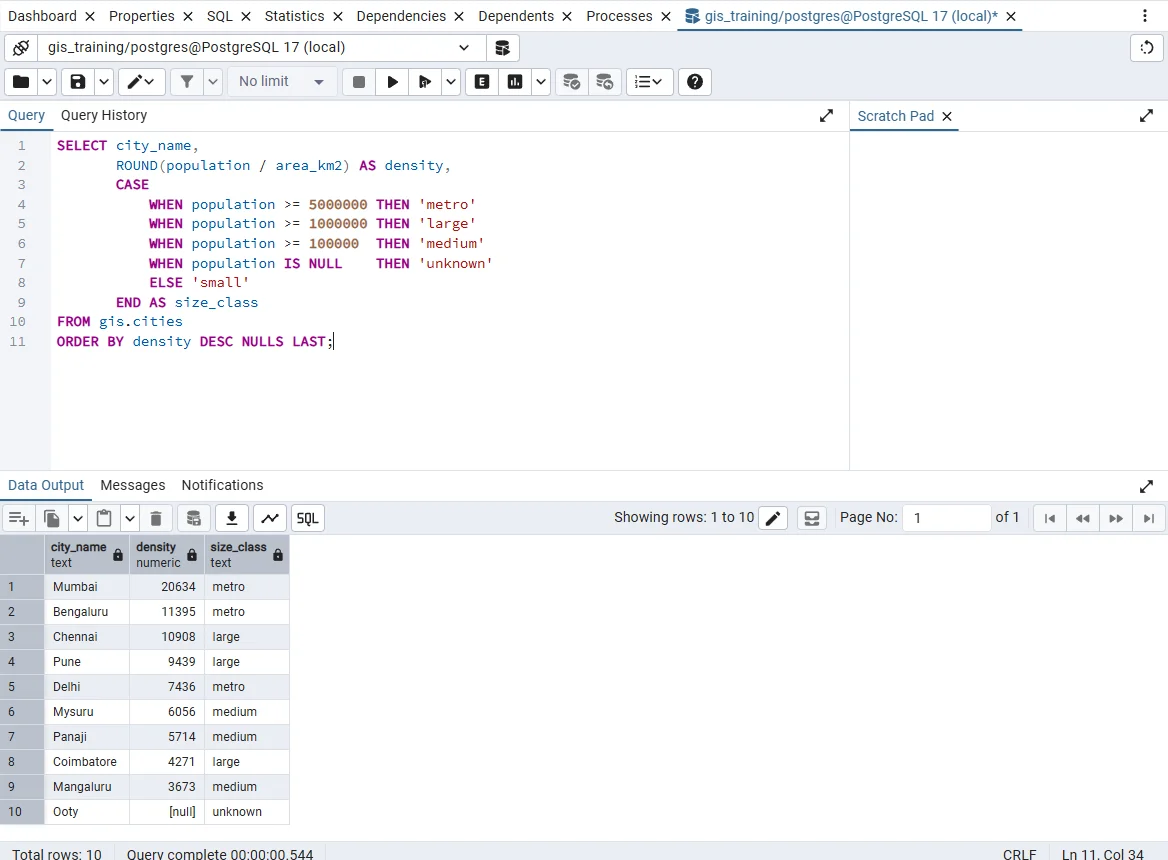
The rows in the grid are the rows printed above. The missing density of Ooty shows as [null].
This is the same classification as pd.cut in Part 8, done in the database. Ooty has NULL for density, because dividing by a missing value gives NULL. Be careful with integer division: in PostgreSQL 7 / 2 is 3. Here area_km2 is a NUMERIC, so the result keeps its decimals. When both values are integers, cast one of them, as in population::numeric / households. NULLIF(area_km2, 0) protects a division from a zero.
7. Text functions
-- Text functions, one column each:
SELECT UPPER(city_name) AS upper_name,                  -- all capitals
       LENGTH(city_name) AS letters,                    -- number of characters
       SUBSTR(city_name, 1, 3) AS first_three,          -- 3 characters, starting at the 1st
       REPLACE(city_name, 'uru', 'ooru') AS respelt,    -- swap one piece of text for another
       city_name || ' (' || latitude || ')' AS label    -- || glues text together
FROM cities
WHERE city_name LIKE '%uru';                            -- names that END with "uru"
 upper_name | letters | first_three |  respelt   |        label
------------+---------+-------------+------------+---------------------
 BENGALURU  |       9 | Ben         | Bengalooru | Bengaluru (12.9716)
 MYSURU     |       6 | Mys         | Mysooru    | Mysuru (12.2958)
 MANGALURU  |       9 | Man         | Mangalooru | Mangaluru (12.9141)
(3 rows)
|| joins text, and CONCAT() does the same and treats NULL as empty. TRIM, LOWER, UPPER and REPLACE match the pandas .str methods from Part 9. PostgreSQL also has SPLIT_PART(text, ',', 2) to cut a string at a separator, and REGEXP_REPLACE for patterns:
-- SPLIT_PART(text, separator, n) gives the n-th piece. TRIM removes the extra space.
SELECT SPLIT_PART('Bengaluru, Karnataka', ',', 2) AS part,
       TRIM(SPLIT_PART('Bengaluru, Karnataka', ',', 2)) AS state;
    part    |   state
------------+-----------
  Karnataka | Karnataka
(1 row)
8. Aggregation: GROUP BY and HAVING
Aggregate functions summarise many rows into one: COUNT, SUM, AVG, MIN, MAX. GROUP BY does it once per group, the same idea as pandas groupby.
-- Aggregate functions turn many rows into one number.
-- COUNT(*) counts all rows; COUNT(column) counts only rows where that column is filled in.
SELECT COUNT(*) AS rows_total,
       COUNT(population) AS with_population,
       SUM(population) AS total
FROM cities;
 rows_total | with_population |  total
------------+-----------------+----------
         10 |               9 | 42262608
(1 row)
COUNT(*) counts rows, and COUNT(column) counts the non-missing values, so the two numbers differ when there are NULLs. AVG and SUM skip NULL values.
-- GROUP BY makes one result row per state, and the aggregates are calculated inside each group.
SELECT state_id,
       COUNT(*) AS n_cities,
       SUM(population) AS total_pop,
       ROUND(AVG(population)) AS mean_pop
FROM cities
GROUP BY state_id
ORDER BY total_pop DESC;
 state_id | n_cities | total_pop | mean_pop
----------+----------+-----------+----------
        3 |        2 |  15566831 |  7783416
        4 |        1 |  11034555 | 11034555
        1 |        3 |   9849010 |  3283003
        2 |        3 |   5697453 |  2848727
        5 |        1 |    114759 |   114759
(5 rows)
WHERE filters rows before grouping and HAVING filters groups after it:
-- WHERE filters rows BEFORE grouping. HAVING filters the groups AFTER grouping.
-- Here: only states that have 3 or more cities.
SELECT state_id, COUNT(*) AS n_cities
FROM cities
GROUP BY state_id
HAVING COUNT(*) >= 3
ORDER BY state_id;
 state_id | n_cities
----------+----------
        1 |        3
        2 |        3
(2 rows)
A conditional count in one pass uses FILTER:
-- FILTER counts only the rows that pass a test, so one query can show two counts side by side
SELECT state_id,
       COUNT(*) FILTER (WHERE population >= 1000000) AS big_cities,
       COUNT(*) FILTER (WHERE population <  1000000) AS smaller_cities
FROM cities
GROUP BY state_id
ORDER BY state_id;
 state_id | big_cities | smaller_cities
----------+------------+----------------
        1 |          1 |              2
        2 |          2 |              0
        3 |          2 |              0
        4 |          1 |              0
        5 |          0 |              1
(5 rows)
Ooty falls in neither count, because a comparison with NULL is never true. The older form that works in any database is SUM(CASE WHEN ... THEN 1 ELSE 0 END).
9. Joins
The state name is in another table. A join combines rows of two tables using a key, like merge in Part 8.
-- JOIN combines two tables. ON says which columns must match (the state id in both).
-- "cities AS c" gives the table a short nickname, so we can write c.city_name.
-- INNER JOIN keeps only rows that have a match in both tables.
SELECT c.city_name, s.state_name, s.region, c.population
FROM cities AS c
INNER JOIN states AS s ON s.state_id = c.state_id
ORDER BY c.population DESC NULLS LAST
LIMIT 5;
 city_name | state_name  | region | population
-----------+-------------+--------+------------
 Mumbai    | Maharashtra | West   |   12442373
 Delhi     | Delhi       | North  |   11034555
 Bengaluru | Karnataka   | South  |    8443675
 Chennai   | Tamil Nadu  | South  |    4646732
 Pune      | Maharashtra | West   |    3124458
(5 rows)
c and s are short aliases for the tables, and ON states how rows match. INNER JOIN keeps rows with a match in both tables. LEFT JOIN keeps every row of the left table:
-- LEFT JOIN keeps every row of the left table (states), even states with no city. Goa has one; others may have none.
-- COUNT(c.city_id) counts only real matches, so a state with no cities shows 0.
SELECT s.state_name, COUNT(c.city_id) AS n_cities
FROM states AS s
LEFT JOIN cities AS c ON c.state_id = s.state_id
GROUP BY s.state_name
ORDER BY n_cities DESC, s.state_name;
 state_name  | n_cities
-------------+----------
 Karnataka   |        3
 Tamil Nadu  |        3
 Maharashtra |        2
 Delhi       |        1
 Goa         |        1
(5 rows)
Goa and Delhi each have one city, so they appear. A state with no city would show 0, and it would vanish from an inner join. A left join also finds unmatched records: add WHERE c.city_id IS NULL.
A join can multiply rows. If a state appeared twice in states, every one of its cities would appear twice and the totals would double. After a join, compare the row counts with the original table.
-- Join first, then group: cities per region, with the total population
SELECT s.region, COUNT(*) AS n_cities, SUM(c.population) AS total_pop
FROM cities c
JOIN states s ON s.state_id = c.state_id
GROUP BY s.region
ORDER BY s.region;
 region | n_cities | total_pop
--------+----------+-----------
 North  |        1 |  11034555
 South  |        6 |  15546463
 West   |        3 |  15681590
(3 rows)
10. Subqueries and common table expressions
A query can use the result of another query. A common table expression (WITH) gives that result a name, which reads more clearly than nesting.
-- WITH ... AS creates a named temporary result (a CTE), so a long query can be built in readable steps.
-- Step 1 (state_totals): total population of each state.
WITH state_totals AS (
    SELECT state_id, SUM(population) AS total_pop
    FROM cities
    GROUP BY state_id
)
-- Step 2: join the totals to the state names and work out each state's share of the whole country list.
-- 100.0 (with the .0) makes the division give decimals. The inner SELECT in brackets is the grand total.
SELECT s.state_name, t.total_pop,
       ROUND(100.0 * t.total_pop / (SELECT SUM(population) FROM cities), 1) AS share_pct
FROM state_totals t
JOIN states s ON s.state_id = t.state_id
ORDER BY share_pct DESC;
 state_name  | total_pop | share_pct
-------------+-----------+-----------
 Maharashtra |  15566831 |      36.8
 Delhi       |  11034555 |      26.1
 Karnataka   |   9849010 |      23.3
 Tamil Nadu  |   5697453 |      13.5
 Goa         |    114759 |       0.3
(5 rows)
The first part builds a small table of state totals. The main query joins it to the state names and divides each total by the overall total, which is itself a small subquery in brackets.
11. Change data: INSERT, UPDATE, DELETE
-- INSERT adds a row.
INSERT INTO cities (city_id, city_name, state_id, population, area_km2, latitude, longitude)
VALUES (11, 'Test town', 5, 1000, 5, 15.3, 73.9);

-- UPDATE changes values. ALWAYS add WHERE, or every row will change!
UPDATE cities SET population = 120000 WHERE city_name = 'Panaji';

-- DELETE removes rows. ALWAYS add WHERE here too, or every row will be deleted!
DELETE FROM cities WHERE city_name = 'Test town';

-- Check the result
SELECT city_name, population FROM cities WHERE city_name = 'Panaji';
 city_name | population
-----------+------------
 Panaji    |     120000
(1 row)
Always include WHERE on an UPDATE or DELETE. Without it, every row changes. Check with a SELECT using the same WHERE first. In pgAdmin each statement is saved as soon as it runs (auto-commit), so there is no undo. To experiment safely, wrap the statements in BEGIN; and finish with ROLLBACK; to undo them, or COMMIT; to keep them.
The constraints also protect the data. This insert breaks the latitude rule and is refused:
-- This is meant to FAIL. Latitude 120 breaks the CHECK rule from the table definition,
-- so PostgreSQL refuses the row. The rules protect your data.
INSERT INTO cities (city_id, city_name, state_id, latitude, longitude)
VALUES (12, 'Nowhere', 1, 120, 77);
ERROR:  new row for relation "cities" violates check constraint "cities_latitude_check"
DETAIL:  Failing row contains (12, Nowhere, 1, null, null, 120, 77).
12. Dates
PostgreSQL has real DATE and TIMESTAMP types, so dates can be compared, subtracted and broken into parts.
-- A table with a DATE column. Dates are written as text in the form 'year-month-day'.
CREATE TABLE inspections (
    city_id      INTEGER REFERENCES cities (city_id),
    inspected_on DATE
);

INSERT INTO inspections VALUES
    (1, '2025-01-15'), (1, '2025-03-02'), (2, '2024-11-20'), (4, '2025-03-15');

-- EXTRACT pulls a part (year, month) out of a date. Subtracting two dates gives the number of days between them.
SELECT city_id,
       inspected_on,
       EXTRACT(YEAR FROM inspected_on)  AS year,
       EXTRACT(MONTH FROM inspected_on) AS month,
       DATE '2025-04-10' - inspected_on AS days_ago
FROM inspections
WHERE inspected_on >= DATE '2025-01-01'           -- only inspections from 2025 on
ORDER BY inspected_on;
 city_id | inspected_on | year | month | days_ago
---------+--------------+------+-------+----------
       1 | 2025-01-15   | 2025 |     1 |       85
       1 | 2025-03-02   | 2025 |     3 |       39
       4 | 2025-03-15   | 2025 |     3 |       26
(3 rows)
Subtracting two dates gives a number of days. NOW() and CURRENT_DATE give the current time and date, and inspected_on + INTERVAL '30 days' moves a date forward. Dates are written in the ISO form YYYY-MM-DD, which cannot be misread as day-month or month-day.
13. Use the database from Python
SQL and Python work well together. With the packages sqlalchemy, psycopg2-binary and pandas installed, a query result becomes a DataFrame, and Part 10 can turn the coordinates into points.
import pandas as pd
from sqlalchemy import create_engine

engine = create_engine("postgresql+psycopg2://postgres:YOUR_PASSWORD@localhost:5432/gis_training")

df = pd.read_sql_query(
    "SELECT city_name, latitude, longitude, population FROM gis.cities WHERE population IS NOT NULL",
    engine,
)
print(df.shape)
print(list(df.columns))
Put the password in an environment variable and not in a script you share. The first print shows (9, 4), and the second lists the four column names.
Practice
- List the cities in the
Southregion with more than one million people. - Count the cities per region and show only regions with at least three.
- Find the state with the highest total population using a join and
GROUP BY. - Make the density query show
no datainstead of an empty value for Ooty. - Write an
UPDATEwith aWHEREthat renames one city, and check it with aSELECTbefore and after.
Try each one before you open the solutions.
Solutions
-- 1: big southern cities
SELECT c.city_name, c.population
FROM cities c JOIN states s ON s.state_id = c.state_id
WHERE s.region = 'South' AND c.population > 1000000;

-- 2: regions with at least 3 cities
SELECT s.region, COUNT(*) AS n_cities
FROM cities c JOIN states s ON s.state_id = c.state_id
GROUP BY s.region
HAVING COUNT(*) >= 3;

-- 3: the state with the largest total population (sort biggest first, keep one row)
SELECT s.state_name, SUM(c.population) AS total_pop
FROM cities c JOIN states s ON s.state_id = c.state_id
GROUP BY s.state_name
ORDER BY total_pop DESC
LIMIT 1;

-- 4: density for every city, or 'no data' where it cannot be worked out
SELECT city_name, COALESCE(ROUND(population / area_km2)::text, 'no data') AS density
FROM cities
ORDER BY city_name;

-- 5: change a city name safely: look first, update, then check by id
SELECT city_id, city_name FROM cities WHERE city_name = 'Panaji';
UPDATE cities SET city_name = 'Panjim' WHERE city_name = 'Panaji';
SELECT city_id, city_name FROM cities WHERE city_id = 9;
UPDATE cities SET city_name = 'Panaji' WHERE city_id = 9;
Common mistakes
- Writing
= NULLinstead ofIS NULL. - Selecting a column that is neither grouped nor aggregated.
- Forgetting
WHEREonUPDATEorDELETE. - Dividing two integers and getting a whole number.
- Using an inner join and losing the rows without a match.
- Joining on a column that is not unique, which duplicates rows.
- Using
WHEREwhereHAVINGis needed to filter groups. - Running a query in a new Query Tool tab without setting the
search_pathor naming the schema.
Key takeaways
Next: Spatial SQL with PostGIS.