

Most statistics assume that observations are independent. Spatial data usually is not, because things near each other tend to resemble each other. Geostatistics measures that dependence, and simulation uses it to ask what could happen next.
What is spatial autocorrelation?
Spatial autocorrelation is the tendency of nearby locations to have similar values. Land surface temperature is a clear case: a hot roof sits next to other hot roofs, and a cool lake sits among cooler cells. Tobler's first law of geography says the same thing in a sentence: near things are more related than distant things.
Positive autocorrelation means similar values cluster. Negative means neighbours differ more than chance would give, like a checkerboard. Zero means no spatial pattern.
Why it matters
Ordinary statistics treat each observation as new information, but neighbouring cells share information. A regression that ignores this reports confidence it does not have. Interpolation (QGIS series Part 14) works only because of autocorrelation, and kriging uses it directly through the variogram.
Data used
outputs/suit/hospitals.gpkg, the 1,146 hospital points in EPSG:32643 from QGIS series Part 15outputs/interp/lst_c.tif, land surface temperature in Celsius from QGIS series Part 14outputs/interp/train.gpkg, the 234 temperature sample points from QGIS series Part 14outputs/city/S2_ndbi.tifandS2_ndvi.tif, the Sentinel-2 index rasters from QGIS series Part 8
QGIS ships with numpy, scipy, pandas, geopandas, shapely and matplotlib in its Python. It does not ship with rasterio or PySAL, so the code below uses GDAL for rasters and plain numpy for the statistics.
1. Nearest neighbour analysis
The nearest neighbour index compares the average distance from each point to its closest neighbour with the average expected for random points in the same area.
- Vector > Analysis Tools > Nearest Neighbour Analysis (or Processing Toolbox > Nearest neighbour analysis).
- Input: the hospitals layer in a projected CRS. Run.
The report gives these numbers for the hospitals:
| Measure | Value |
|---|---|
| Points | 1,146 |
| Observed mean distance | 248 m |
| Expected mean distance | 469 m |
| Nearest neighbour index | 0.53 |
| Z-score | -30.4 |
An index below 1 means clustering, 1 means random and above 1 means dispersion. Here the observed distance is about half of what chance would give, and the very large negative z-score says the difference is not luck. That is no surprise, since hospitals follow population and roads. The test also depends on the area you give it, so a study window that includes a lot of empty land makes any pattern look more clustered.
2. Moran's I
Moran's I measures autocorrelation for values attached to areas or cells. It runs from about -1 to +1. The steps below use a 1 km grid of mean temperature.
- Aggregate the temperature raster to cells of about 1 km (33 by 33 pixels).
- Subtract the mean from every cell.
- For each cell, compute the mean of its four neighbours (up, down, left, right).
- Moran's I is the sum of each cell's value times its neighbour mean, divided by the sum of squared values.
In code, with cells holding the 1 km means and NaN where there is no data:
import numpy as np

# Step 1: mark which cells have data (True) and which are empty (False).
# isnan means "is not a number"; the ~ flips it, so True = a real value.
mask = ~np.isnan(cells)

# Step 2: subtract the average from every value, so a cell is now "above or below normal".
# Empty cells get 0 so they do not affect the sums.
z = np.where(mask, cells - np.nanmean(cells), 0.0)


# Step 3: a helper that finds, for every cell, the average of its four neighbours (up, down, left, right)
def neighbour_mean(z, mask):
    total = np.zeros_like(z)               # running sum of neighbour values, one per cell
    count = np.zeros_like(z)               # running count of valid neighbours, one per cell
    for dy, dx in ((-1, 0), (1, 0), (0, -1), (0, 1)):      # the four directions
        # np.roll slides the whole grid one step, so each cell lines up with one neighbour
        shifted = np.roll(np.roll(z, dy, 0), dx, 1)
        valid = np.roll(np.roll(mask, dy, 0), dx, 1).astype(float)
        # np.roll wraps the grid around like a ball; remove values that wrapped around the edge
        if dy == -1: valid[-1, :] = 0
        if dy == 1:  valid[0, :] = 0
        if dx == -1: valid[:, -1] = 0
        if dx == 1:  valid[:, 0] = 0
        total += shifted * valid
        count += valid
    # average = sum / count (cells with no valid neighbour get 0)
    return np.where(count > 0, total / np.maximum(count, 1), 0)


# Step 4: Moran's I = (each cell's value x its neighbours' average, added up) / (each value squared, added up)
lag = neighbour_mean(z, mask)
moran_i = (z[mask] * lag[mask]).sum() / (z[mask] ** 2).sum()
The function shifts the grid in four directions and averages the shifted values. The valid array stops the edges wrapping around to the opposite side. moran_i then follows the formula above.
To test it, shuffle the cell values 499 times, compute Moran's I each time, and count how often the shuffled value reaches the observed one. That gives a pseudo p-value.
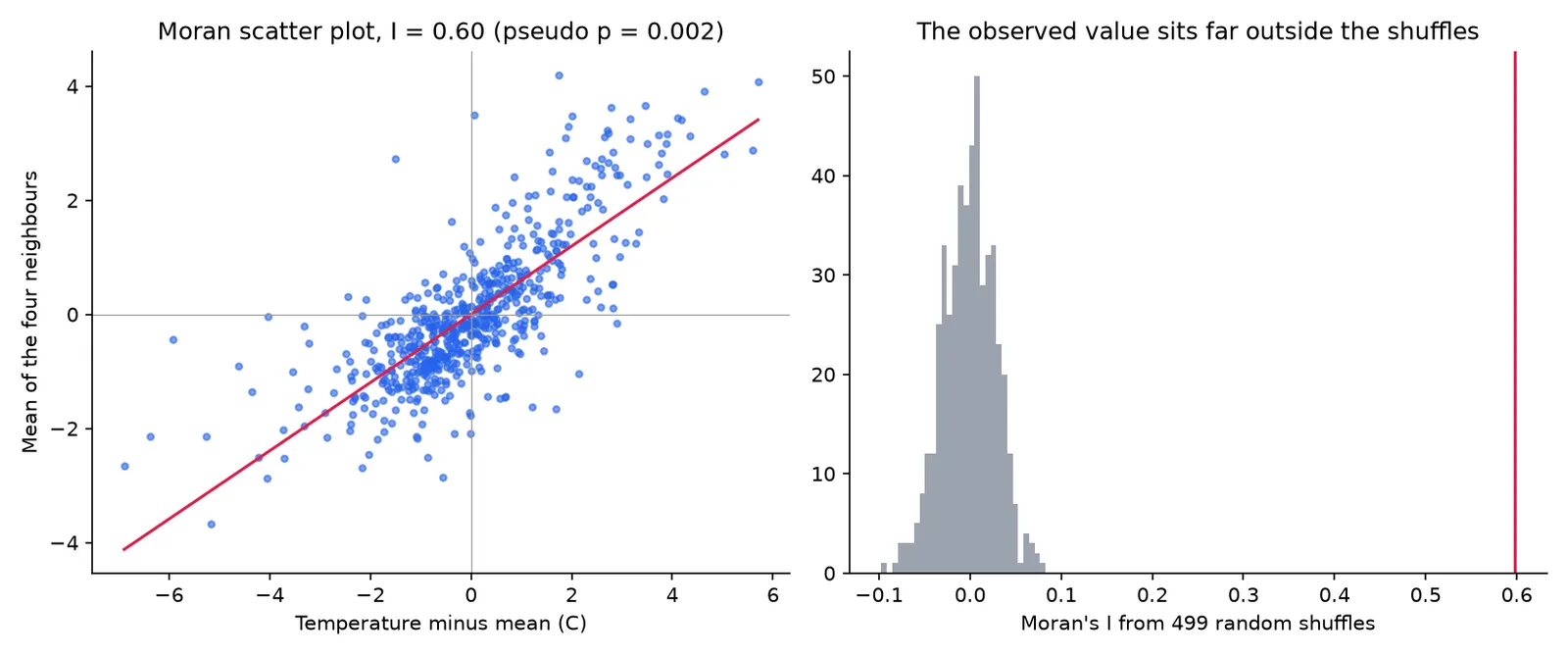
For the temperature grid of 600 cells, Moran's I is 0.60, and none of the 499 shuffles got near it (pseudo p = 0.002, the smallest value 499 shuffles can give). Hot cells sit next to hot cells. The scatter plot shows the same thing: cells above the mean mostly have neighbours above the mean.
Moran's I depends on how you define neighbours. This example uses the four cells that share an edge. Other choices, such as eight neighbours or a distance band, give different values. State your choice.
3. The variogram
A variogram shows how the difference between two sample values grows with the distance between them. For each pair of points, the semivariance is half the squared difference in value. Averaging the semivariance within distance bins gives the empirical variogram.
import numpy as np

# pts is an array with three columns: x, y and temperature for each sample point

# Step 1: the gap between every pair of points in x and in y.
# pts[:, None, 0] is a column of x values, pts[None, :, 0] a row of them; subtracting gives a full table of gaps.
dx = pts[:, None, 0] - pts[None, :, 0]
dy = pts[:, None, 1] - pts[None, :, 1]

# Step 2: straight-line distance between every pair (Pythagoras)
dist = np.sqrt(dx ** 2 + dy ** 2)

# Step 3: semivariance = half the squared difference in temperature for every pair
semivar = 0.5 * (pts[:, None, 2] - pts[None, :, 2]) ** 2

# Step 4: the tables list every pair twice (A to B and B to A); keep each pair once
upper = np.triu_indices(len(pts), 1)       # each pair once
dist, semivar = dist[upper], semivar[upper]

# Step 5: group the pairs by distance (1 km wide bins) and average the semivariance in each bin
edges = np.arange(0, 12001, 1000)           # 1 km bins up to 12 km
for lo, hi in zip(edges[:-1], edges[1:]):   # each bin runs from lo to hi
    inside = (dist >= lo) & (dist < hi)     # which pairs fall in this bin
    print(lo, hi, inside.sum(), semivar[inside].mean())   # bin start, bin end, number of pairs, average semivariance
Three numbers describe a fitted variogram model. The nugget is the semivariance at zero distance, which comes from measurement error and variation at scales smaller than the sampling. The sill is the level where the curve flattens. The range is the distance at which it flattens, beyond which points are no longer correlated.
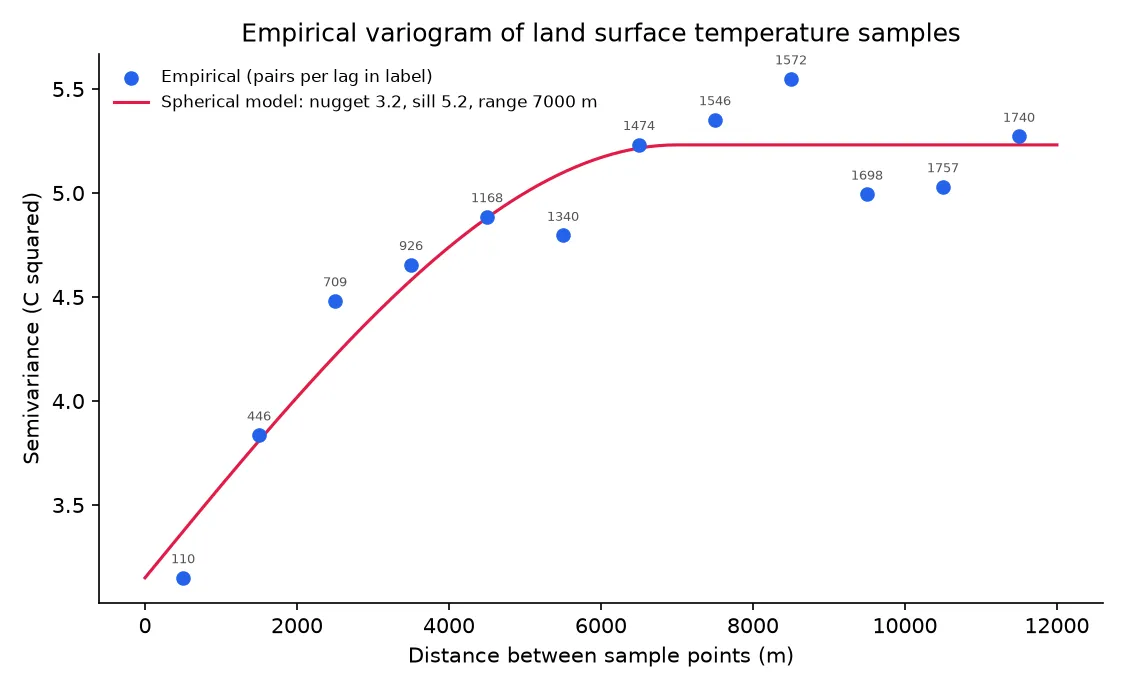
A spherical model fitted to the 234 samples by grid search has a nugget of 3.2, a sill of 5.2 and a range of about 7 km, in squared degrees Celsius for the first two. So points more than 7 km apart behave as unrelated, and the nugget is more than half the sill, which means much of the variation happens at scales finer than the sample spacing. Kriging uses a model like this to weight neighbours. QGIS has no kriging in the core Processing tools, so use GRASS v.krige (needs R with gstat), SAGA if installed, or PyKrige in a Python environment of your own.
Treat a variogram fitted by a grid search as a teaching aid. For real work use a package that fits models with proper weights and checks them.
4. A simple geosimulation: cellular automaton
A cellular automaton (CA) divides the map into cells with states and updates all cells at each step by a local rule. Urban growth models use it: a cell of open land becomes built-up with a probability that depends on its built-up neighbours.
The example starts from a built-up mask made from the Sentinel-2 indices at 100 m cells: built-up where NDBI is above 0 and NDVI is below 0.25, excluding water. That gives 48 percent built-up cells, which is a mask for teaching, not a mapped land cover. Then the rule is:
- Count the built-up cells among the eight neighbours of every cell.
- The chance of conversion is
clip((neighbours - 2) / 8, 0, 1) * 0.5 * (1 - NDVI). More built-up neighbours and less vegetation raise it. - Convert open cells at random with that chance. Water cells never convert.
- Repeat for ten steps.
import numpy as np

rng = np.random.default_rng(7)              # random number generator; seed 7 makes every run give the same result
state = built.astype(np.uint8)              # 1 = built-up, 0 = open

# Repeat the growth rule 10 times (each step is one "year")
for step in range(10):
    # Step 1: count the built-up neighbours of every cell, looking at all 8 surrounding cells
    neighbours = np.zeros(state.shape)
    for dy in (-1, 0, 1):
        for dx in (-1, 0, 1):
            if dy or dx:                    # skip (0, 0), which is the cell itself
                neighbours += np.roll(np.roll(state, dy, 0), dx, 1)

    # Step 2: the chance that a cell converts: more built-up neighbours raise it, more vegetation lowers it
    chance = np.clip((neighbours - 2) / 8, 0, 1) * 0.5 * (1 - np.clip(ndvi, 0, 1))

    # Step 3: a cell grows if it is open, is not water, and a random number (0 to 1) falls below its chance
    grow = (state == 0) & (~water) & (rng.random(state.shape) < chance)

    # Step 4: turn the cells that grew into built-up
    state = np.where(grow, 1, state).astype(np.uint8)
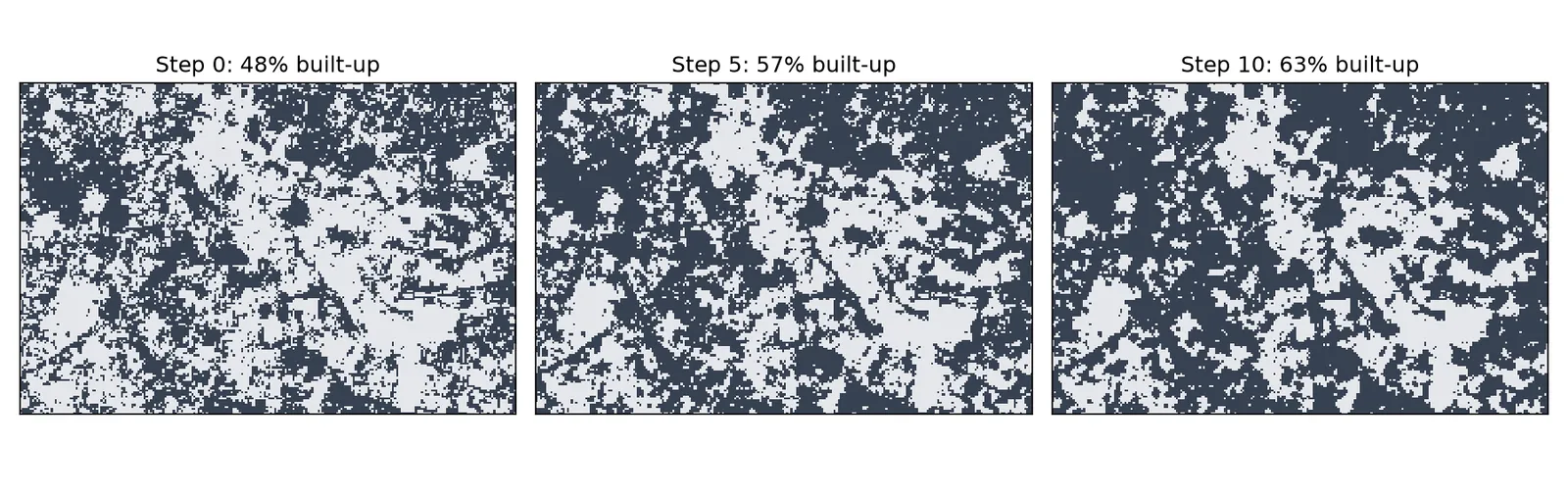
The built-up share rises from 48 percent to 63 percent in ten steps, and growth fills in around existing built-up cells and extends their edges.
Common mistakes
- Running statistics that assume independence on spatially autocorrelated data.
- Reporting Moran's I without saying how neighbours were defined.
- Using a nearest neighbour test on a window with large empty areas.
- Fitting a variogram on too few points or too few pairs per bin.
- Presenting a simulation with made-up parameters as a prediction.
- Forgetting that every result depends on the cell size and the extent you chose.