

Part 10 made points and measured them. This part uses the operations that make GIS different from a spreadsheet: answers that depend on where things are. They map to the QGIS tools Join Attributes by Location, Buffer, Intersection and Dissolve.
The data
To keep the example runnable anywhere, the layers are built in code and are invented. They sit in EPSG:32643 (UTM zone 43N, metres) so every measurement is in metres. With real data you would replace the construction lines with gpd.read_file("districts.gpkg") and the rest would stay the same.
# Step 1: bring in the tools we need
import geopandas as gpd                      # maps and tables with geometry
import pandas as pd                          # ordinary tables
from shapely.geometry import box, Point, LineString   # shapes: rectangle, point, line

# Step 2: two settings used below
CRS = "EPSG:32643"                           # a coordinate system measured in metres (UTM zone 43N)
X0, Y0, SIZE = 700000, 1400000, 40000        # lower left corner of the grid, and each square's side in metres

# Step 3: build nine square districts in a 3 x 3 grid
# We make three empty lists, then add one district at a time.
cells, names, zones = [], [], []
for row in range(3):                         # rows 0, 1, 2 (bottom to top)
    for col in range(3):                     # columns 0, 1, 2 (left to right)
        # box(left, bottom, right, top) draws one square
        cells.append(box(X0 + col * SIZE, Y0 + row * SIZE,
                         X0 + (col + 1) * SIZE, Y0 + (row + 1) * SIZE))
        names.append(f"D{row * 3 + col + 1}")        # D1 ... D9
        zones.append(["South", "Central", "North"][row])   # row 0 = South, 1 = Central, 2 = North

# Step 4: put the names, zones and shapes into one GeoDataFrame (a table with a map column)
districts = gpd.GeoDataFrame({"district": names, "zone": zones}, geometry=cells, crs=CRS)

# Step 5: population lives in a separate plain table, as it often does in real life
pop = pd.DataFrame({
    "district": names,
    "population": [210000, 95000, 140000, 320000, 180000, 60000, 75000, 130000, 50000],
})

# Step 6: nine hospitals as (x, y) points in metres
hospital_xy = [(715000, 1410000), (725000, 1415000), (770000, 1405000), (730000, 1445000),
               (790000, 1450000), (750000, 1470000), (705000, 1485000), (765000, 1490000), (795000, 1515000)]
hospitals = gpd.GeoDataFrame(
    {"hospital": [f"H{i + 1}" for i in range(len(hospital_xy))]},   # H1 ... H9
    geometry=[Point(xy) for xy in hospital_xy],                    # turn each pair into a Point
    crs=CRS,
)

# Step 7: one main road (a line) and one flood zone along a river (a rectangle)
road = gpd.GeoDataFrame({"name": ["Main road"]},
                        geometry=[LineString([(700000, 1450000), (820000, 1440000)])], crs=CRS)
flood = gpd.GeoDataFrame({"name": ["River flood"]},
                         geometry=[box(735000, 1400000, 765000, 1470000)], crs=CRS)

# Check: 9 districts, 9 hospitals, and the EPSG code of the coordinate system
print(len(districts), len(hospitals), districts.crs.to_epsg())
9 9 32643
All four layers share one CRS. That is a rule for every operation here: layers must be in the same CRS, or the results are wrong.
1. Attribute join
First attach the population table to the district polygons by the key district. A GeoDataFrame merges just like a DataFrame (Part 8) and stays a GeoDataFrame.
# Step 1: attach population to each district by matching the "district" column
districts = districts.merge(pop, on="district", how="left")

# Step 2: area of each square in km2 (the CRS is in metres, so area is in m2; divide by 1,000,000)
districts["area_km2"] = (districts.geometry.area / 1_000_000).round(0)

# Step 3: people per km2
districts["density"] = (districts["population"] / districts["area_km2"]).round(1)

# Look at the result
print(districts[["district", "zone", "population", "area_km2", "density"]])
print("unmatched:", districts["population"].isna().sum())     # 0 means every district found its population
  district     zone  population  area_km2  density
0       D1    South      210000    1600.0    131.2
1       D2    South       95000    1600.0     59.4
2       D3    South      140000    1600.0     87.5
3       D4  Central      320000    1600.0    200.0
4       D5  Central      180000    1600.0    112.5
5       D6  Central       60000    1600.0     37.5
6       D7    North       75000    1600.0     46.9
7       D8    North      130000    1600.0     81.2
8       D9    North       50000    1600.0     31.2
unmatched: 0
The last line checks that every district found its population. Always count unmatched keys after a join.
2. Spatial join: points in polygons
A spatial join matches rows by geometry instead of by a key column. Here each hospital receives the attributes of the district it lies in.
# Which district is each hospital inside?
# sjoin = spatial join: it matches rows by where they are on the map, not by a shared column.
# how="left" keeps every hospital; predicate="within" means "the point lies inside the polygon".
located = gpd.sjoin(hospitals, districts[["district", "geometry"]], how="left", predicate="within")
print(located[["hospital", "district"]])
  hospital district
0       H1       D1
1       H2       D1
2       H3       D2
3       H4       D4
4       H5       D6
5       H6       D5
6       H7       D7
7       H8       D8
8       H9       D9
predicate="within" keeps pairs where the hospital point is inside the district. Other predicates are intersects, contains, touches and crosses. A point that falls on a shared border can match two polygons and appear twice, so check the row count (here it stays at 9).
Count hospitals per district with the groupby tool from Part 8, and add the result to the district table:
# Step 1: count hospitals per district (groupby gathers the rows of each district, size counts them)
counts = located.groupby("district").size().rename("hospitals")

# Step 2: add the counts to the districts table
districts = districts.merge(counts, on="district", how="left")

# Step 3: districts with no hospital got an empty value; make that 0 and a whole number
districts["hospitals"] = districts["hospitals"].fillna(0).astype(int)

# Step 4: hospitals per 100,000 people
districts["per_100k"] = (districts["hospitals"] / districts["population"] * 100000).round(2)

print(districts[["district", "population", "hospitals", "per_100k"]])
  district  population  hospitals  per_100k
0       D1      210000          2      0.95
1       D2       95000          1      1.05
2       D3      140000          0      0.00
3       D4      320000          1      0.31
4       D5      180000          1      0.56
5       D6       60000          1      1.67
6       D7       75000          1      1.33
7       D8      130000          1      0.77
8       D9       50000          1      2.00
A district with no hospital does not appear in counts, so the merge gives it NaN, and fillna(0) turns that into a true zero. Hospitals per 100,000 people is a fairer comparison than the raw count, because districts differ in size.
3. Buffer: what is near the road?
A buffer is the area within a distance of a feature. The distance is in the CRS units, so the layer must be projected. This is why EPSG:4326 data must be reprojected first (Part 10).
# Step 1: draw a 5 km zone on each side of the road (a "buffer")
road_buffer = road.copy()                    # copy, so the original road stays a line
road_buffer["geometry"] = road.buffer(5000)  # 5000 metres = 5 km

# Step 2: area of that zone in km2
print(round(road_buffer.geometry.area.iloc[0] / 1_000_000, 1), "km2")

# Step 3: keep only the hospitals that fall inside the buffer
# how="inner" drops hospitals with no match, so only the close ones remain
near_road = gpd.sjoin(hospitals, road_buffer[["geometry"]], how="inner", predicate="within")
print(sorted(near_road["hospital"]))
1282.6 km2
['H4']
The road is about 120 km long, so a 5 km buffer on each side covers about 1,200 km2, plus the rounded ends. The join keeps the hospitals inside it. Compare distances too: hospitals.distance(road.geometry.iloc[0]) gives each hospital's distance to the road in metres.
4. Overlay: intersect two polygon layers
overlay combines the geometry of two layers. intersection keeps only the parts that lie in both, and splits polygons where they meet.
# overlay with "intersection" keeps only the parts of each district that overlap the flood zone
flooded = gpd.overlay(districts[["district", "geometry"]], flood[["geometry"]], how="intersection")

# area of each flooded piece, in km2
flooded["flooded_km2"] = (flooded.geometry.area / 1_000_000).round(1)
print(flooded[["district", "flooded_km2"]])
  district  flooded_km2
0       D1        200.0
1       D2       1000.0
2       D4        150.0
3       D5        750.0
Each row is a piece of a district that lies inside the flood zone. A district that the flood does not touch has no row. Join the pieces back to the districts to get a flooded percentage:
# Step 1: add the flooded area to the districts table (districts the flood misses get an empty value)
districts = districts.merge(flooded[["district", "flooded_km2"]], on="district", how="left")
districts["flooded_km2"] = districts["flooded_km2"].fillna(0)      # empty -> 0

# Step 2: what share of each district is flooded?
districts["flooded_pct"] = (districts["flooded_km2"] / districts["area_km2"] * 100).round(1)

# Step 3: turn the percentage into a label.
# pd.cut sorts numbers into bins: -1 to 0 is "none", 0 to 25 is "low", 25 to 50 is "medium", 50 to 100 is "high".
districts["risk"] = pd.cut(
    districts["flooded_pct"],
    bins=[-1, 0, 25, 50, 100],
    labels=["none", "low", "medium", "high"],
)
print(districts[["district", "flooded_km2", "flooded_pct", "risk"]])
  district  flooded_km2  flooded_pct    risk
0       D1        200.0         12.5     low
1       D2       1000.0         62.5    high
2       D3          0.0          0.0    none
3       D4        150.0          9.4     low
4       D5        750.0         46.9  medium
5       D6          0.0          0.0    none
6       D7          0.0          0.0    none
7       D8          0.0          0.0    none
8       D9          0.0          0.0    none
Other how options are union (everything from both), difference (the first layer minus the second, so the order matters) and symmetric_difference. difference of districts and flood gives the dry part of each district.
# "difference" keeps the parts of each district that are NOT in the flood zone
dry = gpd.overlay(districts[["district", "geometry"]], flood[["geometry"]], how="difference")

# dry area plus flooded area should add up to the total
print(round(dry.geometry.area.sum() / 1_000_000), "km2 dry,",
      round(districts.geometry.area.sum() / 1_000_000), "km2 total")
12300 km2 dry, 14400 km2 total
Swapping the two layers would instead give the part of the flood zone outside every district, which here is nothing. The layer on the left is the one that is cut.
5. Dissolve: merge polygons by attribute
dissolve merges polygons that share a value and can summarise their attributes in the same step.
# dissolve merges neighbouring shapes that share a value (here the zone) into one shape
# aggfunc says how to combine the other columns: "sum" adds them up
zones = districts.dissolve(
    by="zone",
    aggfunc={"population": "sum", "hospitals": "sum", "area_km2": "sum"},
).reset_index()                              # make "zone" an ordinary column again

print(zones[["zone", "population", "hospitals", "area_km2"]])
print(len(districts), "districts ->", len(zones), "zones")      # 9 districts become 3 zones
      zone  population  hospitals  area_km2
0  Central      560000          3    4800.0
1    North      255000          3    4800.0
2    South      445000          3    4800.0
9 districts -> 3 zones
Nine district polygons become three zone polygons, and the numbers are added up. This is the Python form of the QGIS Dissolve tool plus Statistics by Categories. The dissolved zones have no internal borders.
6. Rank the districts
Combine the results in one table, the way a final analysis does.
# Sort so the districts with the fewest hospitals per 100,000 people come first, then keep the top 3
priority = districts.sort_values("per_100k").head(3)[["district", "population", "hospitals", "per_100k", "risk"]]
print(priority)
  district  population  hospitals  per_100k    risk
2       D3      140000          0      0.00    none
3       D4      320000          1      0.31     low
4       D5      180000          1      0.56  medium
This keeps things simple: the three districts with the fewest hospitals per 100,000 people. A real study would use weights for several factors and test how the ranking changes. Do not read this invented dataset as a finding about any real place.
7. Map the results
import matplotlib.pyplot as plt              # the drawing library GeoPandas uses

# One figure with three maps side by side. axes[0], axes[1], axes[2] are the three panels.
fig, axes = plt.subplots(1, 3, figsize=(15, 5))

# Map 1: districts coloured by hospital count, hospitals as red dots on top
districts.plot(ax=axes[0], column="hospitals", cmap="Blues", edgecolor="grey", legend=True)
hospitals.plot(ax=axes[0], color="red", markersize=25)
axes[0].set_title("Hospitals per district")

# Map 2: grey districts, then the flood zone, flooded parts, road buffer and road, drawn in that order
districts.plot(ax=axes[1], color="#eeeeee", edgecolor="grey")
flood.plot(ax=axes[1], color="#4a90d9", alpha=0.5)                          # alpha = see-through
flooded.plot(ax=axes[1], facecolor="none", edgecolor="navy")
road_buffer.plot(ax=axes[1], facecolor="none", edgecolor="orange", linestyle="--")
road.plot(ax=axes[1], color="darkorange")
axes[1].set_title("Flood zone and road buffer")

# Map 3: districts coloured by flooded share, with a thick outline around each zone
districts.plot(ax=axes[2], column="flooded_pct", cmap="Reds", edgecolor="grey", legend=True)
zones.boundary.plot(ax=axes[2], color="black", linewidth=2)
axes[2].set_title("Flooded share (%), zone outlines")

# Hide the axis numbers and frame, then save the picture
for ax in axes:
    ax.set_axis_off()
fig.savefig("analysis_maps.png", dpi=130, bbox_inches="tight")
print("saved")
saved
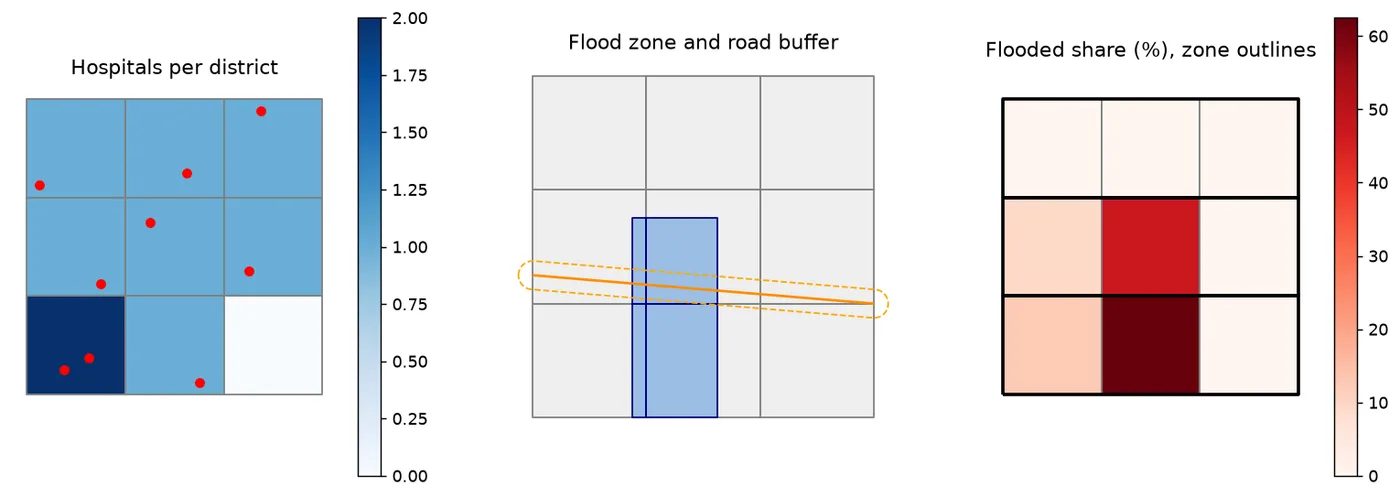
Layers are drawn in the order of the calls, using ax= to share one map. set_axis_off() hides the axes, which are not needed for a schematic map. boundary turns polygons into their outlines.
Run this part as a notebook
The code on this page is also a Jupyter notebook. It has the theory in text cells, then the code, then guided practice, an independent assignment and hidden solutions, so you can try each task before you look. Download the Part 11 notebook, open it in JupyterLab and run the cells from top to bottom. Part 1 shows how to install and start Jupyter.
Practice
- Add a tenth hospital in a district that has none and rerun the join. How does
per_100kchange? - Change the road buffer to 10 km. How many hospitals are within it now?
- Make a second flood zone and use
how="union"on the two zones before the overlay. - Dissolve the districts by a column you create yourself, such as
eastandwest.
Common mistakes
- Combining layers with different CRSs. Check with
a.crs == b.crs. - Buffering a layer in degrees.
- Forgetting that a spatial join can duplicate rows when a feature matches several polygons.
- Swapping the layers in
differenceand cutting the wrong one. - Calculating an area before overlay and not after, so the flooded area is the whole district.
- Forgetting
fillna(0)for districts with no match, so they drop out of charts and averages.
Key takeaways
Next: GDAL rasters with Python.