

GeoPandas adds one thing to pandas: a column of geometries (points, lines or polygons) and the tools to work with them. Everything from Parts 7 to 9 still works. A GeoDataFrame is the Python version of an attribute table with its shapes attached.
What is GeoPandas?
GeoPandas reads and writes vector formats such as Shapefile, GeoPackage and GeoJSON, keeps the coordinate reference system with the data, and offers GIS operations such as buffer, spatial join and overlay. Under the hood it uses the Shapely library for geometry, pyproj for coordinate systems and GDAL (through pyogrio) for files. Install it with pip install geopandas.
| Object | What it is |
|---|---|
GeoSeries | a column of geometries |
GeoDataFrame | a table with one active geometry column, normally called geometry |
1. Make points from a table
Start with a pandas table that has longitude and latitude columns, as in the cleaned file from Part 6.
import pandas as pd
import geopandas as gpd

# Step 1: an ordinary table of cities. lat = north/south position, lon = east/west position.
cities = pd.DataFrame({
    "city": ["Bengaluru", "Mysuru", "Mangaluru", "Hubballi", "Chennai", "Hyderabad", "Mumbai", "Delhi"],
    "state": ["Karnataka", "Karnataka", "Karnataka", "Karnataka", "Tamil Nadu", "Telangana", "Maharashtra", "Delhi"],
    "population": [8443675, 920550, 484785, 943857, 4646732, 6809970, 12442373, 11034555],
    "lat": [12.9716, 12.2958, 12.9141, 15.3647, 13.0827, 17.3850, 19.0760, 28.6139],
    "lon": [77.5946, 76.6394, 74.8560, 75.1240, 80.2707, 78.4867, 72.8777, 77.2090],
})

# Step 2: turn it into a map layer.
# points_from_xy makes a point from each pair. The order is always x first (lon), then y (lat).
# crs="EPSG:4326" says the numbers are longitude and latitude (GPS style coordinates).
gdf = gpd.GeoDataFrame(
    cities,
    geometry=gpd.points_from_xy(cities["lon"], cities["lat"]),
    crs="EPSG:4326",
)
print(gdf[["city", "geometry"]].head(3))      # a new "geometry" column holds the points
print(type(gdf).__name__)
        city                 geometry
0  Bengaluru  POINT (77.5946 12.9716)
1     Mysuru  POINT (76.6394 12.2958)
2  Mangaluru   POINT (74.856 12.9141)
GeoDataFrame
points_from_xy(x, y) builds one point per row. In a geographic system x is longitude and y is latitude, so longitude goes first. The crs="EPSG:4326" argument records what the numbers mean. Forgetting it leaves the layer with no CRS, and every later step is a guess.
2. Inspect a GeoDataFrame
print(gdf.crs)                                    # the coordinate system of the layer
print(gdf.geom_type.unique().tolist())            # the kinds of shape in it (here only Point)
print(gdf.total_bounds.round(2))                  # the box around everything: min x, min y, max x, max y
print(gdf.geometry.iloc[0])                       # the first shape, in text form
print(gdf.geometry.iloc[0].x, gdf.geometry.iloc[0].y)     # its x and y on their own
EPSG:4326
['Point']
[72.88 12.3  80.27 28.61]
POINT (77.5946 12.9716)
77.5946 12.9716
crs is the coordinate reference system. geom_type tells you the shape type. total_bounds returns the extent as minx, miny, maxx, maxy. A point has .x and .y. The first things to check on any new layer are its CRS, geometry type, number of rows and bounds.
3. CRS: set_crs and to_crs
A coordinate reference system (CRS) says how numbers map to places on Earth. Two kinds matter here:
- A geographic CRS uses angles, degrees of latitude and longitude, on the globe. EPSG:4326 (WGS 84) is the one GPS and most web data use.
- A projected CRS flattens the Earth onto a plane and uses metres. EPSG:32643 is WGS 84 / UTM zone 43N, which covers 72°E to 78°E and suits Karnataka.
An EPSG code is a short number from a public registry that names one CRS.
Two different operations are easy to mix up:
| Method | Use it when | What it changes |
|---|---|---|
set_crs | the layer has no CRS, or a wrong label, and you know the true one | only the label, never the numbers |
to_crs | you want the same places in another CRS | the label and every coordinate |
# Step 1: keep only Karnataka's cities. .copy() makes a separate table we can change safely.
karnataka = gdf[gdf["state"] == "Karnataka"].copy()

# Step 2: to_crs() converts the coordinates to another system.
# EPSG:32643 is UTM zone 43N, which measures in metres (good for distance and area).
utm = karnataka.to_crs("EPSG:32643")

# Same place, two sets of numbers: degrees before, metres after
print(karnataka.crs.to_epsg(), utm.crs.to_epsg())
print(karnataka.geometry.iloc[0])
print(utm.geometry.iloc[0])
4326 32643
POINT (77.5946 12.9716)
POINT (781481.0202947541 1435426.4069104537)
The same Bengaluru point has coordinates of about 77.59, 12.97 in degrees, and about 781,481 and 1,435,426 in metres (easting and northing from the zone's origin). Calling set_crs("EPSG:32643") on the degree numbers instead would claim the point is a few metres from the origin, which is wrong. Use to_crs to convert.
4. Measure distance correctly
Degrees are not a unit of length. One degree of longitude is about 111 km at the equator and shrinks towards the poles. Measure in a projected CRS.
# Step 1: pick out Bengaluru's point
blr = utm[utm["city"] == "Bengaluru"].geometry.iloc[0]

# Step 2: distance from Bengaluru to every city. In UTM the answer is in metres, so divide by 1000 for km.
utm["km_from_bengaluru"] = (utm.geometry.distance(blr) / 1000).round(1)
print(utm[["city", "km_from_bengaluru"]])
        city  km_from_bengaluru
0  Bengaluru                0.0
1     Mysuru              127.9
2  Mangaluru              297.2
3   Hubballi              375.8
distance(point) returns the straight line distance from every geometry to the point, in the CRS units, which are metres here. Dividing by 1000 gives kilometres. These are straight line distances, not road distances.
If you call distance on the EPSG:4326 layer the answer is in degrees, which has no useful meaning. A good cross-check is the geodesic distance, the shortest path on the ellipsoid, from the pyproj library:
from pyproj import Geod                           # a tool that measures on the curved Earth

geod = Geod(ellps="WGS84")                        # the Earth shape used by GPS

# Two places given as longitude and latitude: Bengaluru and Mysuru
lon1, lat1 = 77.5946, 12.9716
lon2, lat2 = 76.6394, 12.2958

# inv() returns three values: direction there, direction back, distance in metres.
# We only want the distance, so the first two are thrown away with _
_, _, metres = geod.inv(lon1, lat1, lon2, lat2)
print(round(metres / 1000, 1))                    # compare with the UTM answer above
127.9
The projected result for Mysuru and the geodesic result both give 127.9 km, because Bengaluru and Mysuru are well inside zone 43N. Far from the zone's central meridian, a single UTM zone stretches distances, so use a CRS suited to the study area (or geodesic methods) for national scale work.
5. Measure area and length
Draw a rectangle of roughly 43 km by 44 km around central Bengaluru and measure it.
from shapely.geometry import box

# A box around Bengaluru, written in degrees: box(west, south, east, north)
area = gpd.GeoDataFrame(
    {"name": ["test box"]},
    geometry=[box(77.4, 12.8, 77.8, 13.2)],
    crs="EPSG:4326",
)

# In degrees the "area" is a meaningless number (degrees squared)
print("in degrees squared:", round(area.geometry.area.iloc[0], 4))

# Convert to metres first, then the area and length are real
area_utm = area.to_crs("EPSG:32643")
print("in km2:", round(area_utm.geometry.area.iloc[0] / 1_000_000, 1))
print("perimeter km:", round(area_utm.geometry.length.iloc[0] / 1000, 1))
in degrees squared: 0.16
in km2: 1922.5
perimeter km: 175.4
GeoPandas warns you when you ask for the area of a geographic layer, since the number is in squared degrees. The projected value is in square metres. Divide by 1,000,000 for square kilometres. For lines, .length works the same way, so to get the length of a road layer, project first and then read length.
6. Draw a map
plot() uses matplotlib to draw a layer.
import matplotlib.pyplot as plt                   # the drawing library

# Step 1: create an empty picture (fig) with one drawing area (ax)
fig, ax = plt.subplots(figsize=(9, 8))

# Step 2: draw the points. Colour and size both follow the population.
gdf.plot(
    ax=ax,
    column="population",                          # which column decides the colour
    cmap="YlOrRd",                                # colour ramp: yellow to red
    markersize=gdf["population"] / 40_000,        # bigger city, bigger dot
    edgecolor="black",
    legend=True,
    legend_kwds={"label": "Population", "shrink": 0.6},
)
ax.margins(0.12)                                  # add some empty space around the points

# Step 3: write each city name next to its dot
for _, row in gdf.iterrows():                     # go through the table one row at a time
    ax.annotate(row["city"], (row["lon"], row["lat"]), xytext=(6, 5), textcoords="offset points", fontsize=9)

# Step 4: title, axis names, and save to a file
ax.set_title("Cities by population")
ax.set_xlabel("Longitude")
ax.set_ylabel("Latitude")
fig.savefig("cities_map.png", dpi=150, bbox_inches="tight")
print("saved")
saved
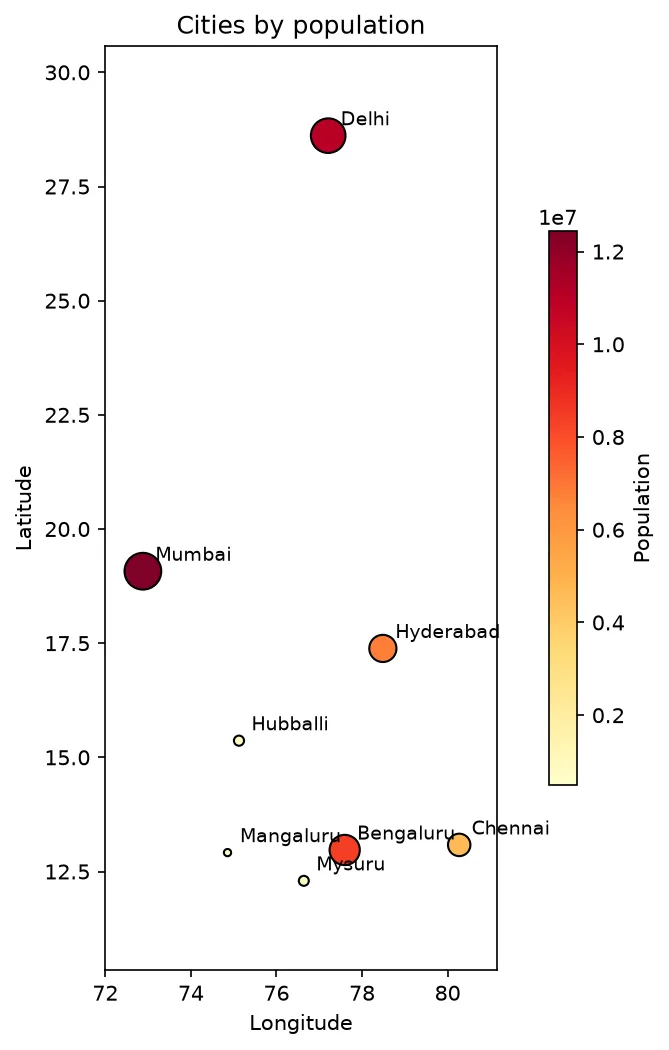
column="population" colours the points by that field, cmap chooses the colour ramp and markersize sets the point size. The loop writes each city's name at its coordinates. ax is the drawing area, and savefig writes the picture to a file. For a quick map with a basemap, gdf.explore() makes an interactive version in a notebook once the folium and mapclassify packages are installed.
7. Save and read layers
# Save the layer in two common GIS formats. GeoPackage (.gpkg) is the better default.
gdf.to_file("cities.gpkg", layer="cities", driver="GPKG")
gdf.to_file("cities.geojson", driver="GeoJSON")

# Read it back to prove the save worked: same number of rows, same coordinate system
back = gpd.read_file("cities.gpkg", layer="cities")
print(len(back), back.crs.to_epsg())
8 4326
GeoPackage (.gpkg) is a single file that holds several layers, keeps field types and is the format to prefer. A Shapefile is really several files and truncates field names to 10 characters. GeoJSON is text and handy for the web. Its standard (RFC 7946) uses EPSG:4326, so convert with to_crs(4326) before saving a GeoJSON for web tools. read_file loads any of them.
Run this part as a notebook
The code on this page is also a Jupyter notebook. It has the theory in text cells, then the code, then guided practice, an independent assignment and hidden solutions, so you can try each task before you look. Download the Part 10 notebook, open it in JupyterLab and run the cells from top to bottom. Part 1 shows how to install and start Jupyter.
Practice
- Make a GeoDataFrame from five places you choose and check its CRS and bounds.
- Project the Karnataka cities to EPSG:32643 and find the pair that is farthest apart.
- Use
set_crson a layer with no CRS andto_crson another one. Explain what happened to the coordinates each time. - Plot the points coloured by state with
column="state"andlegend=True.
Common mistakes
- Giving latitude first to
points_from_xy. It takes longitude (x) first. - Using
set_crswhereto_crsis needed, which relabels the numbers without moving the data. - Measuring distance or area in EPSG:4326.
- Using a UTM zone that does not cover the study area.
- Forgetting that two layers must share a CRS before they are combined.
- Saving to Shapefile and losing long field names.