

You now have the pieces: a template, a loop, checks and an export. A pipeline joins them into one repeatable sequence that you can run next month, give to a colleague, or leave to run on its own. The aim is not cleverness. The aim is a script that is easy to understand, easy to rerun, and easy to fix when something goes wrong. This lesson turns the loop of the last two into that.
Open scripts/lesson7_pipeline.py. It is the longest script so far, so go step by step.
The shape of the folder
The download is laid out the way a pipeline should be.
part-c/
  bengaluru_layout_start.qgz     the project
  data/                          the input data
  templates/                     the template (.qpt)
  scripts/                       the scripts
  output/                        everything the script writes
    pipeline/                    the PDFs
    pipeline/logs/               the log file
Keep the inputs, the template, the scripts and the outputs apart. A script that writes only into output cannot damage your data, and you can delete output and make it again.
Before the steps: imports
# Lesson 7: put it together as a pipeline: settings in one place, a log file, small functions, and a summary.
import logging
import re
from pathlib import Path
from qgis.core import (
    Qgis,
    QgsProject,
    QgsPrintLayout,
    QgsReadWriteContext,
    QgsLayoutItemMap,
    QgsLayoutItemLabel,
    QgsLayoutExporter,
    QgsExpressionContextUtils,
)
from qgis.PyQt.QtXml import QDomDocument
logging is Python's way of recording messages. Qgis gives the version of QGIS, which goes into the log.
Step 1: All the settings in one dictionary
# Step 1: all the settings that might change, in one dictionary. The rest of the script only reads them.
config = {
    "regions_layer": "Parks and lakes, share of area (%)",
    "name_field": "short",
    "title_field": "title",
    "template": "templates/parks_and_lakes_template.qpt",
    "padding": 1.15,
    "output_folder": "output/pipeline",
}
REQUIRED_ITEMS = {"main_map": QgsLayoutItemMap, "map_title": QgsLayoutItemLabel}

project = QgsProject.instance()
folder = Path(project.homePath())
output_folder = folder / config["output_folder"]
(output_folder / "logs").mkdir(parents=True, exist_ok=True)
A dictionary stores settings as key: value pairs. Everything that might change is here: the layer, the fields, the template, the padding and the output folder. The rest of the script reads from config, and nothing else has to be edited when you move to new data. REQUIRED_ITEMS is the safety net from Lesson 4.
Step 2: A log file
# Step 2: a log file. A dedicated logger is used, and old handlers are removed, so that running the
# script twice does not write every line twice.
logger = logging.getLogger("map_series")
logger.setLevel(logging.INFO)
for handler in list(logger.handlers):
    handler.close()
    logger.removeHandler(handler)
file_handler = logging.FileHandler(output_folder / "logs" / "map_generation.log", mode="w", encoding="utf-8")
file_handler.setFormatter(logging.Formatter("%(asctime)s %(levelname)s %(message)s"))
logger.addHandler(file_handler)
print shows a message and forgets it. A log writes each message to a file with the time, so you can read what happened last night, or last month. The format %(asctime)s %(levelname)s %(message)s gives lines such as 2026-10-13 21:56:43 INFO Exported East.pdf.
Two details are easy to get wrong. A dedicated logger called map_series is used, because the root logger may already be set up by QGIS. And any old handlers are closed and removed first. Without that, running the script twice in one QGIS session adds a second handler, and every line is written twice.
Step 3: Small functions
# Step 3: small functions, each doing one job
def validate_inputs():
    """Return the regions layer and the template document, or raise an error that says what is wrong."""
    matches = project.mapLayersByName(config["regions_layer"])
    if not matches:
        raise ValueError(f"Layer not found: {config['regions_layer']}")
    layer = matches[0]
    if not layer.isValid():
        raise ValueError(f"Layer is not valid: {config['regions_layer']}")
    for field in (config["name_field"], config["title_field"]):
        if layer.fields().indexFromName(field) == -1:
            raise ValueError(f"Field not found: {field}")
    template_path = folder / config["template"]
    if not template_path.exists():
        raise FileNotFoundError(f"Template not found: {template_path}")
    document = QDomDocument()
    ok, message, line, column = document.setContent(template_path.read_text(encoding="utf-8"))
    if not ok:
        raise ValueError(f"Template is not valid XML (line {line}): {message}")
    return layer, document


def make_layout(document):
    layout = QgsPrintLayout(project)
    layout.loadFromTemplate(document, QgsReadWriteContext(), True)
    for item_id, item_class in REQUIRED_ITEMS.items():
        if not isinstance(layout.itemById(item_id), item_class):
            raise ValueError(f"The template has no usable item with the ID {item_id!r}")
    return layout


def safe_filename(value):
    return re.sub(r'[<>:"/\\|?*]', "_", str(value).strip()) or "unnamed"


def export_layout(layout, path):
    result = QgsLayoutExporter(layout).exportToPdf(str(path), QgsLayoutExporter.PdfExportSettings())
    if result != QgsLayoutExporter.Success:
        raise RuntimeError(f"Export failed ({result}): {path.name}")
    if not path.exists() or path.stat().st_size == 0:
        raise RuntimeError(f"File is missing or empty: {path.name}")
    return path
Each function does one job and has a name that says what it is:
validate_inputsfinds the layer, checks the fields, reads the template and checks that it is valid XML. It returns what the pipeline needs, or raises an error that says what is wrong.make_layoutbuilds a layout from the template and checks that the required items are there.safe_filenamemakes a name safe for a file.export_layoutexports a PDF and then checks the file. If the export fails, or the file is missing or empty, it raises an error. Raising an error is better than returning a code that someone forgets to look at.
Small functions are easier to test. You can run safe_filename("North/West") on its own in the console and see North_West.
Step 4: The pipeline
# Step 4: the pipeline. Anything unexpected is written to the log, and the script carries on with the next map.
results = []
logger.info("Map generation started. QGIS %s", Qgis.version())
try:
    regions, document = validate_inputs()
    logger.info("Inputs are valid: %s features", regions.featureCount())

    seen = set()
    for feature in sorted(regions.getFeatures(), key=lambda f: f[config["name_field"]]):
        name = feature[config["name_field"]]
        filename = safe_filename(name) + ".pdf"
        try:
            if filename in seen:
                raise ValueError(f"Duplicate file name: {filename}")
            seen.add(filename)
            layout = make_layout(document)
            layout.itemById("map_title").setText(feature[config["title_field"]])
            QgsExpressionContextUtils.setProjectVariable(project, "focus_name", name)
            extent = feature.geometry().boundingBox()
            extent.scale(config["padding"])
            layout.itemById("main_map").zoomToExtent(extent)
            export_layout(layout, output_folder / filename)
            logger.info("Exported %s", filename)
            results.append((name, "ok"))
        except Exception as error:
            logger.exception("Map %s failed", name)
            results.append((name, f"failed: {error}"))
except Exception:
    logger.exception("Map generation stopped because of an error")
    raise
finally:
    logger.info("Map generation finished.")
Read this from the outside in.
The outer try is for problems with the whole run, such as a missing layer. logger.exception writes the error and its traceback to the log, and then raise lets the error continue, so that the failure is not hidden. The finally part always writes "Map generation finished", whatever happened.
The inner try is inside the loop and is for problems with one map. If one corporation fails, the script writes the failure to the log, notes it in results and carries on with the next. This is important for a big job. Without it, one bad feature out of five hundred stops everything.
seen is a set of the file names already used. If two features had the same name, the second would overwrite the first without anyone noticing, so the script raises an error for a duplicate.
Step 5: A summary
# Step 5: a summary for the person running the script
failed = [r for r in results if r[1] != "ok"]
print(f"{len(results) - len(failed)} of {len(results)} maps exported to {output_folder}")
for name, status in results:
    print(f"  {name}: {status}")
print("Log file:", output_folder / "logs" / "map_generation.log")
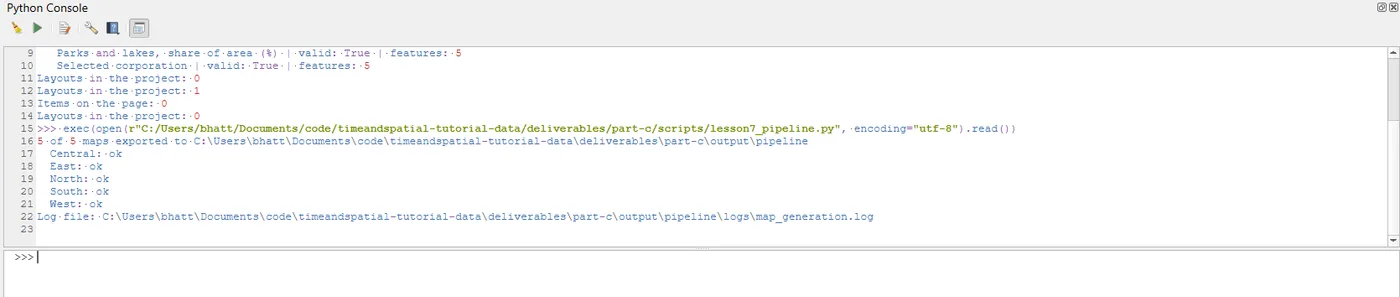
The script ends with a short report: how many maps were exported, the status of each, and where the log is. Run it:
5 of 5 maps exported to ...\part-c\output\pipeline
  Central: ok
  East: ok
  North: ok
  South: ok
  West: ok
Log file: ...\part-c\output\pipeline\logs\map_generation.log
Here it is in the console:
Now open the log file, output/pipeline/logs/map_generation.log. It holds one line for each event:
INFO Map generation started. QGIS 3.44.13-Solothurn
INFO Inputs are valid: 5 features
INFO Exported Central.pdf
INFO Exported East.pdf
INFO Exported North.pdf
INFO Exported South.pdf
INFO Exported West.pdf
INFO Map generation finished.
Every line also starts with the date and time. The log records the QGIS version too. When a map looks different in six months, you can see which version made it.
Production habits
These apply to any pipeline, not only this one.
- No machine-specific paths. Everything is built from the project folder.
- Check the inputs before the work. Fields, template, folders.
- One setting, one place. The dictionary.
- Record the QGIS version, the input data and the date. The log does part of this.
- Handle bad data on purpose. Empty geometries, missing values and duplicate names are decided, not discovered.
- Do not call a map publication-ready because the export worked. Look at it, with the checklist.
- Run big jobs from a standalone QGIS environment that is set up for it, and not from the console on your laptop while you work.
Where to go from here
The full project puts this pipeline into practice. It adds a combined PDF made with the Atlas, PNG files, a CSV report, and a fully commented script that you can adapt to your own regions. Reading it after this lesson should feel familiar.
When it breaks
| What you see | Why | What to do |
|---|---|---|
ValueError: Layer not found: ... | The name in config does not match | Copy the name from the Layers panel |
FileNotFoundError: Template not found: ... | The path in config is wrong | Check templates/ next to the project |
ValueError: Template is not valid XML (line 1): ... | The template file is damaged | Save the template again from the layout |
| Every line in the log appears twice | Old handlers were not removed | Keep the handler clean-up of Step 2 |
failed: Duplicate file name: East.pdf | Two features share a name | Make the names unique, or add the id to the file name |
| One map fails and the rest are fine | A bad feature | Read the log. It records the error and its traceback |
| The log is empty | The logger or the folder is wrong | Check that output/pipeline/logs exists and that Step 2 ran |
Make it your own
- Add
"output_format": "png"toconfig. Which functions must change to use it? - Make the pipeline write a small CSV file with the name and status of each map, as in the full project.
- Break the template on purpose, for example by renaming
map_title. Run the script and read what the log says for each map. - Add
"padding": 1.4and compare the maps. Where did you have to edit the code?
Common mistakes
- Settings spread through the script, so changing the data means changing many lines.
- Using
printfor things you will want to read later. - Letting one bad feature stop the whole job.
- Letting two features write to the same file.
- Never opening the log.
- Calling the maps finished because the script said so.
Key takeaways
Next: The full project.