

What is remote sensing?
Remote sensing is the process of collecting information about an object or area without physically being in contact with it. Satellites, aircraft and drones can all be used for it. Instead of visiting every field, forest or lake and measuring it manually, we can collect information about large areas from above, which is how a satellite image can show where the forests, water bodies, agricultural fields and cities are.
How does remote sensing work?
The Sun sends electromagnetic energy toward the Earth, and different surfaces interact with that energy differently. For example:
- Vegetation absorbs a lot of visible red light.
- Healthy vegetation reflects strongly in the near-infrared.
- Water absorbs much of the near-infrared and shortwave infrared energy.
- Bare soil has its own reflectance characteristics.
- Buildings and roads also have distinct spectral responses.
A satellite sensor measures some of this energy and records it as digital data. We can then process and analyze that data to understand what is happening on the ground.
What is a sensor?
A sensor is the instrument that detects electromagnetic energy. For example, satellites such as Landsat 8/9 and Sentinel-2 carry sensors designed to observe the Earth's surface in multiple parts of the electromagnetic spectrum.
A normal photograph shows only a limited portion of what is happening. Satellite sensors can detect wavelengths that our eyes cannot see.
Platforms
A sensor is carried on a platform, which can be a:
- Satellite
- Aircraft
- Drone
A drone can capture very high-resolution imagery, while a satellite can cover an entire region or country. The choice of platform depends on the problem you are trying to solve.
Sensor types worth knowing
The platform carries the sensor, and the sensor decides what is recorded. These are the main types you will meet:
| Sensor type | How it works | Typical use |
|---|---|---|
| Multispectral | Records a few broad bands, such as blue, green, red, NIR and SWIR | Landsat and Sentinel-2 imagery |
| Hyperspectral | Records hundreds of narrow, continuous bands | Detailed identification of materials |
| Thermal | Records heat energy emitted by the surface | Surface temperature and urban heat |
| SAR (radar) | Active: sends microwave pulses and records the echo | Mapping through cloud, floods, deformation |
| LiDAR | Active: sends laser pulses and measures the time they take to return | Elevation, terrain and 3D structure of vegetation and buildings |
What can remote sensing be used for?
| Field | What it can help with |
|---|---|
| Agriculture | Crop health, vegetation stress, irrigation, crop growth, drought conditions |
| Disaster management | Mapping flooded areas, burned areas, landslides and cyclone damage |
| Environmental monitoring | Deforestation, water bodies, wetlands, urban expansion, land degradation |
| Urban studies | Built-up expansion, land-use change, urban heat, road development |
Remote sensing and GIS
Remote sensing and GIS are often used together. Remote sensing gives us information collected from sensors. GIS lets us organize, analyze and visualize that information along with other geographic datasets.
For example, you can calculate NDVI from satellite imagery, identify stressed vegetation, overlay agricultural field boundaries and calculate the affected area.
The electromagnetic spectrum
Electromagnetic energy travels as waves. The distance between one wave peak and the next is the wavelength, and the full range of wavelengths is called the electromagnetic spectrum.
Our eyes can only see a small slice of it, called visible light, which spans roughly 400 to 700 nm. Remote sensing sensors can record much more: the near-infrared, shortwave infrared, thermal infrared and microwave regions are all used to observe the Earth.
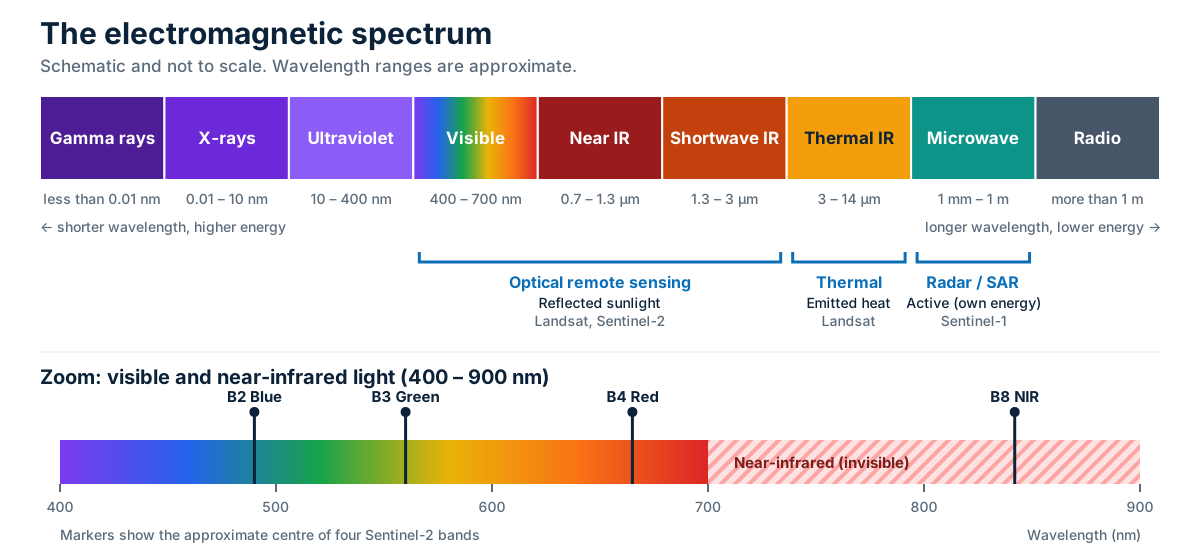
Regions used in remote sensing
| Region | Approximate wavelength | How it is used |
|---|---|---|
| Visible | 400 – 700 nm | Natural-color imagery; the blue, green and red bands |
| Near infrared (NIR) | 0.7 – 1.3 µm | Vegetation, and separating water from land |
| Shortwave infrared (SWIR) | 1.3 – 3 µm | Moisture, burned areas and soil |
| Thermal infrared | 3 – 14 µm | Heat emitted by the surface |
| Microwave | 1 mm – 1 m | Radar and SAR, which can see through clouds |
Atmospheric windows
The atmosphere absorbs or blocks some wavelengths. Sensors are designed to record in the ranges where the atmosphere is reasonably transparent, which are called atmospheric windows. This is one reason the bands on a satellite sit where they do.
Spectral signatures
A full chapter with measured Bengaluru values is in Spectral signatures.
Different materials reflect and absorb energy differently at different wavelengths. If you plot how much energy a surface reflects across wavelengths, you get a curve called its spectral signature. Each kind of surface has a characteristic shape, and that is what lets us tell them apart from space.
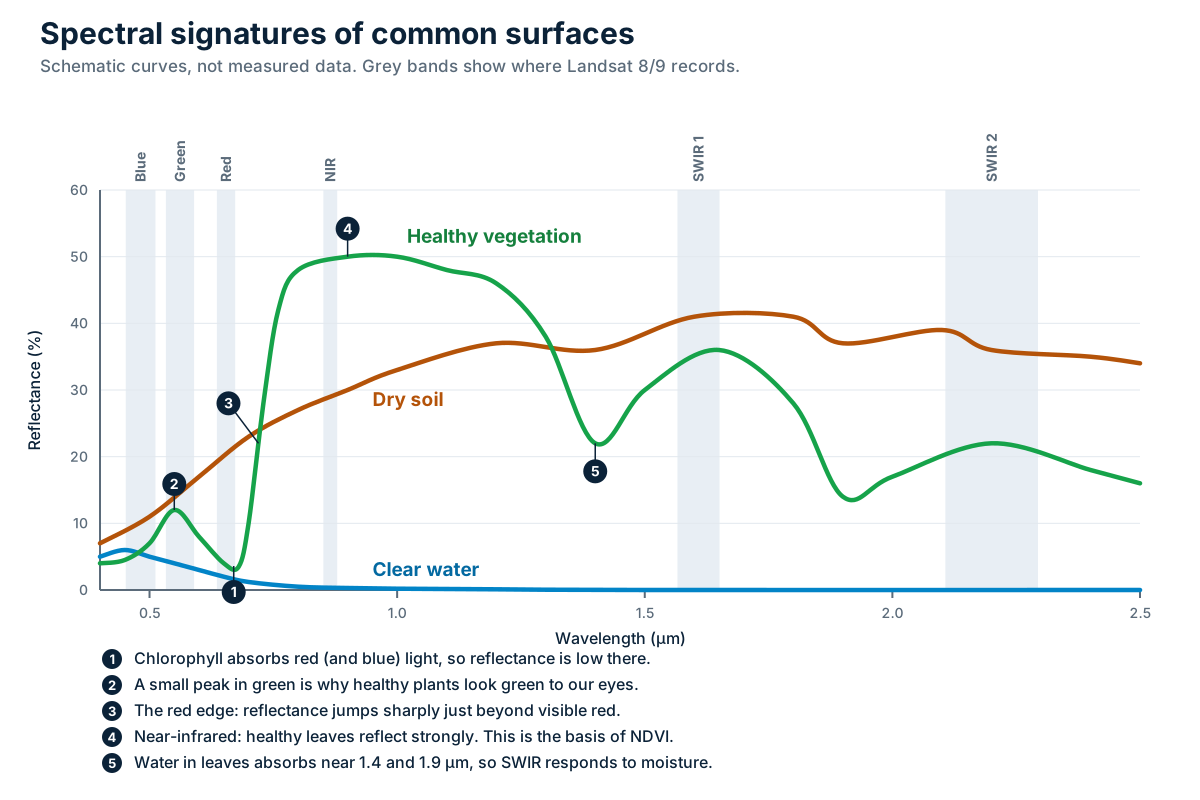
How to read the chart
| Surface | What its signature looks like |
|---|---|
| Healthy vegetation | Low in blue and red, a small peak in green, a sharp jump just beyond red (the red edge), high in near-infrared, then lower in SWIR where water in the leaves absorbs energy |
| Dry soil | Reflectance rises gradually from the visible into the shortwave infrared |
| Clear water | Low reflectance overall, a little higher in blue and green, and close to zero in near-infrared and SWIR |
Passive vs active remote sensing
Remote sensing systems are classified as passive or active, and the difference comes down to one question: does the sensor provide its own energy, or does it rely on energy from an external source?
| Passive | Active | |
|---|---|---|
| Energy source | Natural, usually the Sun | The sensor sends its own energy |
| What it measures | Reflected (or emitted) natural energy | The signal that returns from the surface |
| Examples | Landsat, Sentinel-2 | Radar, SAR (for example Sentinel-1) |
| Works at night | Limited, because it relies on sunlight | Yes |
| Affected by clouds | Yes, clouds can block the view | Microwaves can often penetrate clouds |
Passive remote sensing
A passive sensor detects naturally occurring electromagnetic energy. For Earth observation, the most important natural source is usually the Sun. The Sun illuminates the Earth's surface, different materials reflect different amounts of energy, and the sensor detects that reflected energy.
Examples include many optical satellite sensors, such as Landsat and Sentinel-2.
Passive sensing has two limitations:
- If you rely on sunlight to illuminate the surface, there is not much reflected sunlight to measure at night.
- Clouds can block the sensor from seeing the surface.
Active remote sensing
Active sensors do not have to wait for the Sun. They send their own energy toward the Earth's surface and measure the signal that comes back.
Radar is a common example. SAR (Synthetic Aperture Radar) is an important active remote-sensing technology. The satellite sends microwave pulses toward the Earth and measures the returned signal.
Why is radar so useful?
Microwave signals can often penetrate clouds. This means SAR can collect useful observations even when optical imagery is blocked by cloud cover. SAR is particularly useful for:
- Flood mapping
- Monitoring land deformation
- Agriculture
- Forest monitoring
- Surface change detection
One example is Sentinel-1, a SAR satellite.
In many real-world projects, active and passive data complement each other.
Understanding spectral bands
Satellite imagery does not always come as one image. It often comes as separate files, or bands, such as Blue, Green, Red, Near Infrared and SWIR.
What is a spectral band?
A spectral band is a specific range of wavelengths of electromagnetic radiation that a sensor records. Instead of measuring everything at once, a satellite sensor divides the electromagnetic spectrum into different wavelength ranges. Each band captures different information about the Earth's surface.
Why do we need different bands?
Different materials interact with electromagnetic energy differently. A healthy green crop looks green to our eyes because it reflects more green light than some other visible wavelengths. Healthy vegetation also strongly reflects near-infrared radiation, which is not visible to our eyes but can be detected by a satellite sensor. That is one reason near-infrared is so useful for vegetation analysis.
Common satellite bands
| Band | Useful for |
|---|---|
| Blue | Water bodies, atmospheric effects, coastal applications |
| Green | Vegetation, water, natural-color visualization |
| Red | Vegetation analysis, chlorophyll-related information, vegetation indices |
| Near Infrared (NIR) | Vegetation monitoring, crop health, biomass-related analysis, water/land separation |
| Shortwave Infrared (SWIR) | Moisture analysis, burned areas, soil, vegetation stress |
| Thermal Infrared (TIR) | Surface temperature, urban heat |
Thermal infrared: measuring heat
Most bands record sunlight that the surface has reflected. Thermal infrared is different: it records heat energy that the surface emits. That makes it useful for studying surface temperature and urban heat, which is one of the urban applications listed earlier.
Thermal bands usually have coarser spatial resolution than the optical bands. For example, Landsat 8 and 9 collect their thermal bands at 100 m, compared with 30 m for the optical bands.
Why band combinations matter
Bands can be combined into indices. For example:
- Red + NIR → NDVI
- Green + NIR → NDWI (in one commonly used formulation)
- NIR + SWIR → NDMI
The exact index formula matters, but the main point is that different wavelengths give different clues about what is happening on the ground.
The four types of resolution
When people say a satellite has "high resolution", they usually mean spatial resolution. In remote sensing, resolution has four dimensions: spatial, spectral, radiometric and temporal. Understanding all four makes satellite data much easier to compare.
| Type | The question it answers |
|---|---|
| Spatial | How much ground area does one pixel represent? |
| Spectral | How finely does the sensor separate wavelengths? |
| Radiometric | How finely can the sensor distinguish signal intensity? |
| Temporal | How often does the satellite revisit the same area? |
Spatial resolution
Spatial resolution describes the size of the area represented by each pixel. For example, 10 m resolution means each pixel represents approximately a 10 m × 10 m area on the ground for that band. Smaller pixels generally mean more spatial detail, so 10 m imagery can show smaller features than 30 m imagery.
Spectral resolution
Spectral resolution describes how finely a sensor separates different wavelength ranges. A sensor with many relatively narrow spectral bands can provide detailed information about how surfaces behave across the electromagnetic spectrum. This is particularly useful for identifying or studying different materials.
Radiometric resolution
Radiometric resolution describes how well a sensor can distinguish between different levels of energy, which is to say how sensitive it is to differences in signal intensity.
Think of a brightness scale. An 8-bit image can represent 2⁸ = 256 possible digital values (0 to 255). A 12-bit sensor can represent 2¹² = 4096 possible values (0 to 4095). The 12-bit sensor can represent many more levels of intensity.
This matters because two surfaces may have very similar reflectance. A sensor with higher radiometric resolution may be better able to distinguish the subtle difference between them, for example in vegetation, surface properties, water, soil or thermal conditions.
Temporal resolution
Temporal resolution describes how frequently a satellite revisits the same area. If a satellite can image a location every few days under suitable conditions, it has a relatively high revisit frequency for that application.
Temporal resolution becomes particularly important when studying things that change quickly, such as:
- Flooding
- Crop growth
- Forest fires
- Construction
- Seasonal water levels
Why all four matter
When monitoring crops, you might want high spatial resolution to see individual fields, useful spectral resolution to distinguish vegetation characteristics, good radiometric resolution to detect subtle differences, and high temporal resolution to follow changes through the growing season.
So rather than asking which satellite has the highest resolution, ask which type of resolution matters most for your analysis.
Landsat vs Sentinel-2
For orbits, swaths, revisit times and other missions, see Earth observation satellites.
Landsat and Sentinel-2 are two of the most widely used sources of satellite imagery. Both are useful for Earth observation, but they are not identical.
Landsat
The Landsat program has been observing the Earth's surface for decades, and its long historical record is a major strength. Landsat 8 and Landsat 9 provide multispectral imagery at different spatial resolutions, including 30 m multispectral data for many of the commonly used bands.
This makes Landsat particularly useful when your project looks at change over a long period. For example: How has urban expansion changed since 2000? A long historical archive matters for questions like this.
Sentinel-2
Sentinel-2 is part of the European Union's Copernicus Earth observation program. It provides multispectral imagery with spatial resolutions from 10 m to 60 m, depending on the band. Several important visible and near-infrared bands are available at 10 m resolution, which can provide more spatial detail for many applications.
Side by side
| Landsat | Sentinel-2 | |
|---|---|---|
| Long historical record | Excellent | More recent |
| Common multispectral resolution | 30 m | 10 m for several key bands |
| Multispectral analysis | Yes | Yes |
| Vegetation monitoring | Yes | Yes |
| Long-term change studies | Very useful | Useful |
| Higher spatial detail | Generally lower | Generally higher for key bands |
A practical comparison
Suppose you are studying urban expansion from 1990 to 2026. Landsat may be particularly useful because of its long historical archive. Now suppose you are analyzing the condition of individual agricultural fields today. Sentinel-2's higher spatial resolution for several bands may be more useful.
Choose the dataset that suits your study area, time period and analysis.
Spectral indices: NDVI, NDWI and NDMI
The chapter Spectral indices gives formulas for Sentinel-2 and Landsat 8 and real values from Bengaluru.
Satellite imagery holds more information than a normal image shows. Spectral indices are one way to extract it: instead of interpreting several bands one by one, an index combines spectral information into a single value that makes a particular feature easier to analyze. Three you will encounter frequently are NDVI, NDWI and NDMI.
| Index | Full name | Highlights | Commonly uses |
|---|---|---|---|
| NDVI | Normalized Difference Vegetation Index | Vegetation | NIR and Red |
| NDWI | Normalized Difference Water Index | Open water (formulas vary) | Green and NIR, or NIR and SWIR |
| NDMI | Normalized Difference Moisture Index | Vegetation or surface moisture | NIR and SWIR |
NDVI: vegetation
NDVI is commonly used to analyze vegetation. The formula is:
NDVI = (NIR − Red) / (NIR + Red)
These two bands are used because healthy vegetation tends to absorb red light and strongly reflect near-infrared, so it often produces relatively high NDVI values. Lower values can indicate bare soil, built-up surfaces, water or sparse vegetation.
NDVI with a worked example
Here are two pixels.
A pixel of healthy vegetation, with NIR = 0.45 and Red = 0.05:
NDVI = (0.45 − 0.05) / (0.45 + 0.05)
NDVI = 0.40 / 0.50
NDVI = 0.80
A pixel of mostly bare soil, with NIR = 0.30 and Red = 0.25:
NDVI = (0.30 − 0.25) / (0.30 + 0.25)
NDVI = 0.05 / 0.55
NDVI ≈ 0.09
The vegetation pixel produces a much stronger NDVI signal.
What do NDVI values mean?
Very broadly:
| NDVI value | What it often means |
|---|---|
| Close to 1 | Strong vegetation signal |
| Moderate positive | Vegetation may be present |
| Close to 0 | Sparse vegetation, soil or built surfaces |
| Negative | Often water or other non-vegetated surfaces |
These are rough guides, not universal rules. NDVI values also depend on the sensor and surface characteristics.
NDWI: water
NDWI refers to the Normalized Difference Water Index, but there are multiple formulations of NDWI in the remote sensing literature. One common formulation uses Green and NIR and can help highlight open water. Another commonly used water-related index uses different bands, such as NIR and SWIR, so check which formula a workflow uses before comparing results.
NDMI: moisture
NDMI stands for Normalized Difference Moisture Index. A common formulation uses NIR and SWIR. It is often used to examine vegetation or surface moisture conditions.
NBR: burned areas
NBR stands for Normalized Burn Ratio. It is used to map burned areas and to judge how severe a fire was. It uses NIR and the longer SWIR band (around 2.2 µm).
Healthy vegetation has high NIR and low SWIR, so NBR is high. After a fire the plants are gone, so NIR drops, and the dry, bare surface reflects more SWIR. NBR falls, often to negative values.
Analysts usually compare NBR from before and after a fire. The difference, called dNBR, shows how much burned and how severely.
More spectral indices
There are many indices, each designed to answer a particular question. These are some of the most common.
| Index | Full name | Formula | Highlights |
|---|---|---|---|
| NDVI | Normalized Difference Vegetation Index | (NIR − Red) / (NIR + Red) | Vegetation |
| GNDVI | Green NDVI | (NIR − Green) / (NIR + Green) | Vegetation, sensitive to chlorophyll |
| EVI | Enhanced Vegetation Index | 2.5 × (NIR − Red) / (NIR + 6 × Red − 7.5 × Blue + 1) | Vegetation, with less soil and atmospheric effect |
| SAVI | Soil Adjusted Vegetation Index | ((NIR − Red) / (NIR + Red + L)) × (1 + L) | Vegetation where soil shows through |
| NDRE | Normalized Difference Red Edge | (NIR − RedEdge) / (NIR + RedEdge) | Vegetation, especially dense or late-season crops |
| NDWI | Normalized Difference Water Index | (Green − NIR) / (Green + NIR) | Open water |
| MNDWI | Modified NDWI | (Green − SWIR1) / (Green + SWIR1) | Open water, including in built-up areas |
| NDMI | Normalized Difference Moisture Index | (NIR − SWIR1) / (NIR + SWIR1) | Vegetation moisture |
| NBR | Normalized Burn Ratio | (NIR − SWIR2) / (NIR + SWIR2) | Burned areas |
| dNBR | Differenced NBR | NBR before fire − NBR after fire | Burn severity |
| NDBI | Normalized Difference Built-up Index | (SWIR1 − NIR) / (SWIR1 + NIR) | Built-up areas |
| NDSI | Normalized Difference Snow Index | (Green − SWIR1) / (Green + SWIR1) | Snow and ice |
| BSI | Bare Soil Index | ((SWIR1 + Red) − (NIR + Blue)) / ((SWIR1 + Red) + (NIR + Blue)) | Bare soil |
Notes on these indices
- EVI: the constants in the formula assume reflectance values from 0 to 1. It is designed to stay sensitive in dense vegetation, where NDVI tends to level off.
- SAVI:
Lis a soil adjustment factor. A value of 0.5 is commonly used. - NDRE: it needs a red-edge band. Sentinel-2 has red-edge bands (B5, B6, B7 and B8A), but Landsat 8/9 does not.
- MNDWI: it is often better than NDWI at separating water from built-up areas, which can confuse the Green and NIR version.
- NDBI: bare soil can look similar to built-up areas, so check the result.
- NDSI: clouds can also look bright, so snow results need care.
- dNBR: it compares two dates, so the two images should be as comparable as possible.
Which bands to use
The same index uses different band numbers on different satellites. This table shows the usual bands for Landsat 8/9 and Sentinel-2.
| Band used in a formula | Landsat 8/9 | Sentinel-2 |
|---|---|---|
| Blue | B2 | B2 |
| Green | B3 | B3 |
| Red | B4 | B4 |
| Red edge | Not available | B5, B6, B7 and B8A |
| NIR | B5 | B8 (or B8A) |
| SWIR1 | B6 | B11 |
| SWIR2 | B7 | B12 |
Why are indices useful?
They turn imagery into something easier to read: a vegetation index shows vegetation patterns, a water index shows water extent, and a moisture index shows moisture-related patterns.
True color vs false color composites
Vegetation that appears bright red in a satellite image is usually a false color composite (FCC), not an error.
True color composite
A true color composite uses the visible bands that correspond approximately to what our eyes see: red, green and blue. For Sentinel-2, a common true-color combination is B4 – B3 – B2, where B4 is red, B3 is green and B2 is blue.
The result looks relatively similar to a normal photograph. Vegetation appears green, water appears dark or blue, and buildings appear in colors closer to what we would expect.
False color composite
A false color composite uses bands in combinations that do not correspond to normal human vision. A very common vegetation-focused combination is NIR – Red – Green. For Sentinel-2, that is B8 – B4 – B3.
When this combination is displayed as RGB, healthy vegetation appears bright red, because it strongly reflects near-infrared radiation and the NIR signal is assigned to the red display channel.
Why make an image look "wrong"?
Our eyes cannot see near-infrared. By assigning invisible wavelengths to visible colors, we can make certain features much easier to identify. FCC can help show:
- Vegetation
- Water
- Agricultural patterns
- Vegetation stress
- Land-cover differences
See it for yourself
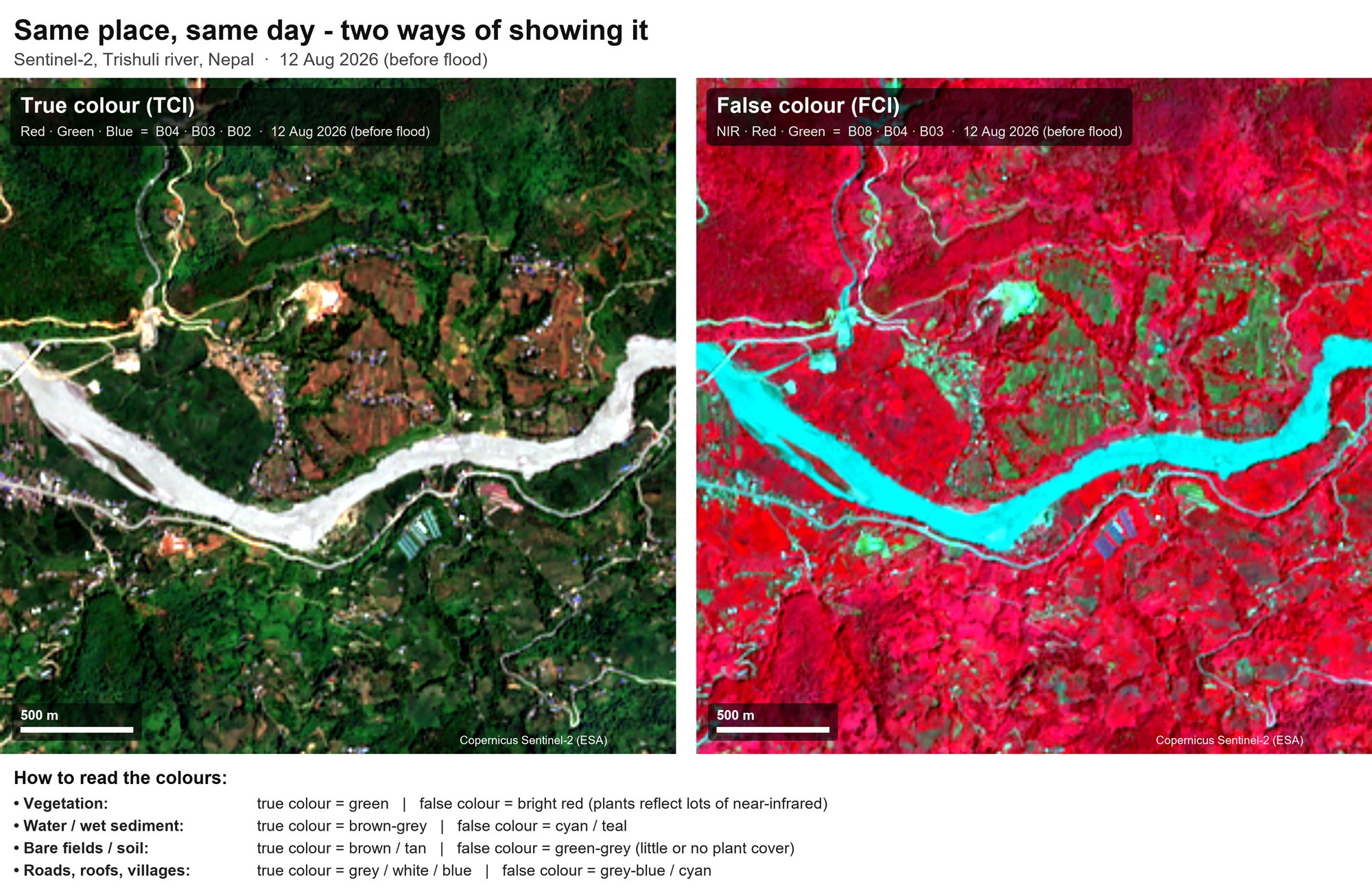
How to read the colors in that image
| Surface | True color | False color |
|---|---|---|
| Vegetation | Green | Bright red, because plants reflect a lot of near-infrared |
| Water and wet sediment | Brown-grey | Cyan or teal |
| Bare fields and soil | Brown or tan | Green-grey, with little or no plant cover |
| Roads, roofs and villages | Grey, white or blue | Grey-blue or cyan |
True vs false color
| True color | False color |
|---|---|
| Looks more natural | Does not necessarily look natural |
| Uses visible bands | Can include NIR and SWIR |
| Easier for visual interpretation | Often better for highlighting specific features |
| Vegetation usually looks green | Vegetation can appear red |
What is atmospheric correction?
A building looks different depending on whether you photograph it on a clear day, through haze, through dust, or at sunset. Satellite sensors face a similar problem.
Before sunlight reaches the Earth's surface and returns to a satellite sensor, it has to travel through the atmosphere. Along the way, gases, aerosols, water vapour and other atmospheric components can affect the signal, which can change what the sensor records.
What does atmospheric correction do?
Atmospheric correction attempts to reduce or compensate for atmospheric effects, so that the imagery represents the Earth's surface more accurately. It tries to separate the signal coming from the surface from effects introduced by the atmosphere.
The atmosphere can cause:
- Scattering
- Absorption
- Haze
- Aerosol effects
Why is it important?
Suppose you want to compare imagery from June 2025 with imagery from June 2026. If atmospheric conditions were very different on the two dates, some differences in pixel values may be caused by the atmosphere rather than by real change on the ground. Atmospheric correction can help make comparisons more meaningful.
Does every project need it?
Not necessarily. It depends on:
- Which satellite product you are using
- What processing level it already has
- Your analysis
- Whether you are comparing dates
- The accuracy you need
For example, Sentinel-2 provides products that have already undergone different levels of processing, so you should not automatically assume you need to apply every atmospheric correction step yourself.
Cloud masking and other preprocessing
Raw satellite data usually needs some preparation before it can be analyzed. Atmospheric correction is one part of that. These are the main ideas.
| Idea | What it deals with |
|---|---|
| Cloud and shadow masking | Clouds and their shadows hide the surface. Masking flags those pixels so they are left out of the analysis. |
| Atmospheric correction | Reduces the effect of the atmosphere on the recorded signal, as described above. |
| Radiometric calibration | Converts raw digital values into physical measurements such as radiance or reflectance, so values can be compared across dates and sensors. |
| Geometric correction and alignment | Makes sure the image lines up with the ground and with other layers. This relies on a consistent coordinate reference system. |
| Clipping | Cuts the image down to your study area, which makes the data smaller and easier to handle. |
Supervised vs unsupervised classification
Identifying water, forest, agriculture, built-up areas and bare soil across a large satellite image by looking at every pixel would take a very long time. Image classification automates this. Two common approaches are supervised and unsupervised classification.
| Supervised | Unsupervised | |
|---|---|---|
| Training samples | You provide them | Not provided in the same way |
| How it works | The algorithm learns from your examples, then classifies the rest | The algorithm groups pixels by spectral similarity |
| Who names the classes | You, before classification | You, after looking at the groups |
| Common example | Learning from labelled water, vegetation and building pixels | K-means clustering |
Supervised classification
In supervised classification, you provide training information to the algorithm. You essentially tell it, "These pixels represent water", "These pixels represent vegetation", and "These pixels represent buildings." The algorithm learns the characteristics of those classes and uses them to classify the rest of the image. It is similar to teaching a model with examples.
Unsupervised classification
In unsupervised classification, you do not provide predefined training samples. Instead, the algorithm groups pixels based on their spectral similarity. It may discover several clusters in the image, and you then examine those clusters and decide what they represent. One common example is K-means clustering.
Which should you use?
Supervised classification is useful when:
- You know the classes you are interested in
- You have reliable training samples
- You want specific land-cover categories
Unsupervised classification can be useful when:
- You do not have training data
- You are exploring an unfamiliar area
- You want to identify natural spectral groupings
A simple analogy
Consider sorting fruit.
- Supervised: you show someone an apple, an orange and a banana as examples, then ask them to classify the rest.
- Unsupervised: you give them a basket and say, "Group similar things together." They create the groups first, and you decide what the groups represent afterward.
Land use and land cover (LULC)
A satellite image contains millions of pixels, and they are not very meaningful until we interpret them. One common application is Land Use/Land Cover (LULC) classification. Land use and land cover are related but not the same.
| Land cover | Land use | |
|---|---|---|
| Describes | What is physically covering the Earth's surface | How people are using that land |
| Examples | Forest, water, grassland, built-up area, bare soil | Residential, industrial, agricultural, commercial, recreational |
In many GIS projects the two are used together as LULC.
Checking the result
A classification map is not automatically correct just because the software produced it. You need to compare the classified result against reliable reference data. Common accuracy measures include:
- Overall accuracy
- Producer's accuracy
- User's accuracy
- Confusion matrix
- Kappa coefficient, where appropriate
Why is LULC useful?
Once you have a classified map, you can ask:
- How much forest exists?
- How much agricultural land exists?
- How much has the built-up area expanded?
- Where has vegetation been lost?
- How has land cover changed over time?
A classified map turns imagery into measurable geographic information.
Change detection
One satellite image is a snapshot. Change detection compares two or more images taken at different times to identify differences in the Earth's surface.
For example, comparing an image from 2018 with one from 2026, you might want to know:
- Where did forests disappear?
- Where did cities expand?
- Which agricultural areas changed?
- Did a water body shrink?
- Which areas were affected by a flood?
Multi-temporal imagery
Multi-temporal simply means data collected at multiple points in time, such as January 2020, January 2022, January 2024 and January 2026. By comparing them, you can examine how the landscape evolved.
For example, if you study a city with imagery from 2015 and 2025, you might discover that agricultural land around the city has gradually been replaced by residential development. That is far more useful than saying "the city looks bigger", because you can measure the change spatially.
The biggest challenge
Differences can also come from:
- Different seasons
- Cloud or haze
- Atmospheric conditions
- Different sensor characteristics
- Shadows
- Differences in preprocessing
- Soil moisture
This is why selecting comparable images matters. When comparing two dates, keep as many conditions consistent as possible. For example, January 2020 vs January 2026 is generally more meaningful for seasonal vegetation analysis than January 2020 vs July 2026, because seasonal vegetation differences could dominate the result.
Questions change detection answers
Change detection is more than "Image A − Image B". The useful questions are what changed, where it changed, how much changed, and what might explain the change.
Popular remote sensing tools and data sources
You do not need all of these to start. They are where beginners commonly find imagery and software.
| Name | What it is | Good for |
|---|---|---|
| Copernicus Browser | Online viewer and download portal for Sentinel data | Browsing and downloading Sentinel-1 and Sentinel-2 imagery |
| USGS EarthExplorer | Search and download portal run by the USGS | Landsat imagery and its long historical archive |
| Google Earth Engine | Cloud platform with a large archive of satellite data | Analyzing large areas and long time periods without downloading data |
| QGIS | Free, open-source desktop GIS | Viewing, mapping and working with raster imagery |
| SNAP | Free toolbox from the European Space Agency | Working with Sentinel data, including SAR |
| ENVI | Commercial remote sensing software | Professional image analysis workflows |
Glossary
| Term | Meaning |
|---|---|
| Remote sensing | Collecting information about the Earth without being in contact with it |
| Sensor | The instrument that detects electromagnetic energy |
| Platform | What carries the sensor, such as a satellite, aircraft or drone |
| Electromagnetic spectrum | The full range of wavelengths of electromagnetic energy |
| Wavelength | The distance between one wave peak and the next |
| Atmospheric window | A wavelength range where the atmosphere is reasonably transparent |
| Spectral signature | How much energy a surface reflects at each wavelength |
| Red edge | The sharp rise in vegetation reflectance just beyond visible red |
| Multispectral | A sensor that records a few broad bands |
| Hyperspectral | A sensor that records hundreds of narrow, continuous bands |
| Thermal infrared | Heat energy emitted by the surface, used for surface temperature |
| LiDAR | An active sensor using laser pulses to measure height and 3D structure |
| Passive sensing | Measuring natural energy, usually reflected sunlight |
| Active sensing | Sending out energy and measuring the signal that returns |
| SAR | Synthetic Aperture Radar, an active microwave technology that can see through clouds |
| Spectral band | A specific range of wavelengths recorded by a sensor |
| NIR | Near infrared, strongly reflected by healthy vegetation |
| SWIR | Shortwave infrared, useful for moisture, burned areas and soil |
| Spatial resolution | The ground area represented by one pixel |
| Spectral resolution | How finely a sensor separates wavelengths |
| Radiometric resolution | How finely a sensor distinguishes signal intensity |
| Temporal resolution | How often a satellite revisits the same area |
| Spectral index | A value calculated from bands to highlight a feature, such as NDVI |
| NBR / dNBR | Normalized Burn Ratio, and the before-and-after difference used for burn severity |
| MNDWI | Modified NDWI, which uses Green and SWIR to map water |
| True color composite | An image using red, green and blue bands, similar to a photograph |
| False color composite | An image that assigns other bands, such as NIR, to display colors |
| Atmospheric correction | Reducing the effect of the atmosphere on the recorded signal |
| Cloud masking | Flagging cloudy and shadowed pixels so they are excluded from analysis |
| Radiometric calibration | Converting raw digital values into radiance or reflectance |
| Geometric correction | Aligning imagery with the ground and with other layers |
| LULC | Land Use/Land Cover |
| Multi-temporal | Data collected at several points in time |
| Change detection | Identifying differences in the surface between dates |
Test yourself
Try to answer each question before opening the answer.
1. What is the difference between a passive and an active sensor?
A passive sensor measures natural energy, usually reflected sunlight. An active sensor sends out its own energy and measures the signal that returns.
2. Why can SAR collect useful data when optical imagery cannot?
SAR uses microwave signals, which can often penetrate clouds, and it provides its own energy, so it does not depend on sunlight.
3. Why does healthy vegetation appear red in a false color composite?
Healthy vegetation strongly reflects near-infrared radiation. In an NIR – Red – Green composite the NIR signal is shown in the red display channel, so vegetation looks bright red.
4. What is the difference between spatial and radiometric resolution?
Spatial resolution is how much ground area one pixel represents. Radiometric resolution is how many levels of signal intensity the sensor can distinguish, for example 256 levels for 8-bit and 4096 for 12-bit.
5. Why should you check which NDWI formula is being used?
Because there are several NDWI formulations. One uses Green and NIR, and others use different bands such as NIR and SWIR, so results are not always comparable.
6. Why might two images from different dates show differences that are not real change on the ground?
Pixel values can change because of seasons, cloud or haze, atmospheric conditions, different sensors, shadows, differences in preprocessing and soil moisture.
7. What is a spectral signature?
It is how much energy a surface reflects at each wavelength. Each kind of surface has a characteristic shape, such as the low red, sharp red edge and high near-infrared of healthy vegetation, which lets us tell surfaces apart.
8. How is thermal infrared different from the other bands?
Most bands record reflected sunlight. Thermal infrared records heat energy emitted by the surface, so it is used for things like surface temperature and urban heat.
9. Why does NBR fall after a fire?
Burning removes the plants, so NIR drops, and the dry, bare surface reflects more SWIR. Since NBR is (NIR − SWIR) / (NIR + SWIR), the value falls, often below zero.
10. Why is MNDWI often preferred over NDWI in cities?
MNDWI uses Green and SWIR instead of Green and NIR, and it tends to separate water from built-up surfaces better.
Quick quiz
Pick an answer for each question to see if you got it right.